Skip to content

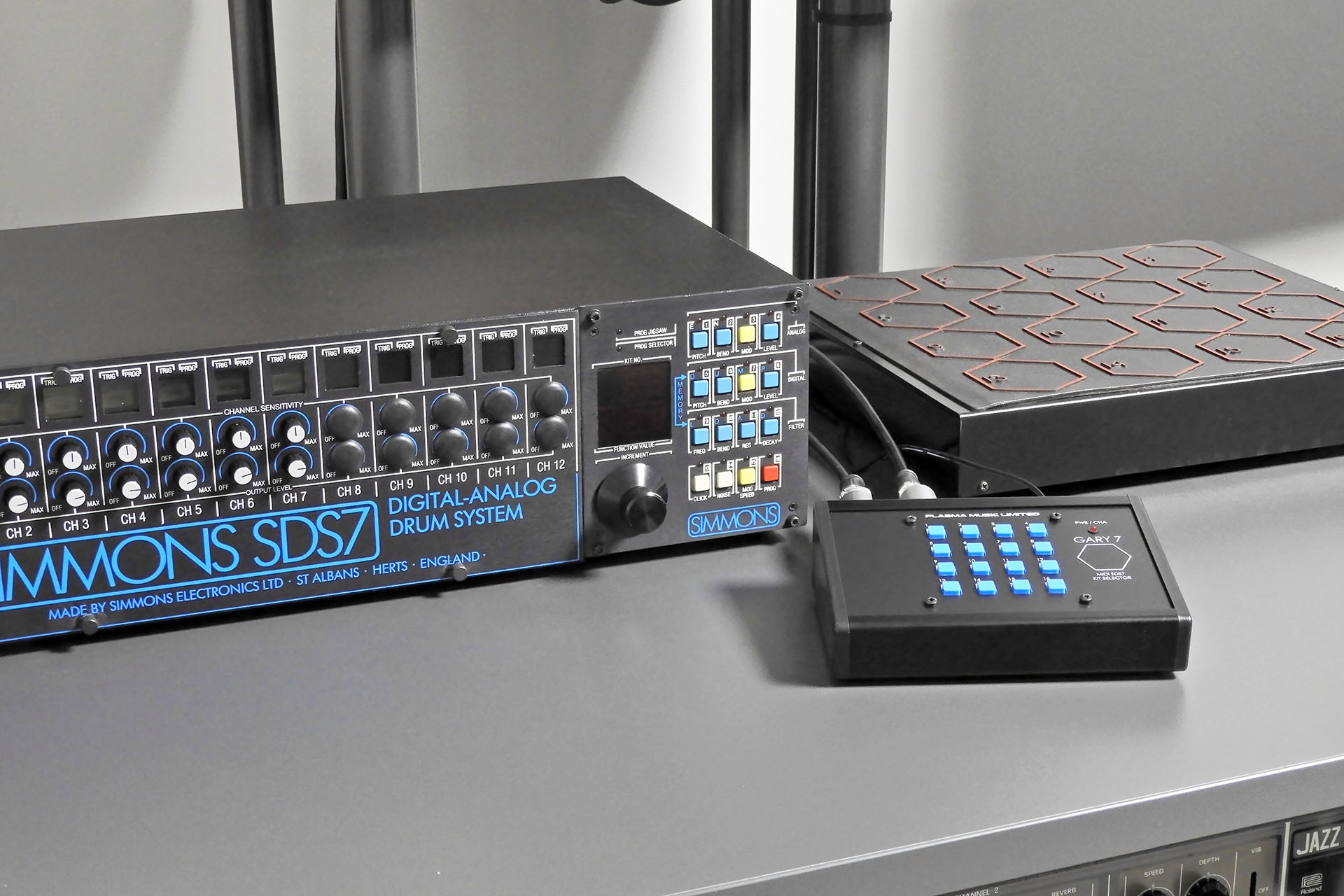
Gary 7 MIDI kit selector for the Simmons SDS7 with SDS7 and Selector PadOne afternoon in late September 2025, a customer turned up to collect his Marshall JCM-800 combo that I’d serviced. My customers mean everything to me and it’s not unusual for those who turn up at my door, to stay a while. 😊 Anyway, Iain and I really hit it off and after mentioning his software work, I told him about my Gary 7 MIDI kit selector for the Simmons SDS7 idea.

Gary 7 was going to be another one of my software-based ideas which would probably never see light of day but then Iain offered to pop over one afternoon to help get me started with coding for the Raspberry Pi. First, he gave me a short list of various bits ‘n’ pieces I should buy in advance of his visit.

Well, Iain stuck to his promise and sometime in November 2025, he came round to explain how Raspberry Pi stuff worked. We had a fantastic afternoon and I learnt so much. THANKS Iain! 😎

Unfortunately, it was also roundabout this time that my doctor told me that a recent routine blood test had come back with a high PSA level. As it turned out, I was eventually diagnosed with prostate cancer. As you can imagine, the news was quite devastating. On the other hand, life goes on and the only way I could focus on the future was by being with my family and working on stuff that I love… like Gary7.

I also had another project that would help keep my mind off things. Nebula-X balanced outputs for the Roland JX-10 had been on my shelf for a couple of years. My third and last revision PCBs had been delivered and I was very keen to get this done too. Hence, my Nebula-X project took priority over Gary 7.
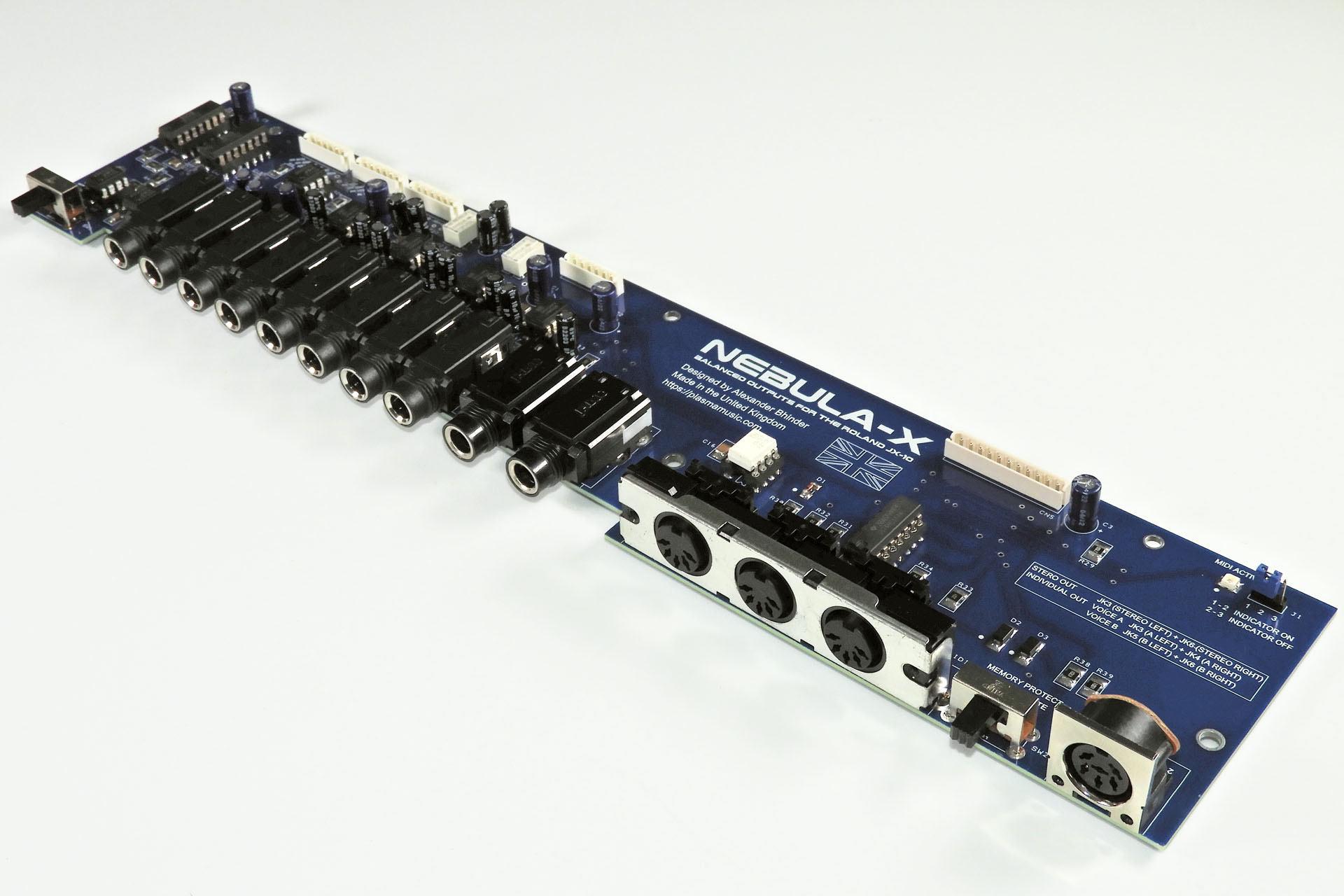
Nebula-X balanced outputs for the Roland JX-10
Nebula-X balanced outputs for the Roland JX-10 was another project that kept me distracted from things.

Iain introduced me to the whole Raspberry Pi thing and showed me stuff which, if I had to suss out on my own, would have taken me weeks if not months. More than that, his patience and general way was particularly inspiring. Iain’s a Java programmer specifically but showed me some Python code which kind of pointed towards what I wanted Gary 7 to do. Yes, I know that the firmware used for MIDI is either written in C or C++ but it wasn’t about the language or code. Iain had a way about him and well, gave me the confidence to make a start. It was a kind of Eureka moment, if you like.

While I toiled with how I was going to approach this whole software thing, I began designing a development board for Gary 7. This was by no means a prototype but simply a board which had a lot of open connections and which would allow me to easily change things if necessary. I believe 'versatility' is the word I'm looking for.

Indeed, although the objectives of this project were quite straight-forward, there was one major aspect of my Gary 7 MIDI kit selector for the Simmons SDS7 in which I had no real experience and that was of course, software.

My Gary 7 development board happened quite quickly. Of course, I didn’t use a full Raspberry Pi but chose the much smaller Raspberry Pi Pico. I was soon talking to Iain and other friends about the best way to proceed.
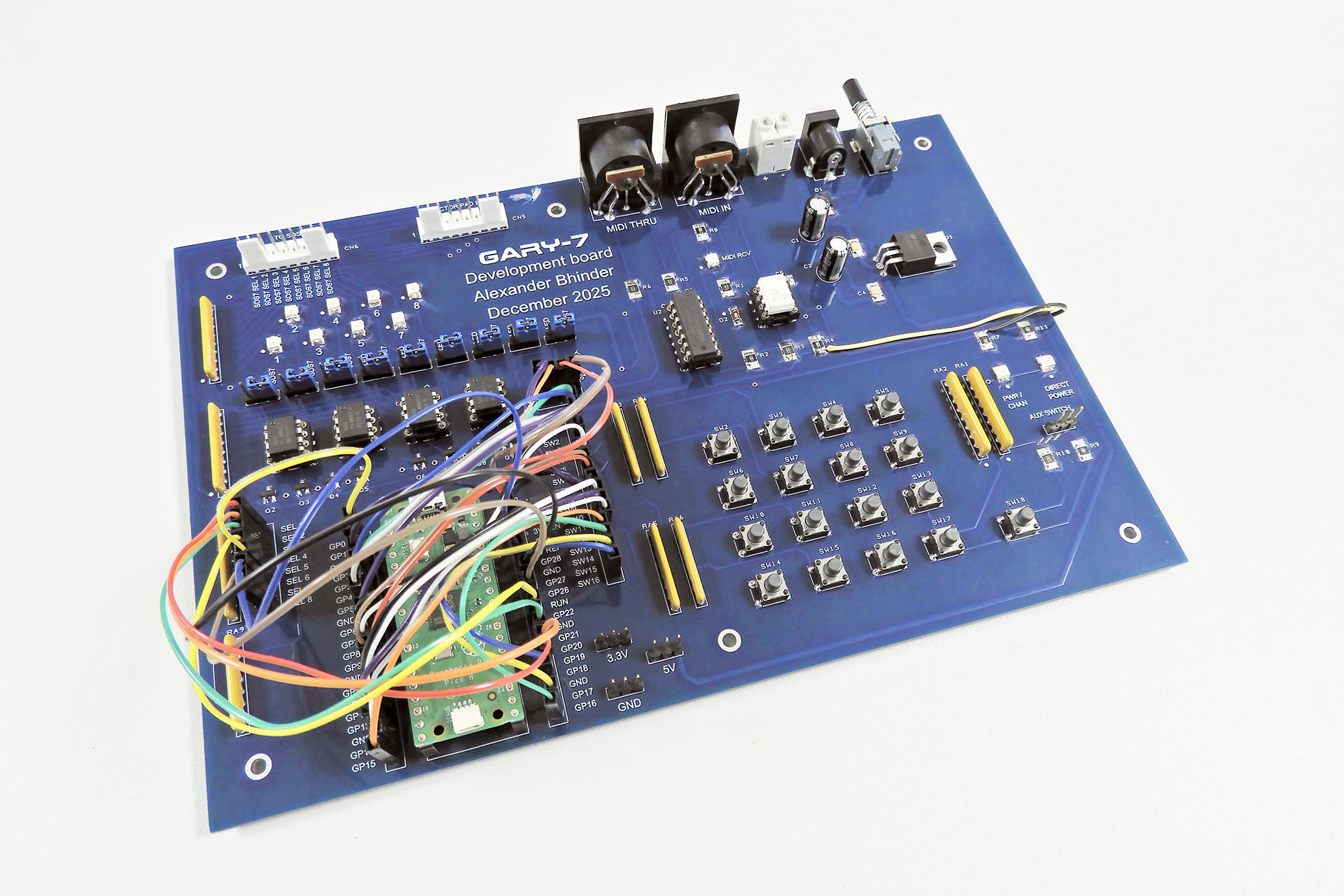
Gary 7 Development Board
Of course, most projects require prototyping but Gary 7 was my first project for which I decided to build a specific development board.

On a side note, with a chunky 7805 regulator, Gary 7 can be powered from an external 9V - 12V DC power supply. 😎 I used a 12V PSU just to check that the 7805 could deal with the voltage drop across it while delivering the current that the board required.

I’ve always been quite critical of AI but this project seemed to be an ideal opportunity to ‘have a go’. It was round about this time that another new friend and I decided to meet up.

As soon as Mike Walden announced his newly designed main-board for the Simmons SDS6, I contacted the customer of a unit that had been brought in to me and subsequently bought the first of Mike's boards. That was almost a year ago. Since then Mike and I have hooked up several times on line but just before Christmas 2025 he kindly agreed to come over to my place to chat Simmons SDS6.

I mentioned Gary 7 to him and that I was considering using AI to develop the software. "Give it a go. See what happens" was his response. With a lot of initial help from Iain and a word of reassurance from Mike, I decided to start where everyone starts and that was with a prompt, a detailed and methodical description of my objectives and the means with which I intended to deliver them. That might sound simple but like most things in life, what you get out of AI  is only as good as what you put in.

On a sidenote, if you're interested in Mike's replacement main-board for the Simmons SDS6, you can read more here.
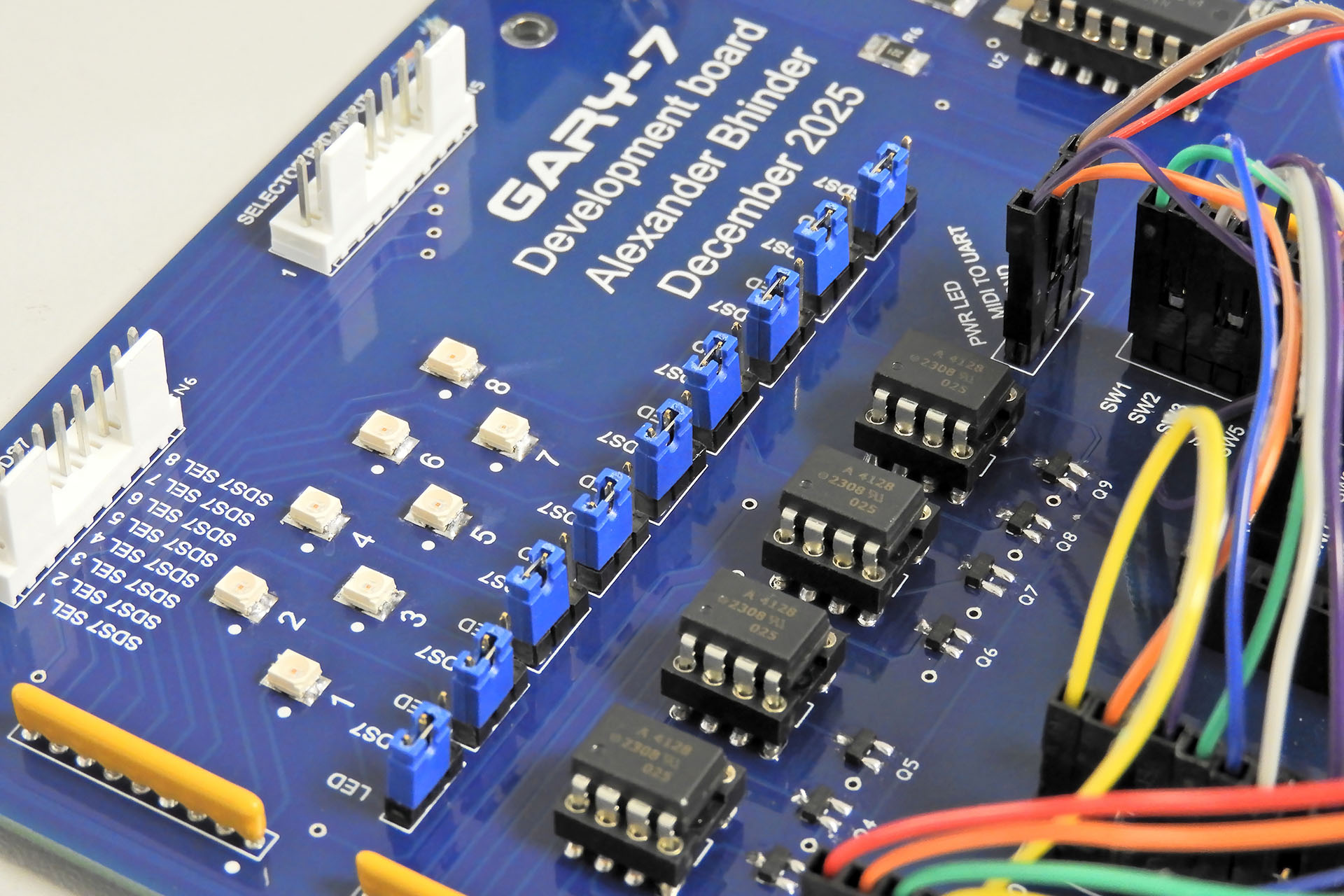
Gary 7 Development Board Matrix Switches
My Gary 7 development board, allowed me test the selector input/output matrix by hitting eight LEDs, before hooking things up to an actual SDS7.

December 2025 was a weird time for me and my family. Nebula-X and Gary 7 were much needed distractions and with the latter, I also immersed myself into the whole AI thing. It only took me two prompts to get something working but boy, did I learn a lot.

After getting the MIDI to SDS7 kit selector lines to work, I decided to push things. With sixteen switches to allow manual kit selection of the SDS7, I introduced a way of setting Gary 7’s MIDI channel with those switches, for example. Of course, it would have been kind of frustrating if Gary 7 didn’t remember the MIDI channel. Hence, the set MIDI channel had to be written to the Pi Pico’s memory. Then I came up with the idea of getting Gary 7 to remember the last kit selection prior to power-down. I referred to this as 'the last command'.

Early tests revealed unreliable memory retention so this had to be addressed and so the memory architecture and management of the Pi Pico were examples of what I learnt from the AI that I was using.

All versions of Gary 7 up to 1.6 were developed with the aid of AI so that was six prompts. I specified that all variables should be listed at the top of the code so tweaking the next three versions of the software was easy and something I could do myself.

By version 1.9, Gary 7 MIDI kit selector for the SDS7 was rocking!

With my cancer prognosis constantly in the back of my mind, getting Gary 7 MIDI kit selector for the Simmons SDS7 working was just so exciting, I just had to record it all. The two videos below show my bench testing.

Before I continue, let's quickly consider the whole kit selector thing of the Simmons SDS7 and the hardware I chose to do this...

The mechanism behind the kit selector of the SDS7 is simple but ingenious. Four signals from the SDS7 are switched to four outputs in a rather clever combination so as to allow for sixteen options. Gary 7 uses optical relays, emulating the zones or ‘pads’ on the Simmons selector pad, thus switching the four signals in the combinations required, to the four outputs.

Now then, questions could be asked like…

Why have the expense of the opto-isolated relays when I could have just got the Raspberry Pi Pico to generate four signals and switch them accordingly?

Well, any SDS7 user will be aware that this ol’ girl can be a bit temperamental and I figured that yes, it’ll cost a bit more and yes, things will be slightly more complicated for me but I really wanted to keep SDS7 as isolated as possible. I also wanted to ensure that SDS7 sees exactly what it wants to see on the four returning lines.
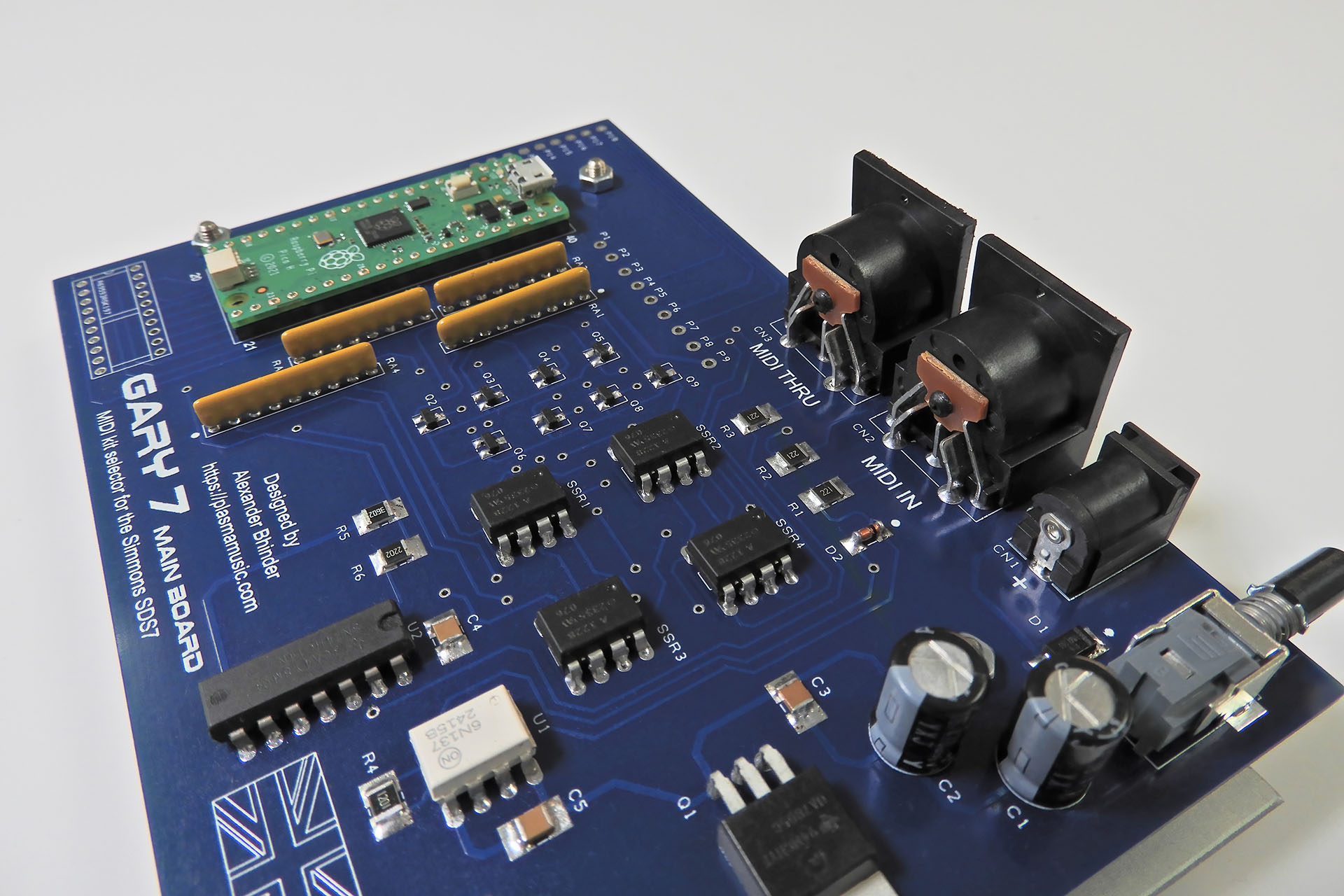
Gary 7 main-board showing dual SSRs and switching transistors
Here you can see the four dual SSRs (middle of image) and the the eight transistors that switch them (just a little up from middle of image).

Electromechanical relays would have cost more, potentially drawn more current and perhaps more importantly, they would have been much slower than optical ‘solid state’ devices so the reason to go for SSRs was clear.

The next challenge was to find a suitable enclosure. There wasn’t much point to start designing PCBs if I didn’t know what they were going to go into. To be honest, I had a rough idea of the size of box required so I actually started looking for something back in November 2025, when I first had the idea of Gary.
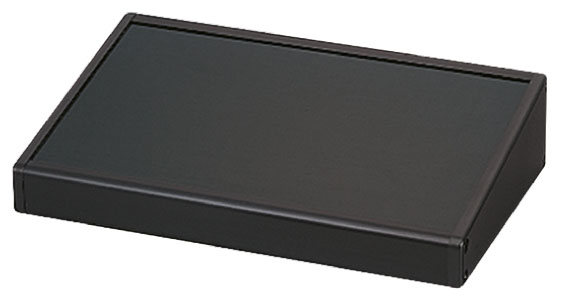
Takachi CF16-11BBThe Takachi CF series of cases, specifically the CF16-11BB consistently came back as my favourite and one of my suppliers seemed to have this in stock so I bought one for prototype purposes. Yes, it was more expensive than I’d have liked but it was small, made from aluminium and readily available.

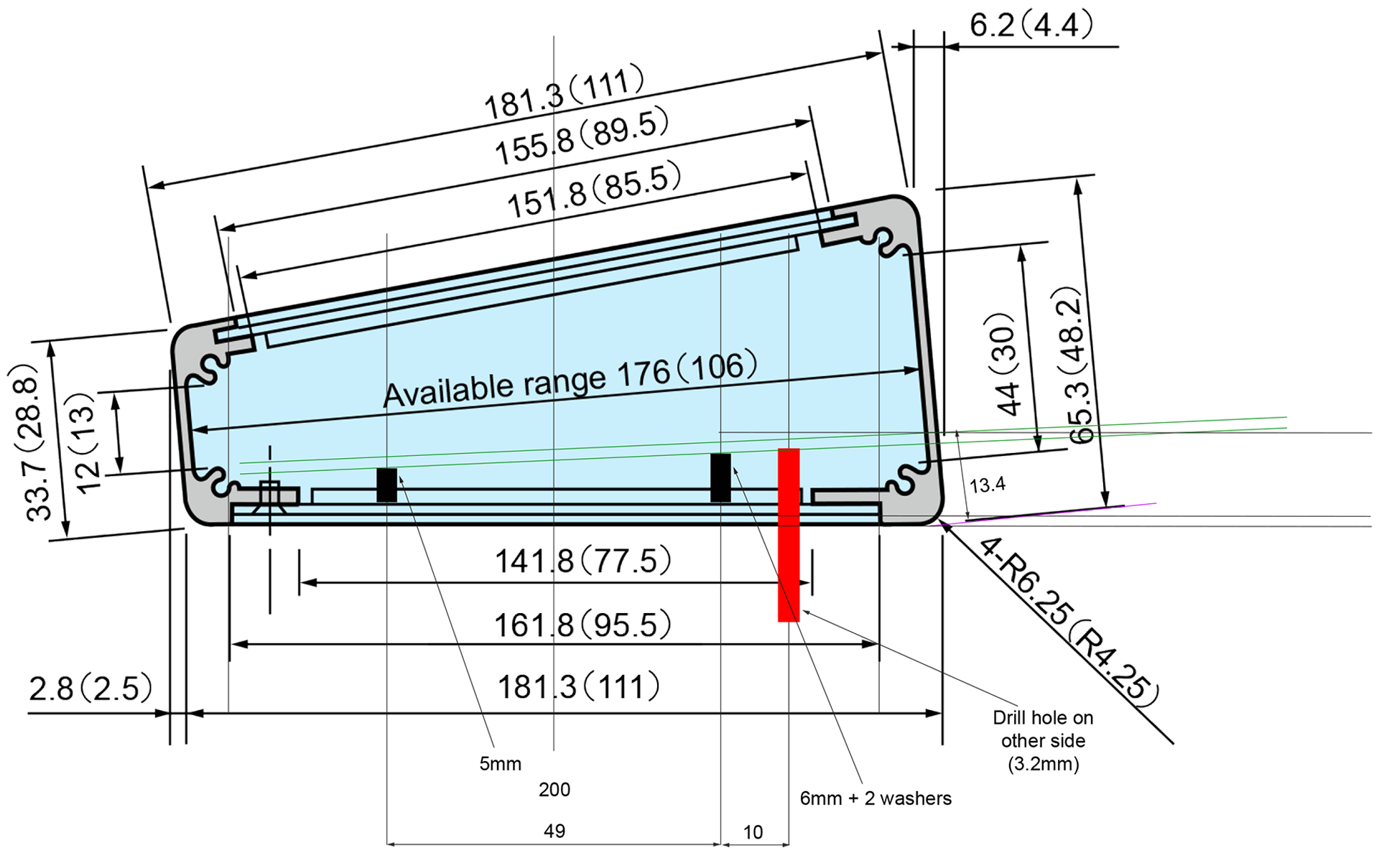
There was however, one very slight problem. The rear of the enclosure had a 10° slant from the vertical axis. To ensure that the rear sockets sat flush with the rear panel, I had to come up with a plan.
Takachi 16-11 for Gary 7
Lining up PCBs and rear sockets was particularly challenging with the Takachi CC16-11 case. As you can see, the rear of the enclosure is sloped. I superimposed my ideas over the original datasheet drawing after adding some dimensions which were missing.

You'll notice in the image above, that my 'plan' was to use slightly higher PCB stand-offs at the rear and slightly lower stand-offs at the front.

Despite lots of experience and all my best efforts, my first attempt at the Gary 7 enclosure had a couple of errors. The cut-outs for the switches were 1mm too big. I had to scrap the black anodised Takachi panel and get Lenton Engineering to make a new one from just plain aluminium.
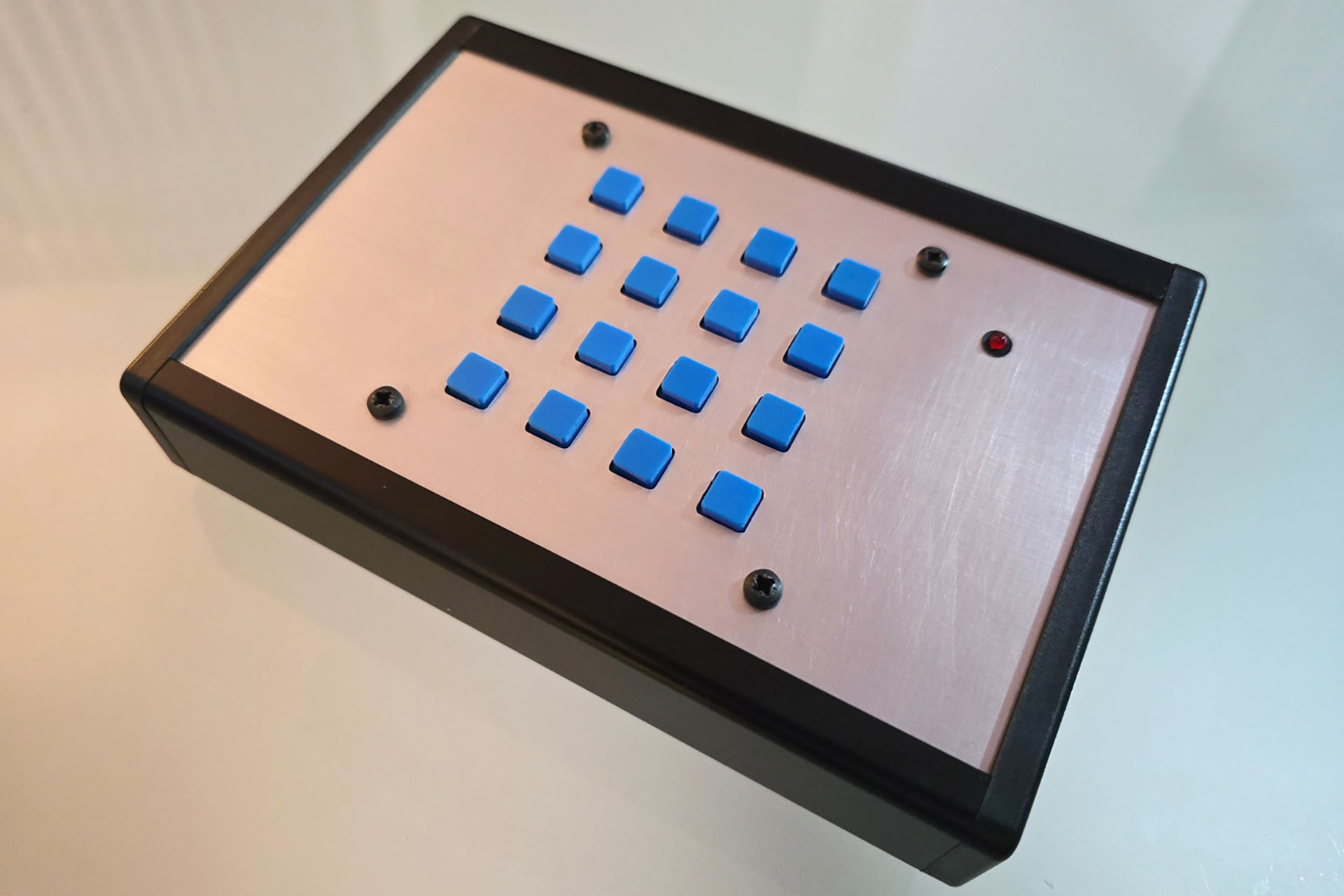
Gary 7 Prototype Top View
Gary 7 prototype top view. Not the top-panel that came with the enclosure as I originally made the tact-switch cut-outs 1mm larger than they had to be. Grr...

The other issue I had was down to the big multi-pin connectors on the rear panel. Basically, they were set too high. You can't see this too well in the image below but on the rear of the chassis mounting sockets, the securing nut butted into the top channel used for the side-screws of the enclosure. Lenton Engineering cut the channel but this wasn't the way to go, long term.
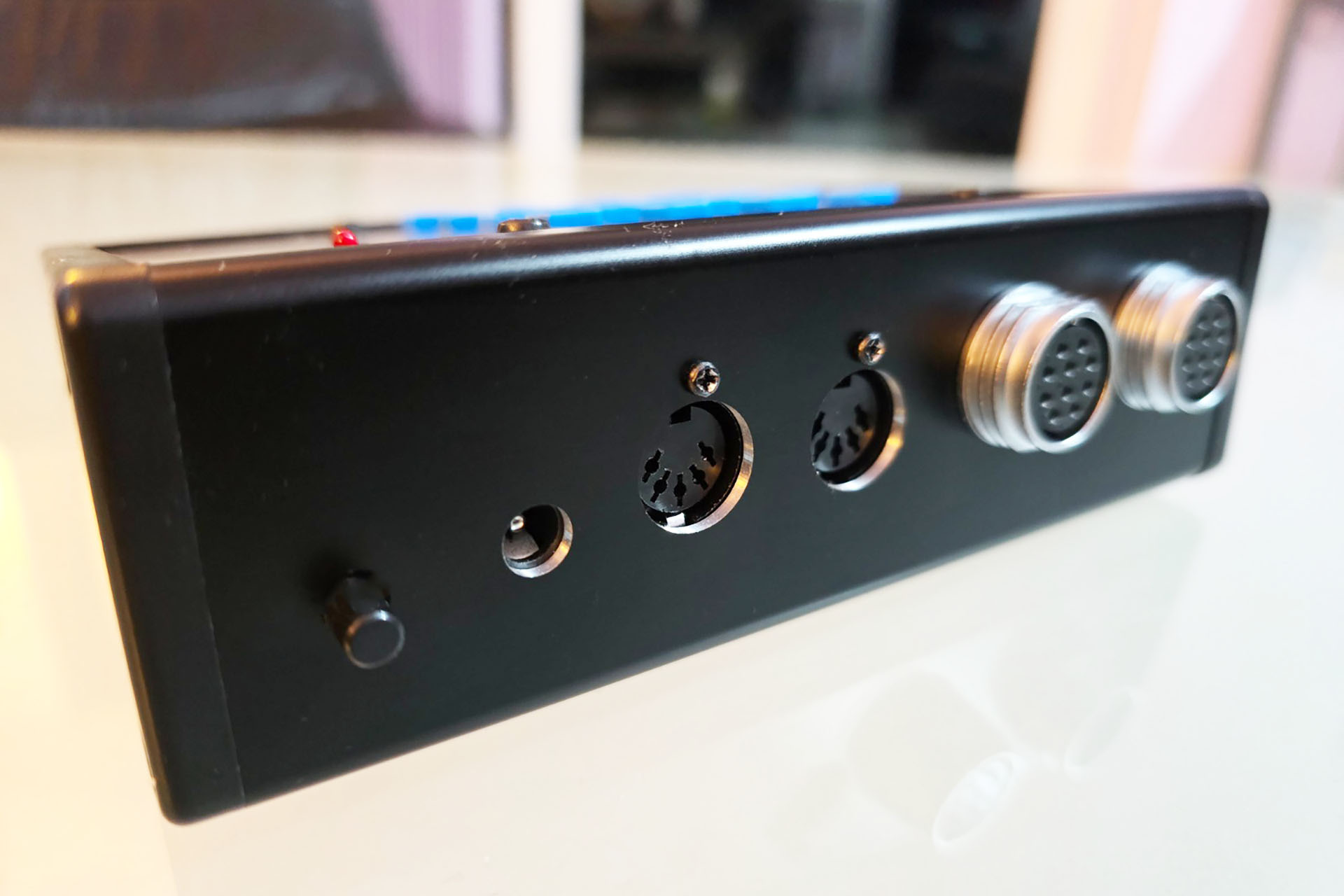
Gary 7 Prototype Rear View
Gary 7 prototype rear view.

I got the switch-board right first time but the main-board had to be redesigned. I had to cut away a section of the PCB, specifically to the left of the MIDI sockets, so as to allow access to secure the chassis mounting multi-pin connectors.
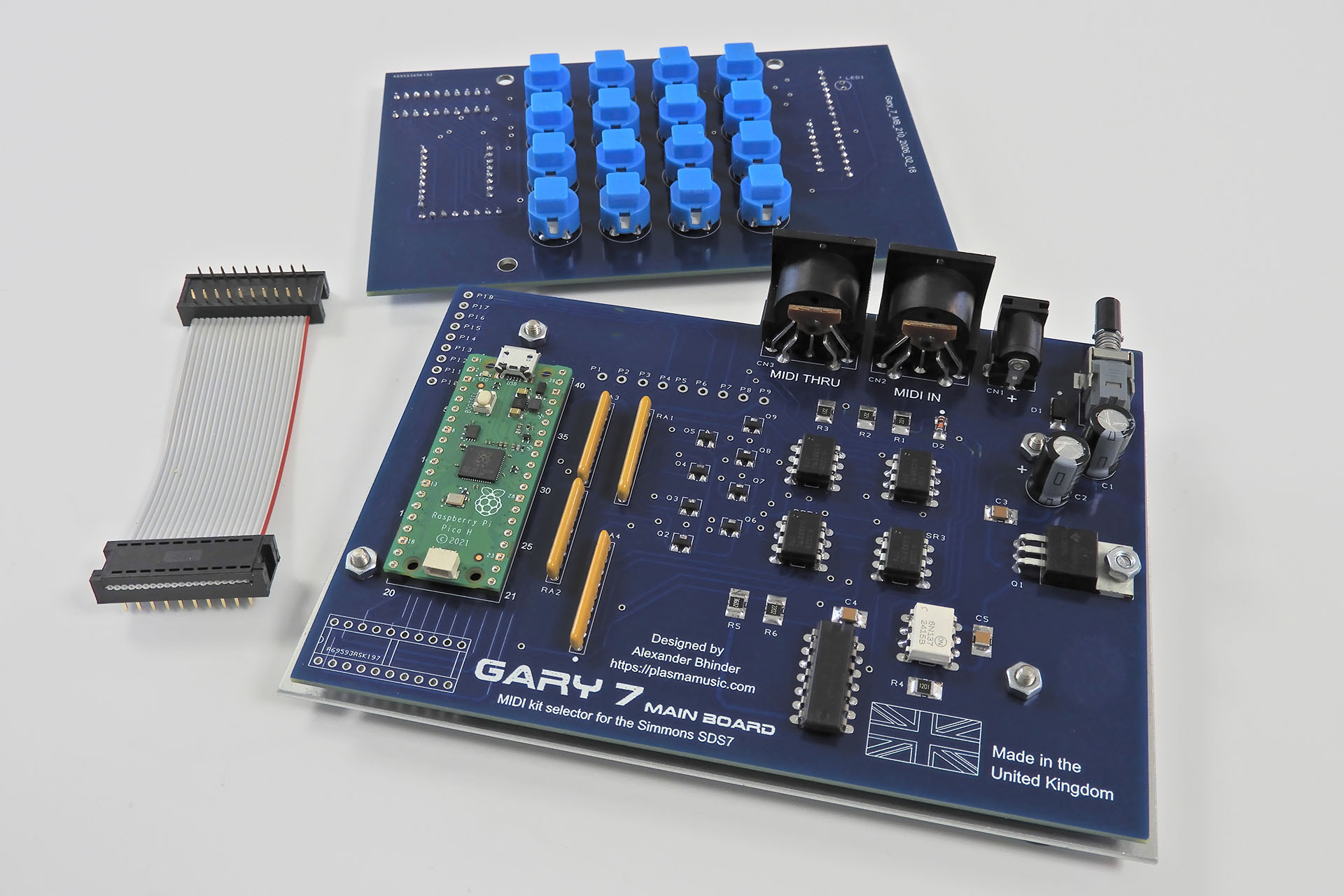
Gary 7 PCBs
Here are the two Gary 7 PCBs: the switch-board and the main-board. Also shown is a 20-way IDC ribbon cable that connects the two.

Power ON / OFF, power input (+9V DC) and MIDI are all soldered to the main-board while the multi-pin connectors to the SDS7 and the selector pad (if you have one) are chassis mounted. You may notice that the DC input and MIDI sockets look slightly lifted as if they're tilted. This is to help alignment of these sockets with the sloped rear of the enclosure.

What a pain in the butt but anyway... When the second drilled case components came back from Lenton Engineering, I couldn’t wait to see how things would fit together. Indeed this time, everything lined up perfectly and WOW... this is starting to look cool.
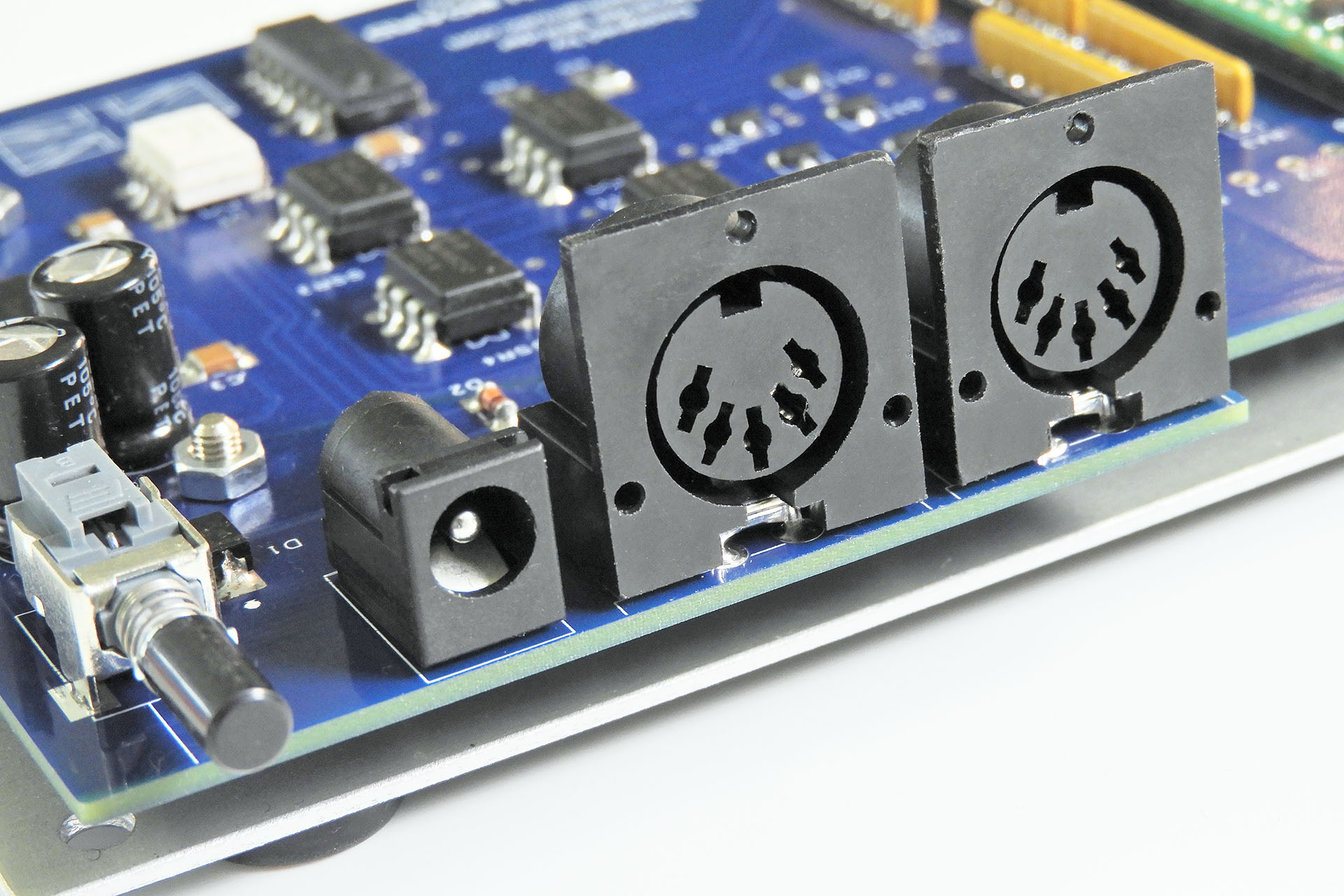
Gary 7 PCB sockets
All the sockets and the power switch all lined up perfectly with the case.

5V MIDI

Yes, I'm quite aware that 'modern' MIDI gear runs on +3.3V so as to interface with modern processors like for example, the Raspberry Pi but... I'm a strong advocate of backward compatibility and ensuring that the MIDI gear I design will work with anything, is a big deal for me. Customers should expect my MIDI products to work, they should take it for granted!
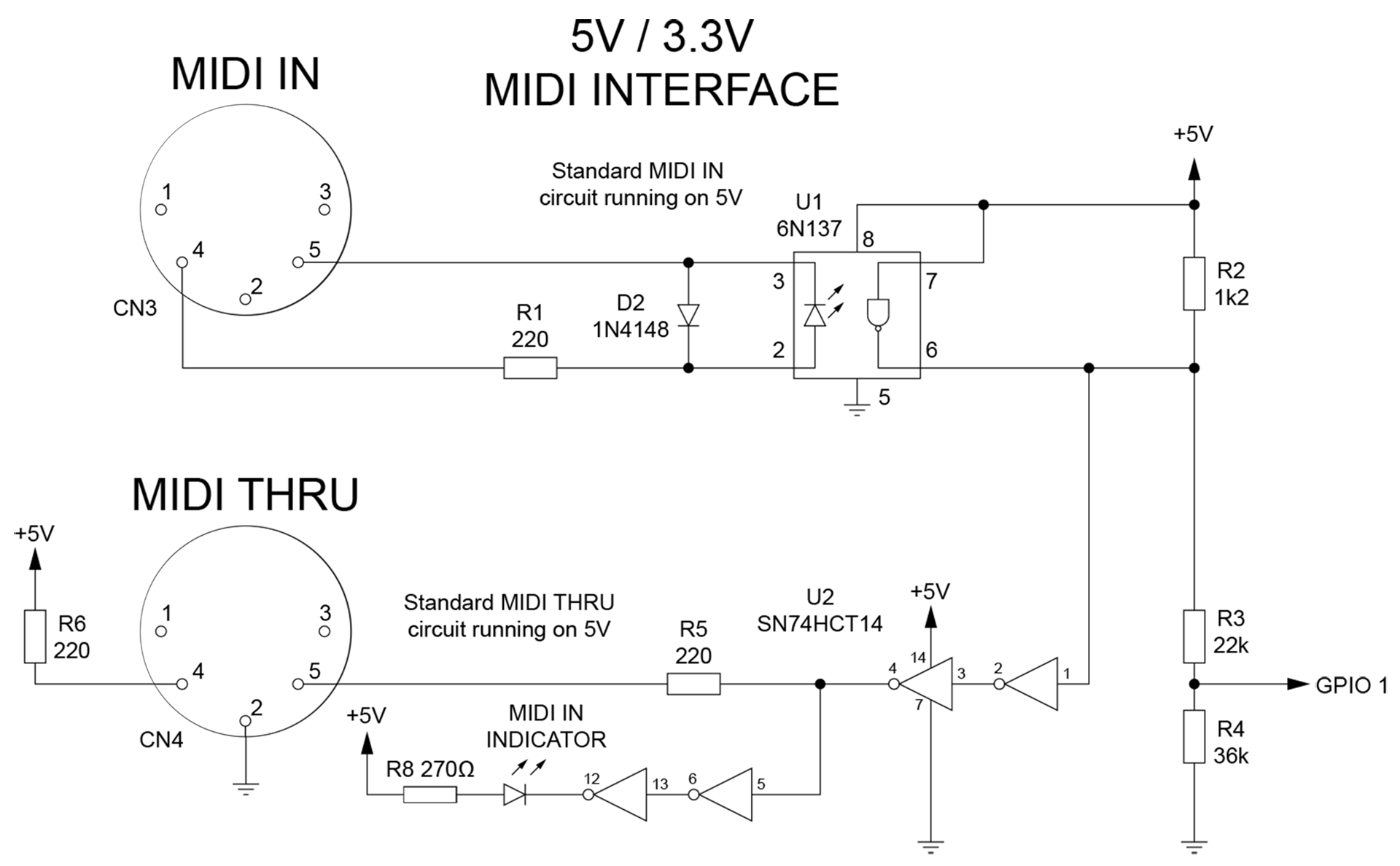
Gary 7 5V to 3.3V MIDI circuit
Here's the MIDI circuit from my Gary 7 development board. Gary 7's MIDI circuit is the same but without the MIDI indicator LED. As you can see 3,.3V MIDI IN for the Raspberry Pi is derived from a simple potential divider. It's just not difficult.

It really annoys me that many Internet gurus don't even acknowledge 5V MIDI. I'm the total opposite and to be honest, having 5V at the MIDI ports isn't a difficult thing to do anyway. As such, Gary 7 has a traditional (albeit much faster) MIDI circuit that's configured around 5v and which is fully backwardly compatible.

It's difficult to make a peripheral more than forty years after the original product was launched and keep a design connection with that product. I did try, though and having Simmons style switches was exactly the retro connection I was looking for.
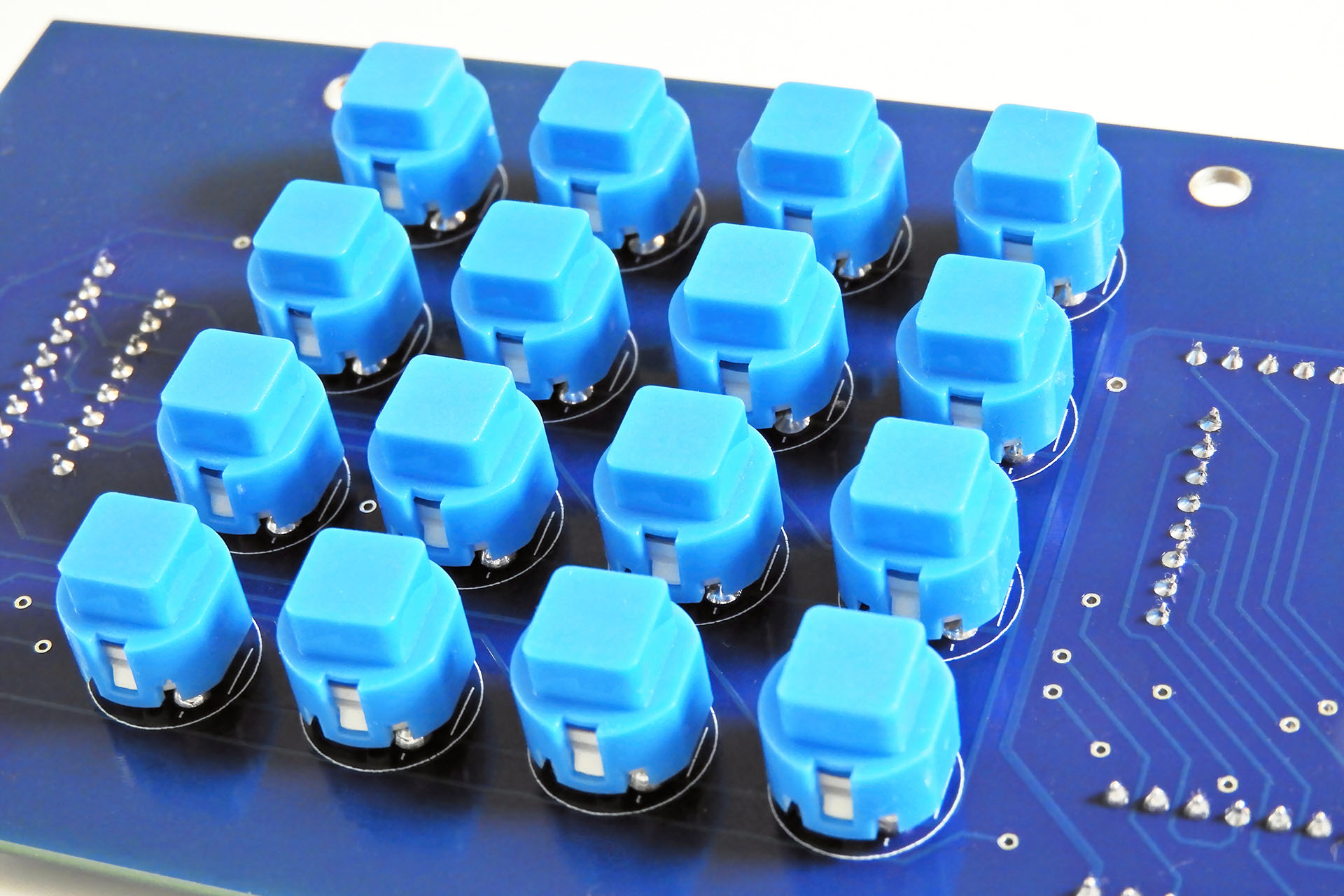
SDS7 Switches on Gary 7 Switch-Board
Gary 7 has the same style of switches as Simmons used on the SDS7, over forty years ago.

With the PCB, multi-pin sockets and enclosure all fitting nicely, I sent a set of silk screen print files to my friend Ivor Mitchell. Ivor dropped round a couple of days later to pick up the case parts. It was only a few days later when Ivor returned with the job. I was delighted and rushed to get the electronics into the now very sexy looking case.
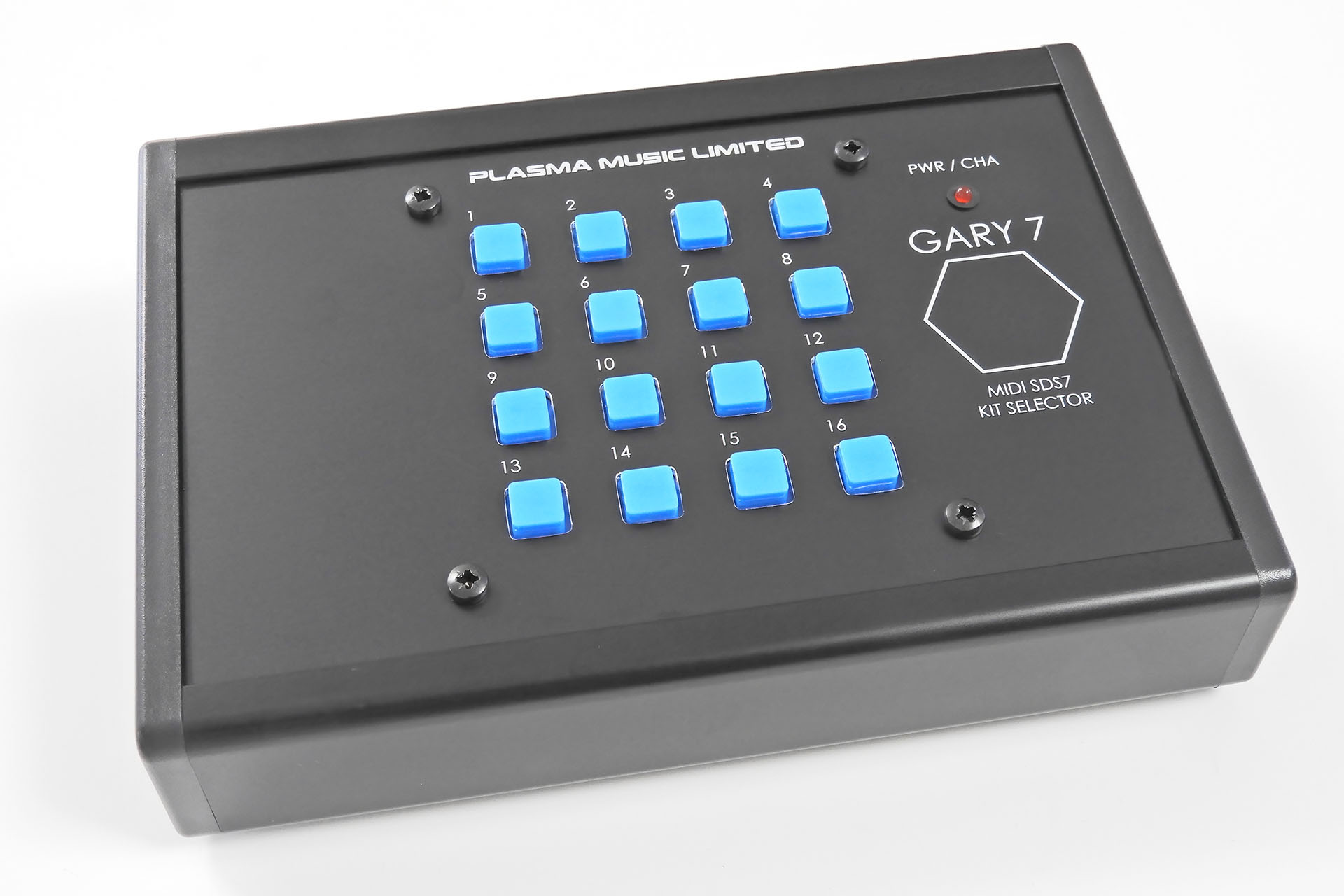
Gary 7 MIDI Kit Selector for the Simmons SDS7
I've never been patient but the time it took to get Gary 7 to this stage seemed like a particularly long wait. Having said that, it all seemed worth it in the end.

I had to buy another enclosure and recut the rear panel, lowering the multi-pin connector sockets by only 2mm.
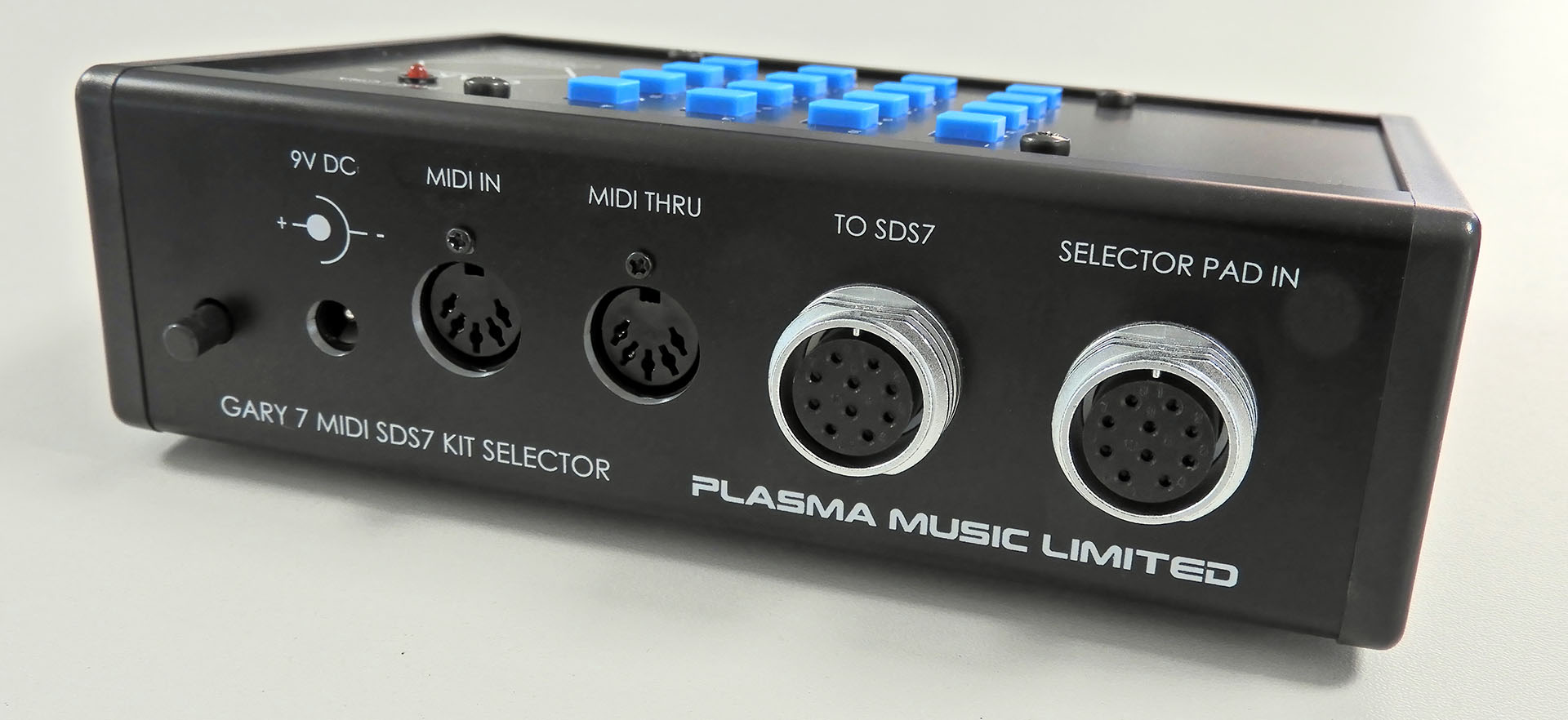
Rear of Gary 7 final
Rear of Gary 7 final with everything fitting and looking much better than my prototype.

Gary 7 MIDI kit selector for the Simmons SDS7 ended up being a BIG little project. My first project involving software, my first for which I made a bespoke development board and the first time I'd used AI for anything, it was seriously fun!

Gary 7offers three ways to select kits on the SDS7:

  1. MIDI program change
  2. Manually via the sixteen on-board buttons
  3. An original Simmons kit selector pad

As well as being able to set the MIDI channel on Gary 7, the last MIDI program change or last button press on the front panel will be remembered and output to the connected SDS7 five seconds after the next power-up. The 'Last Command' feature will NOT remember the last pad hit on a connected Simmons kit selector pad. That's because the selector pad input and the connection to the SDS7 are simply paralleled. The pad input does not pass through the processor so any signals received from the selector pad, can't be written to memory.

THE DOWN-SIDE - GARY 7 IS EXPENSIVE! 😕

On the back of Gary 7 are a pair of female connectors, identical to the selector pad input that's on the back of the SDS7. One connects to the SDS7 and one is for connection of an original Simmons selector pad. There’s also a cable to connect Gary 7 to the SDS7. This cable has two male connectors, one at each end. At the time of writing, just those four connectors alone are over 72 GBP.
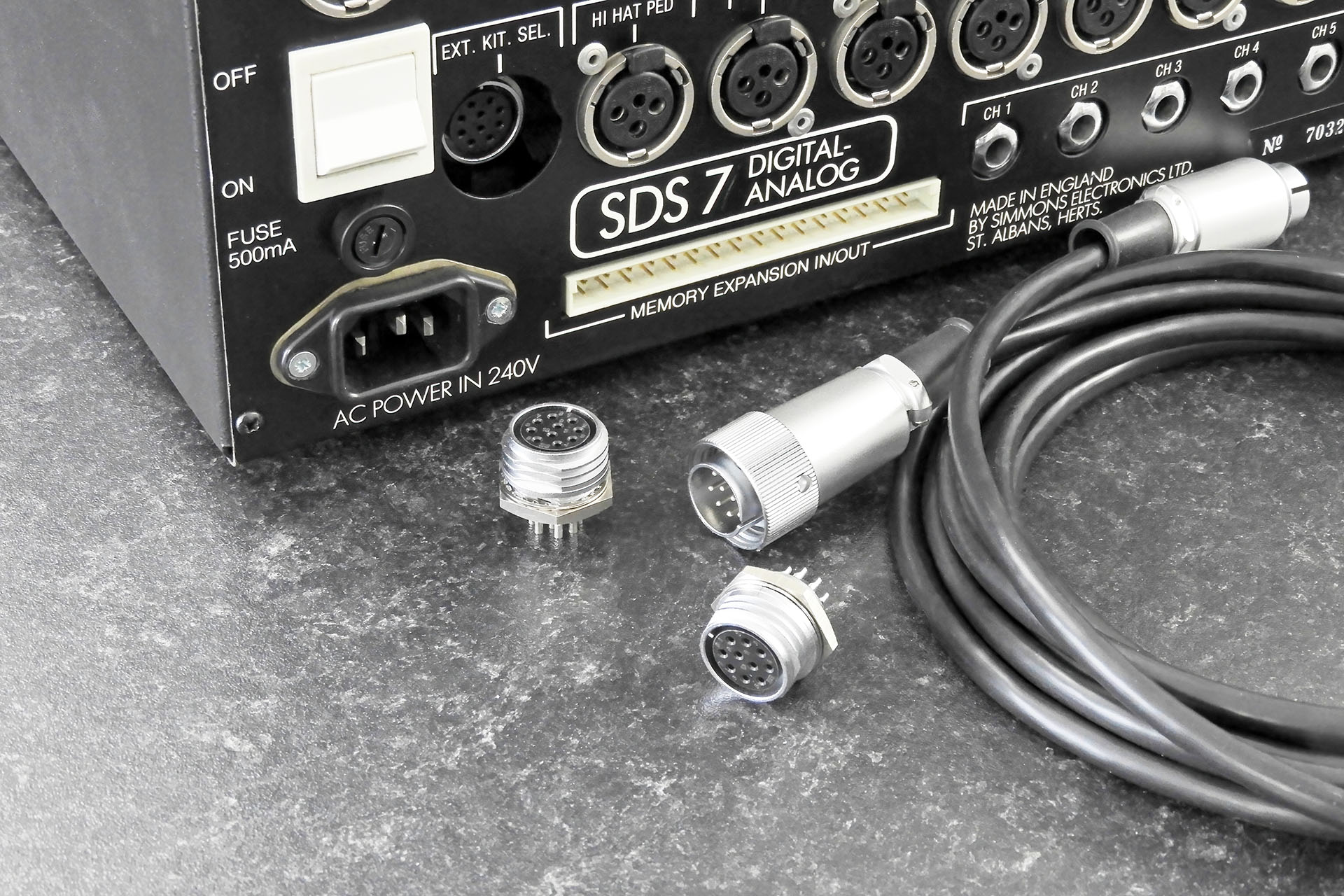
Hirose connectors as used for the kit selector pad connection on the Simmons SDS7
Shown are the connectors as used for the kit selector pad connection on the Simmons SDS7.

In contrast, the heart of the system, the Raspberry Pi Pico (with headers) retails in the UK for just under 5GBP!
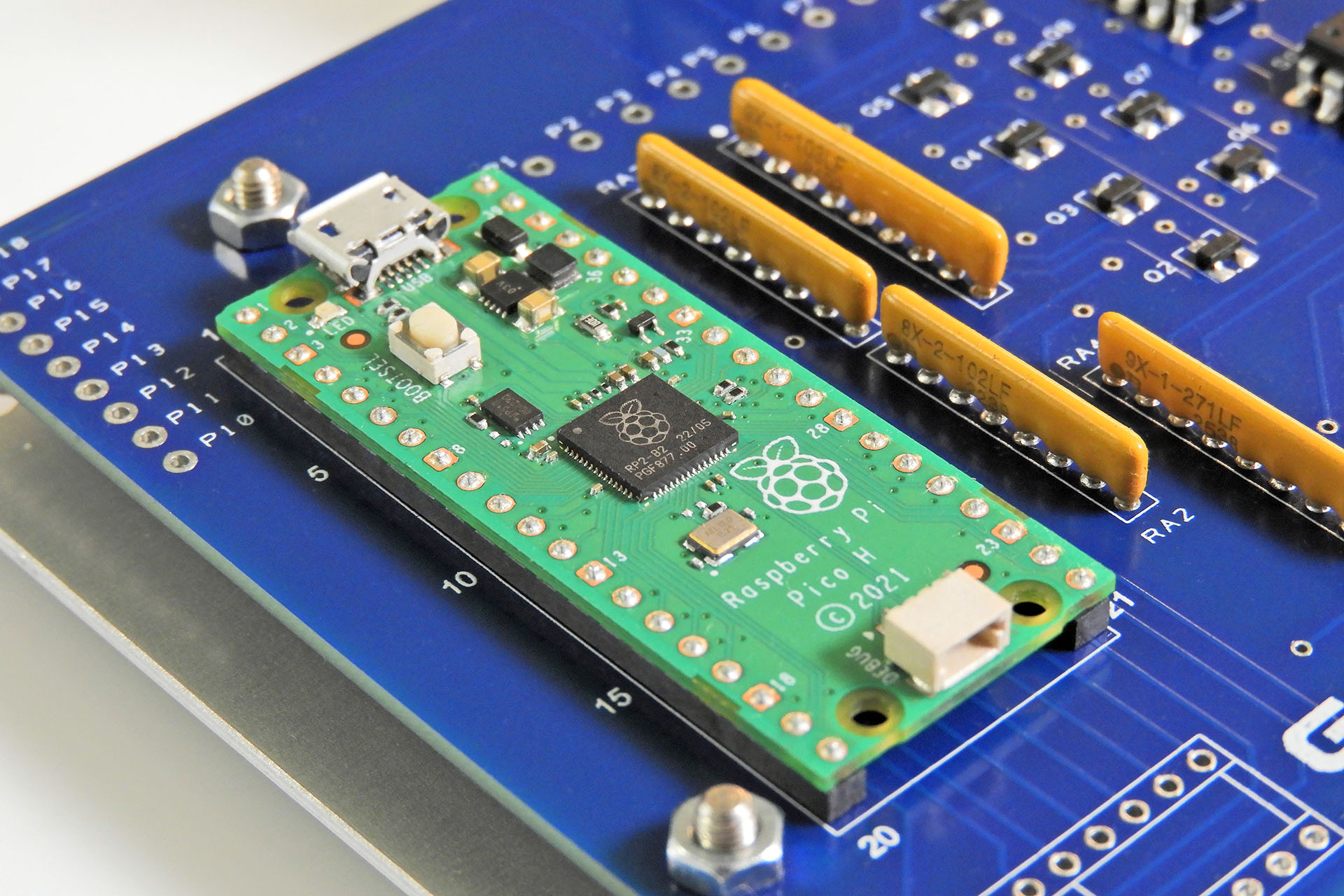
Raspberry Pi Pico on Gary 7
At the heart of Gary 7 is a Raspberry Pi Pico costing less than 5 GBP.

Incidentally, in the image above that shows the connectors, take a closer look at the cable that connects Gary 7 to the SDS7. You'll notice that there's a ring around one of the connectors. This 'locking' ring is supplied by the manufacturer, with the connector. If you have a Simmons selector pad, you'll be aware that this ring is (blatantly) absent. That's because the socket on the SDS7 is recessed and unfortunately, Simmons didn't make the cut-out in the rear of the SDS7 big enough, thus making the locking ring almost impossible to comfortably access. 😕 This connector on Gary is mounted directly to the rear panel and therefore, NOT recessed. As such, I decided to include the locking ring to make things secure at the Gary 7 end of the connection. Trying to fit the connector with the locking ring to the SDS7, might be difficult!

Anyway, back to the expensive Gary 7... The Takachi CF16-11BB enclosure is pretty cool but at more than 30 GBP each, suddenly it's not so cool. Bear in mind that I have to get it drilled out and then silk-screened.
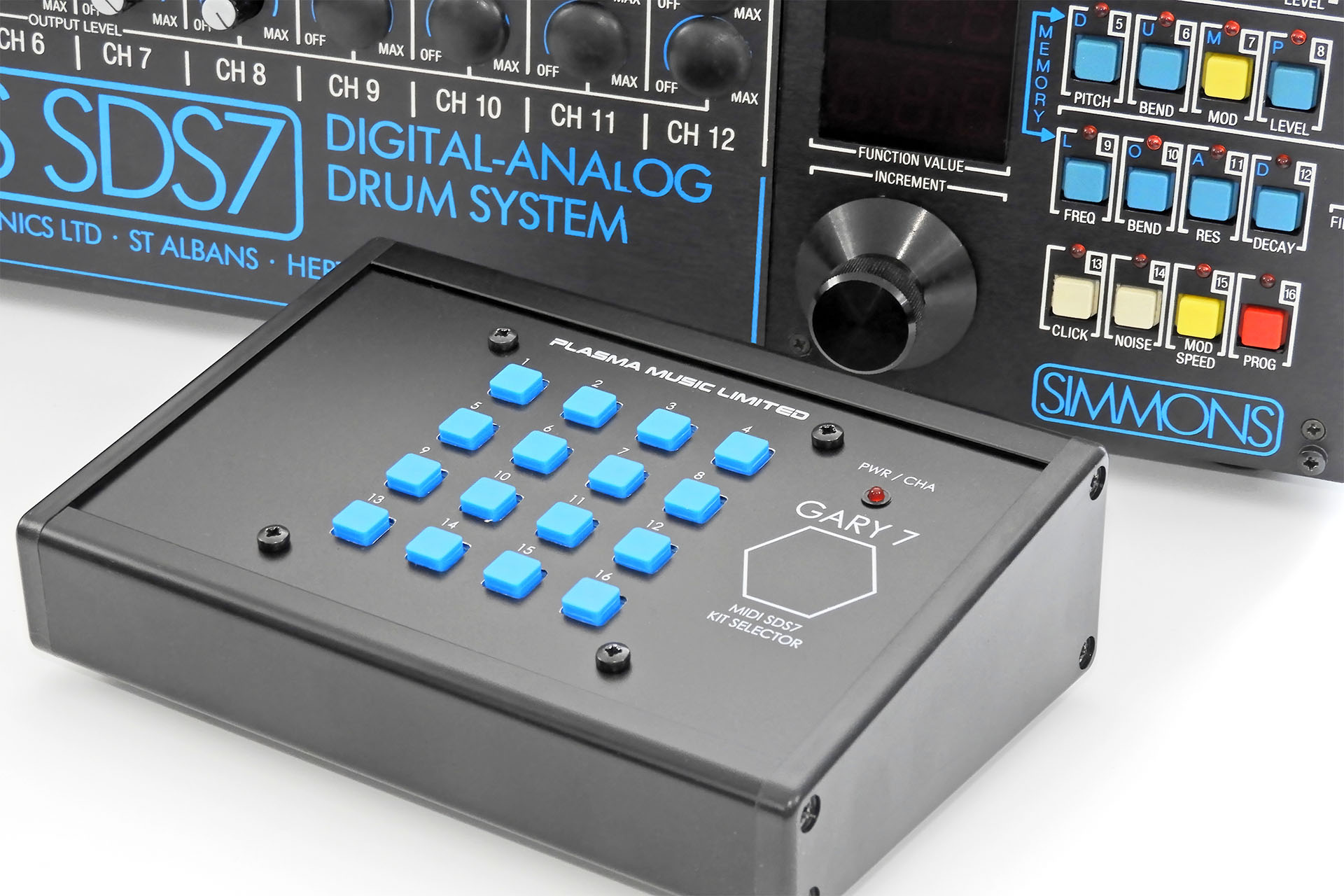
Gary 7 and Simmons SDS7
These guys look made for each other!

A WORD ON AI

The truth is that since this whole AI thing kicked off, I haven't exactly been keen. When I look back however, I was never a fan of having computers in the recording studio, LOL. Of course, it soon became obvious that computers in the studio was the way it was going back in the nineties and in contrast, AI is the way that everything's going now. NO! That's not quite true and there's a lot more to it than that.

I have a lot of test equipment in my lab. I have a couple of oscilloscopes, signal generators, logic analysers. I have over 2500 GBP worth of state-of the-art soldering equipment. And I've never argued that I shouldn't have any of that. All that gear helps me fix music technology and design and build some really cool stuff.

Similarly, I use two computers in my recording studio. Both computers run the most amazing software. The music that comes out of my studio however, is still mine. The computers just help me get it out.

My decision to use AI as an aid to develop the software for Gary 7 was based on the firm commitment that AI would be strictly used as just another tool. Like any other piece of equipment in my lab and like the computers in my studio, my intention from the outset was to use AI to help me develop something specific and not to get it done for me.


GIVING A LITTLE BACK

I've mentioned how Gary 7 kept me occupied and my Prostate Cancer UKmind distracted while I dealt with my prostate cancer diagnosis. In the UK, one in eight men will develop the disease and while the treatment I received was quite simply amazing and the staff who looked after me were angels, I feel that more needs to be done. Wouldn't it be just perfect if I could help in some way?

I have therefore made the decision to DONATE ALL PROCEEDS from Gary 7 sales to prostate cancer research. Since I'm in the UK, the specific charity that I'm choosing to support is Prostate Cancer UK.


GARY 7 CREDITS

I repair and service a wide range of music technology from valve amps to analogue and digital synthesiser and signal processors. I also design and manufacture peripherals for a lot of this equipment. It can get a bit lonely. I don't mean that I feel 'alone', I mean that there's just no way I can know everything. Having people I can talk to is a big deal for me and as well as having the best customers in the world, I'm also very lucky to know some great techs and engineers. 😊

CONCEPT:                             Alexander Bhinder
INSPIRATION:                      Iain Melville, Mike Walden
HARDWARE DESIGN:         Alexander Bhinder
PROMPTS:                            Alexander Bhinder
SOFTWARE:                          Microsoft Copilot
TESTING:                               Alexander Bhinder
ENCLOSURE DESIGN:         Alexander Bhinder
ENCLOSURE CUTTING:      Paul at Lenton Engineering
SILK SCREENING:                Ivor Mitchell at S & S Quality Print
CHEERING ME ON:             Ed Rose, Micha Buchner, Patrice Jacquot (my Simmons Vintage Technical Network buddies).

Gary 7 joins my other peripherals and upgrades for the Simmons SDS7 in the Simmons SDS7 Heaven category in my on-line store. Can't wait? You can buy Gary 7 here:

My Pleiades easy MIDI for the Simmons SDS7 was initially designed to address a common problem with this legendary instrument.

Pleiades installed in simmons sds7 power on

Like so many instruments of its time, the Simmons SDS7 memory was maintained by a Ni-Cd battery. This type of battery requires regular charging. Unfortunately, if not regularly charged and left for a couple of years, these batteries leak and can cause irreparable damage. It saddens me deeply that there are far fewer Simmons SD7s in the world, simply due to the fact that they got forgotten about and bad batteries did their thing.

Pleiades installed in simmons sds7

A 2-in-1 solution, as well as making lithium battery conversion simple and straight-forward, Pleiades also provides a convenient platform for anyone considering a Simmons SDS7 MIDI conversion.

Pleiades with and without tubbutec unipulse
Pleiades offers easy conversion of the SDS7 memory back-up from Ni-Cd to lithium but is also a perfect platform for the Tubbutec uniPulse (not supplied) allowing your Simmons SDS7 to become a MIDI Simmons SDS7!

Making provisions for a piggyback mounting of a third-party board isn't a particularly big deal. The real secret of how Pleiades makes Simmons SDS7 MIDI conversion so easy however, is a tiny snap-in board, that well, snaps in where SDS7's sequencer signals come on to the back plane. Fortunately, this connection is easily accessible. Connection between the daughterboard and the Pleiades main board is via a 26-way IDC cable. Power and MIDI also come on to the Pleiades daughterboard so everything's really easy.

Pleiades interface daughterboard snap-in
Part of the Pleiades kit, is this cool little board which snaps into the DIP header on the SDS7 back plane making trigger connections from the uniPulse solderless. Simmons SDS7 MIDI couldn't be simpler.

BUT THERE'S A CATCH...

SDS7's sequencer input jacks short to ground when no plugs are connected. The idea was to keep things under control and a short to ground on unused inputs reduces the likelihood of anything unwanted appearing and thus, going through the system. More than forty years on however, this now becomes a problem when we want to MIDI up a SDS7 internally. Why? Well, the trigger part of the MIDI to trigger process is injected via SDS7's sequencer inputs. If they're shorted to ground, then they're not going to work!

The twelve sequencer lines join the back plane (the main PCB that runs the width of the SDS7 and into which all cards connect), via a 14-pin IDC header and socket. The socket is located between the CPU and memory boards. The Pleiades snap-in plugs into this socket after the header has been removed. "Simple but brilliant Mr. Bond" but it does mean that when using Pleiades and uniPulse, the IDC cable needs to be completely removed as it's quite redundant. Plugging it into the socket on the Pleiades daughterboard will connect the shorted sequencer jacks to the trigger outputs of the uniPulse and so no triggers from the uniPulse will reach their intended targets.

SDS7 sequencer inputs cannot be used with Pleiades and uniPulse MIDI
Those familiar with the inside of the SDS7, will notice an absence of the 14-way IDC cable that carries the sequencer input signals to the back plane. Plugging it into the Pleiades daughterboard will sink the trigger signals from uniPulse to earth and so MIDI won't work. Hence, the cable is completely removed from the SDS7 when installing Pleiades with uniPulse.

Occupying a spare voice module slot (preferably slot 12) in your SDS7, all you need to do is remove the SDS7's main front panel to access Pleiades. This makes battery monitoring and changing simple. Pleiades also has switches and an LED which, if you have uniPulse installed, provide full access to some cool uniPulse functions.

Pleiades offers easy access to voltage monitoring and uniPulse functions
Pleiades offers easy access to voltage monitoring and uniPulse functions.

Like all my upgrades and modifications, Pleiades doesn't require any holes to be drilled into your SDS7. You won't have to cut any PCBs or carry out any 'hacks' that will permanently change your SDS7. In fact, Pleiades can be easily removed thereby returning your Simmons SDS7 to factory. MIDI access for example, is via the pad trigger input of the voice module that's occupied by the Pleiades board. A XLR to 5-way DIN cable is included with the Pleiades kit. As I said... no holes need to be drilled! Cool, eh? 🙂

You'll have noticed that Pleiades has two AA battery holders. This configuration is designed to make future battery changing possible WITHOUT having to back up your SDS7 memory or having your SDS7 powered on.

Pleiades has two AA battery holders connected in parallel
Pleiades has two AA battery holders connected in parallel which means that you won't have to worry about losing your SDS7 memory when you change batteries.

After several months of testing, it would seem that my original calculations may have been correct and that a single Li-SOCl2 3.6V AA battery would retain the SDS7's memory for close to 150 years! Of course, the battery itself would not last that long but the point I'm making is that you'll only need a single battery in Pleiades to keep your SD7 happy.

Pleiades voltage unchanged after five months
My prototype Pleiades was fitted with a single SAFT 14500 battery. Five months later and things look great! The terminals on Pleiades allowing voltage to be measured, are post protection diode / resistor so what you'll be seeing is the actual voltage that's going to the SRAM. The voltage on the battery is about 0.26volts higher than what's read. Of course when SDS7 is switched on, this will jump to 5V.

Changing your battery regularly, say every five years or so, will naturally mean that your SDS7 memory will be intact when that time comes. So simply dropping in your new battery into the unoccupied battery holder and then removing the old battery is all you'll have to do. Now, isn't that just so easy?!?!?

Additionally, each battery holder has its own (independent) diode / resistor protection circuitry. This arrangement ensures that the new battery won't rush-charge your old battery while you perform the swap. And YES, it also means that should be really (REALLY) want to use two batteries, then the same will apply; independent protection diode / resistor networks will mean that any micro voltage differences between the two batteries won't make one battery inadvertently charge the other.

Pleiades has independent diode resistor protection on the back of each battery holder
Independent diodes and resistors on the back of each battery holder ensure full protection of the battery and SDS7.

Excluding the Tubbutec uniPulse, Pleiades is supplied with everything you need for a smooth install and a fully illustrated and detailed installation manual is available after purchase.

The Pleiades kit
Pleiades is supplied with everything you need for your SDS7 lithium battery and uniPulse MIDI adapter conversion.

IMPORTANT: If you require  a Tubbutec uniPulse, please order here, specifying that you require the Pleiades Simmons SDS7 kit.

!!!! WARNING !!!!

There's a post that's been on the Internet for a while in which some guy slaps a lithium battery into his SDS7, wires it up to the memory board and claims that it works. PLEASE DO NOT DO THIS.

When powered up, the SDS7 will try to charge the battery. This will not be good and could even lead to a fire. Pleiades has been designed to do the job properly. Yes, it requires a small modification to the memory board but Pleiades won't destroy your SDS7 and definitely won't catch fire.


I joined Simmons a couple of years after the SDS7 was launched but next to the SDX, it's always been my favourite kit. I know that many favour the iconic SDSV analogue drum system but the SDS7 was just so much more 'me' at the time.

The SDS7 I bought while working for the company was sold to fund the purchase of my first SDX. It was a decision I always regretted but last December, a SDS7 came up on a well-known second-hand music gear site and I just had to have it. You can read all about that here.


Vintage Simmons Technical NetworkAnd finally, my Pleiades lithium battery conversion for the Simmons SDS7 would have taken much longer to develop and might not have even happened at all, if it wasn't for the help, support and encouragement that I received from my Simmons Technical Network friends and colleagues and my good friend, Guy Wilkinson. THANK YOU Ed Rose, aka The Simmons Guy, Michael Buchner and Patrice Jacquot.

Guy, many thanks for cracking on with and contributing so much to the Advanced Memory Expansion Pack (AMEP) for the Simmons SDS7.

tubbutecPleiades features extensive uniPulse integration and being a firm believer in partnerships, I'm very proud to mention the special relationship between Tobias of Tubbutec and myself. I see too many people now-a-days thinking that they can do everything themselves... and failing!

I first got to know Tobias while developing SDSM, my uniPulse adapter for the Simmons SDSV. Both Ed Rose and I had a couple of ideas for uniPulse and Tobias kindly updated the uniPulse firmware, implementing those ideas. AWSOME!

Pleiades is built to order and handmade in Hemel Hempstead, Hertfordshire, United Kingdom, only a few miles from St. Albans where Simmons used to based and where I used to work.

Pleiades easy MIDI for the Simmons SDS7 is available to purchase here:


UPDATE - 20th March 2025

The SDS7 memory comprises ten 6116 SRAM chips. These have a minimum memory retention voltage of only 2V so it would seem logical to assume that, so long as the back-up battery voltage is greater than 2V, SDS7's memory will be just fine.

In theory, that's true but there's something else going on...

IC1 (awkwardly located on the power supply PCB) is a CD4011 quad 2-input NAND gate. Used to buffer, invert and interface the Power-On-Reset (POR) circuitry, it's a crucial component in starting up and shutting down SDS7. It's permanently kept alive so just like the memory, when SDS7 is powered off, this device switches over to battery power.

IC1 CD4011 in Simmons SDS7
The CD4011 in the SDS7 is annoyingly difficult to access.

Unfortunately, the CD4011 has a minimum operating voltage of 3V which means that the memory back-up battery has to be above this value. If it's not, then IC1 won't function, the result being that SDS7 won't boot properly, if at all. As mentioned, so long as the battery voltage is above 2V, your SDS7's memory should in theory, remain intact. In practice however, this is NOT the case and without an adequate 'chip enable' (CE) voltage applied to the 6116s, the memory will corrupt.

Of course I considered replacing IC1 but there's no pin-for-pin equivalent to the CD4011 which has a minimum operating voltage of 2V. The SN74HC00N will operate down to 2V but unfortunately gates B and D are oppositely orientated to those on the CD4011. 😡

Developed at the same time as Pleiades, Dark Matter ended up being more than just a replacement power supply for the Simmons SDS7. I took the opportunity to address the short-comings of the original SDS7 POR circuit and so completely revised the design. Not wanting to stress out my test SDS7 by presenting it with something totally alien, my revised POR circuit included a SN74HC14AN which is actually a hex Schmitt trigger inverter. The 74HC14 has a crucial benefit over the original CD4011. Yes, you guessed it, this device has a minimum operating voltage of 2V. Exactly what I was looking for.

So, that's great if you buy Dark Matter. Hey, Dark Matter was even designed to seamlessly integrate with Pleiades. The Dark Matter installation however, is very involved and won't be for everyone so I searched for an alternative solution and quickly came up with something I've called 'RESET7'.


UPDATE - 7th May 2025

RESET-7 POR upgrade for the Simmons SDS7 installed
Mounted to the rear PCB, RESET-7 is very secure and connects easily to the IC1 socket.

REST-7 is now available and is offered as an option extra when you buy Pleiades.

My Pleiades lithium battery conversion for the Simmons SDS7 was initially designed to address a common problem with this legendary instrument.

Pleiades installed in simmons sds7 power on

Like so many instruments of its time, the Simmons SDS7 memory was maintained by a Ni-Cd battery. This type of battery requires regular charging. Unfortunately, if not regularly charged and left for a couple of years, these batteries leak and can cause irreparable damage. It saddens me deeply that there are far fewer Simmons SD7s in the world, simply due to the fact that they got forgotten about and bad batteries did their thing.

Pleiades installed in simmons sds7

A 2-in-1 solution, as well as making lithium battery conversion simple and straight-forward, Pleiades also provides a convenient platform for anyone considering a Simmons SDS7 MIDI conversion.

Pleiades with and without tubbutec unipulse
Pleiades offers easy conversion of the SDS7 memory back-up from Ni-Cd to lithium but is also a perfect platform for the Tubbutec uniPulse (not supplied) allowing your Simmons SDS7 to become a MIDI Simmons SDS7!

Making provisions for a piggyback mounting of a third-party board isn't a particularly big deal. The real secret of how Pleiades makes Simmons SDS7 MIDI conversion so easy however, is a tiny snap-in board, that well, snaps in where SDS7's sequencer signals come on to the back plane. Fortunately, this connection is easily accessible. Connection between the daughterboard and the Pleiades main board is via a 26-way IDC cable. Power and MIDI also come on to the Pleiades daughterboard so everything's really easy.

Pleiades interface daughterboard snap-in
Part of the Pleiades kit, is this cool little board which snaps into the DIP header on the SDS7 back plane making trigger connections from the uniPulse solderless. Simmons SDS7 MIDI couldn't be simpler.

BUT THERE'S A CATCH...

SDS7's sequencer input jacks short to ground when no plugs are connected. The idea was to keep things under control and a short to ground on unused inputs reduces the likelihood of anything unwanted appearing and thus, going through the system. More than forty years on however, this now becomes a problem when we want to MIDI up a SDS7 internally. Why? Well, the trigger part of the MIDI to trigger process is injected via SDS7's sequencer inputs. If they're shorted to ground, then they're not going to work!

The twelve sequencer lines join the back plane (the main PCB that runs the width of the SDS7 and into which all cards connect), via a 14-pin IDC header and socket. The socket is located between the CPU and memory boards. The Pleiades snap-in plugs into this socket after the header has been removed. "Simple but brilliant Mr. Bond" but it does mean that when using Pleiades and uniPulse, the IDC cable needs to be completely removed as it's quite redundant. Plugging it into the socket on the Pleiades daughterboard will connect the shorted sequencer jacks to the trigger outputs of the uniPulse and so no triggers from the uniPulse will reach their intended targets.

SDS7 sequencer inputs cannot be used with Pleiades and uniPulse MIDI
Those familiar with the inside of the SDS7, will notice an absence of the 14-way IDC cable that carries the sequencer input signals to the back plane. Plugging it into the Pleiades daughterboard will sink the trigger signals from uniPulse to earth and so MIDI won't work. Hence, the cable is completely removed from the SDS7 when installing Pleiades with uniPulse.

Occupying a spare voice module slot (preferably slot 12) in your SDS7, all you need to do is remove the SDS7's main front panel to access Pleiades. This makes battery monitoring and changing simple. Pleiades also has switches and an LED which, if you have uniPulse installed, provide full access to some cool uniPulse functions.

Pleiades offers easy access to voltage monitoring and uniPulse functions
Pleiades offers easy access to voltage monitoring and uniPulse functions.

Like all my upgrades and modifications, Pleiades doesn't require any holes to be drilled into your SDS7. You won't have to cut any PCBs or carry out any 'hacks' that will permanently change your SDS7. In fact, Pleiades can be easily removed thereby returning your Simmons SDS7 to factory. MIDI access for example, is via the pad trigger input of the voice module that's occupied by the Pleiades board. A XLR to 5-way DIN cable is included with the Pleiades kit. As I said... no holes need to be drilled! Cool, eh? 🙂

You'll have noticed that Pleiades has two AA battery holders. This configuration is designed to make future battery changing possible WITHOUT having to back up your SDS7 memory or having your SDS7 powered on.

Pleiades has two AA battery holders connected in parallel
Pleiades has two AA battery holders connected in parallel which means that you won't have to worry about losing your SDS7 memory when you change batteries.

After several months of testing, it would seem that my original calculations may have been correct and that a single Li-SOCl2 3.6V AA battery would retain the SDS7's memory for close to 150 years! Of course, the battery itself would not last that long but the point I'm making is that you'll only need a single battery in Pleiades to keep your SD7 happy.

Pleiades voltage unchanged after five months
My prototype Pleiades was fitted with a single SAFT 14500 battery. Five months later and things look great! The terminals on Pleiades allowing voltage to be measured, are post protection diode / resistor so what you'll be seeing is the actual voltage that's going to the SRAM. The voltage on the battery is about 0.26volts higher than what's read. Of course when SDS7 is switched on, this will jump to 5V.

Changing your battery regularly, say every five years or so, will naturally mean that your SDS7 memory will be intact when that time comes. So simply dropping in your new battery into the unoccupied battery holder and then removing the old battery is all you'll have to do. Now, isn't that just so easy?!?!?

Additionally, each battery holder has its own (independent) diode / resistor protection circuitry. This arrangement ensures that the new battery won't rush-charge your old battery while you perform the swap. And YES, it also means that should be really (REALLY) want to use two batteries, then the same will apply; independent protection diode / resistor networks will mean that any micro voltage differences between the two batteries won't make one battery inadvertently charge the other.

Pleiades has independent diode resistor protection on the back of each battery holder
Independent diodes and resistors on the back of each battery holder ensure full protection of the battery and SDS7.

Excluding the Tubbutec uniPulse, Pleiades is supplied with everything you need for a smooth install and a fully illustrated and detailed installation manual is available after purchase.

The Pleiades kit
Pleiades is supplied with everything you need for your SDS7 lithium battery and uniPulse MIDI adapter conversion.

IMPORTANT: If you require  a Tubbutec uniPulse, please order here, specifying that you require the Pleiades Simmons SDS7 kit.

!!!! WARNING !!!!

There's a post that's been on the Internet for a while in which some guy slaps a lithium battery into his SDS7, wires it up to the memory board and claims that it works. PLEASE DO NOT DO THIS.

When powered up, the SDS7 will try to charge the battery. This will not be good and could even lead to a fire. Pleiades has been designed to do the job properly. Yes, it requires a small modification to the memory board but Pleiades won't destroy your SDS7 and definitely won't catch fire.


I joined Simmons a couple of years after the SDS7 was launched but next to the SDX, it's always been my favourite kit. I know that many favour the iconic SDSV analogue drum system but the SDS7 was just so much more 'me' at the time.

The SDS7 I bought while working for the company was sold to fund the purchase of my first SDX. It was a decision I always regretted but last December, a SDS7 came up on a well-known second-hand music gear site and I just had to have it. You can read all about that here.


Vintage Simmons Technical NetworkAnd finally, my Pleiades lithium battery conversion for the Simmons SDS7 would have taken much longer to develop and might not have even happened at all, if it wasn't for the help, support and encouragement that I received from my Simmons Technical Network friends and colleagues and my good friend, Guy Wilkinson. THANK YOU Ed Rose, aka The Simmons Guy, Michael Buchner and Patrice Jacquot.

Guy, many thanks for cracking on with and contributing so much to the Advanced Memory Expansion Pack (AMEP) for the Simmons SDS7.

tubbutecPleiades features extensive uniPulse integration and being a firm believer in partnerships, I'm very proud to mention the special relationship between Tobias of Tubbutec and myself. I see too many people now-a-days thinking that they can do everything themselves... and failing!

I first got to know Tobias while developing SDSM, my uniPulse adapter for the Simmons SDSV. Both Ed Rose and I had a couple of ideas for uniPulse and Tobias kindly updated the uniPulse firmware, implementing those ideas. AWSOME!

Pleiades is built to order and handmade in Hemel Hempstead, Hertfordshire, United Kingdom, only a few miles from St. Albans where Simmons used to based and where I used to work.

Pleiades is available to purchase here:


UPDATE - 20th March 2025

The SDS7 memory comprises ten 6116 SRAM chips. These have a minimum memory retention voltage of only 2V so it would seem logical to assume that, so long as the back-up battery voltage is greater than 2V, SDS7's memory will be just fine.

In theory, that's true but there's something else going on...

IC1 (awkwardly located on the power supply PCB) is a CD4011 quad 2-input NAND gate. Used to buffer, invert and interface the Power-On-Reset (POR) circuitry, it's a crucial component in starting up and shutting down SDS7. It's permanently kept alive so just like the memory, when SDS7 is powered off, this device switches over to battery power.

IC1 CD4011 in Simmons SDS7
The CD4011 in the SDS7 is annoyingly difficult to access.

Unfortunately, the CD4011 has a minimum operating voltage of 3V which means that the memory back-up battery has to be above this value. If it's not, then IC1 won't function, the result being that SDS7 won't boot properly, if at all. As mentioned, so long as the battery voltage is above 2V, your SDS7's memory should in theory, remain intact. In practice however, this is NOT the case and without an adequate 'chip enable' (CE) voltage applied to the 6116s, the memory will corrupt.

Of course I considered replacing IC1 but there's no pin-for-pin equivalent to the CD4011 which has a minimum operating voltage of 2V. The SN74HC00N will operate down to 2V but unfortunately gates B and D are oppositely orientated to those on the CD4011. 😡

Developed at the same time as Pleiades, Dark Matter ended up being more than just a replacement power supply for the Simmons SDS7. I took the opportunity to address the short-comings of the original SDS7 POR circuit and so completely revised the design. Not wanting to stress out my test SDS7 by presenting it with something totally alien, my revised POR circuit included a SN74HC14AN which is actually a hex Schmitt trigger inverter. The 74HC14 has a crucial benefit over the original CD4011. Yes, you guessed it, this device has a minimum operating voltage of 2V. Exactly what I was looking for.

So, that's great if you buy Dark Matter. Hey, Dark Matter was even designed to seamlessly integrate with Pleiades. The Dark Matter installation however, is very involved and won't be for everyone so I searched for an alternative solution and quickly came up with something I've called 'RESET7'.


UPDATE - 7th May 2025

RESET-7 POR upgrade for the Simmons SDS7 installed
Mounted to the rear PCB, RESET-7 is very secure and connects easily to the IC1 socket.

REST-7 is now available and is offered as an option extra when you buy Pleiades.