Skip to content

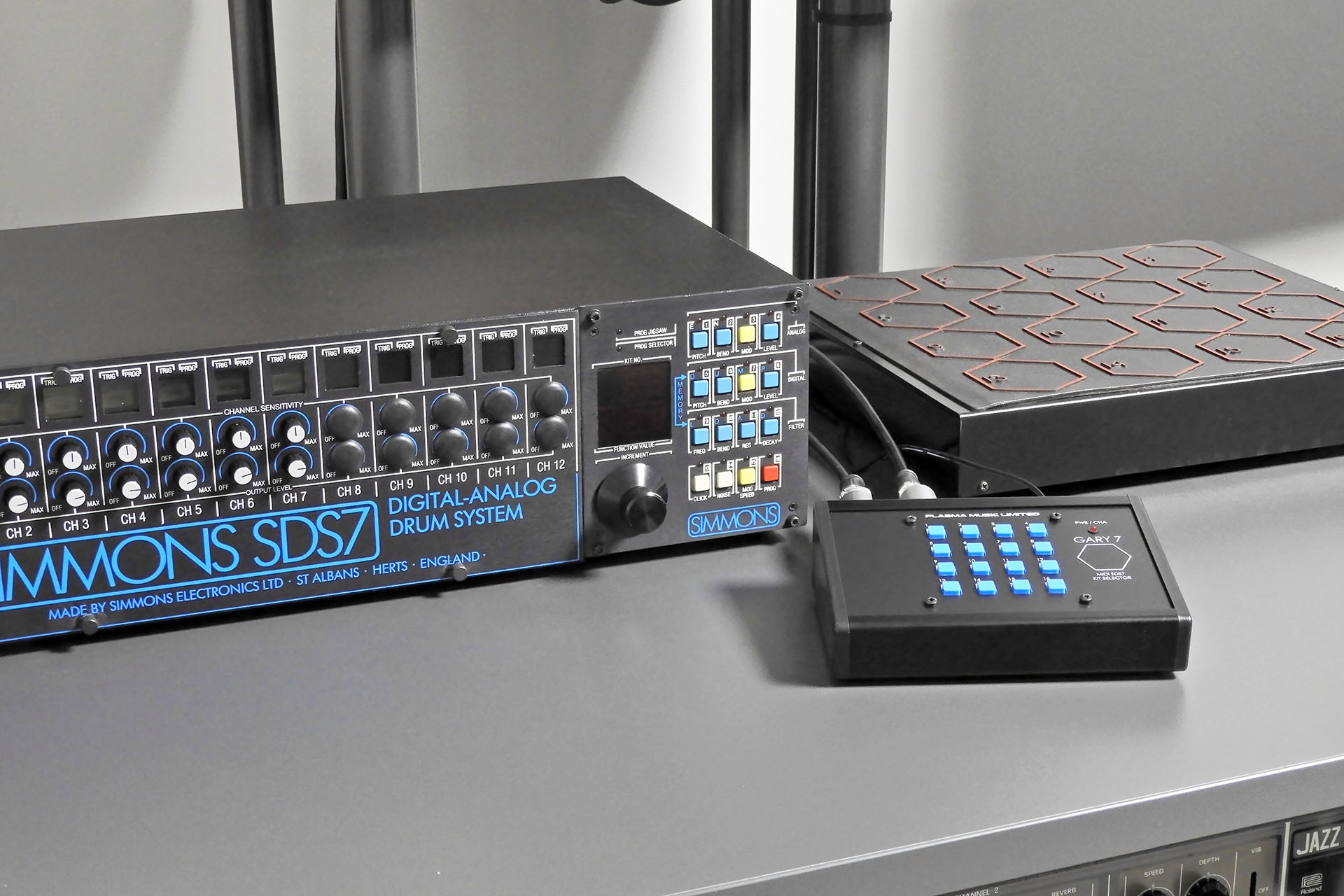
Gary 7 MIDI kit selector for the Simmons SDS7 with SDS7 and Selector PadOne afternoon in late September 2025, a customer turned up to collect his Marshall JCM-800 combo that I’d serviced. My customers mean everything to me and it’s not unusual for those who turn up at my door, to stay a while. 😊 Anyway, Iain and I really hit it off and after mentioning his software work, I told him about my Gary 7 MIDI kit selector for the Simmons SDS7 idea.

Gary 7 was going to be another one of my software-based ideas which would probably never see light of day but then Iain offered to pop over one afternoon to help get me started with coding for the Raspberry Pi. First, he gave me a short list of various bits ‘n’ pieces I should buy in advance of his visit.

Well, Iain stuck to his promise and sometime in November 2025, he came round to explain how Raspberry Pi stuff worked. We had a fantastic afternoon and I learnt so much. THANKS Iain! 😎

Unfortunately, it was also roundabout this time that my doctor told me that a recent routine blood test had come back with a high PSA level. As it turned out, I was eventually diagnosed with prostate cancer. As you can imagine, the news was quite devastating. On the other hand, life goes on and the only way I could focus on the future was by being with my family and working on stuff that I love… like Gary7.

I also had another project that would help keep my mind off things. Nebula-X balanced outputs for the Roland JX-10 had been on my shelf for a couple of years. My third and last revision PCBs had been delivered and I was very keen to get this done too. Hence, my Nebula-X project took priority over Gary 7.
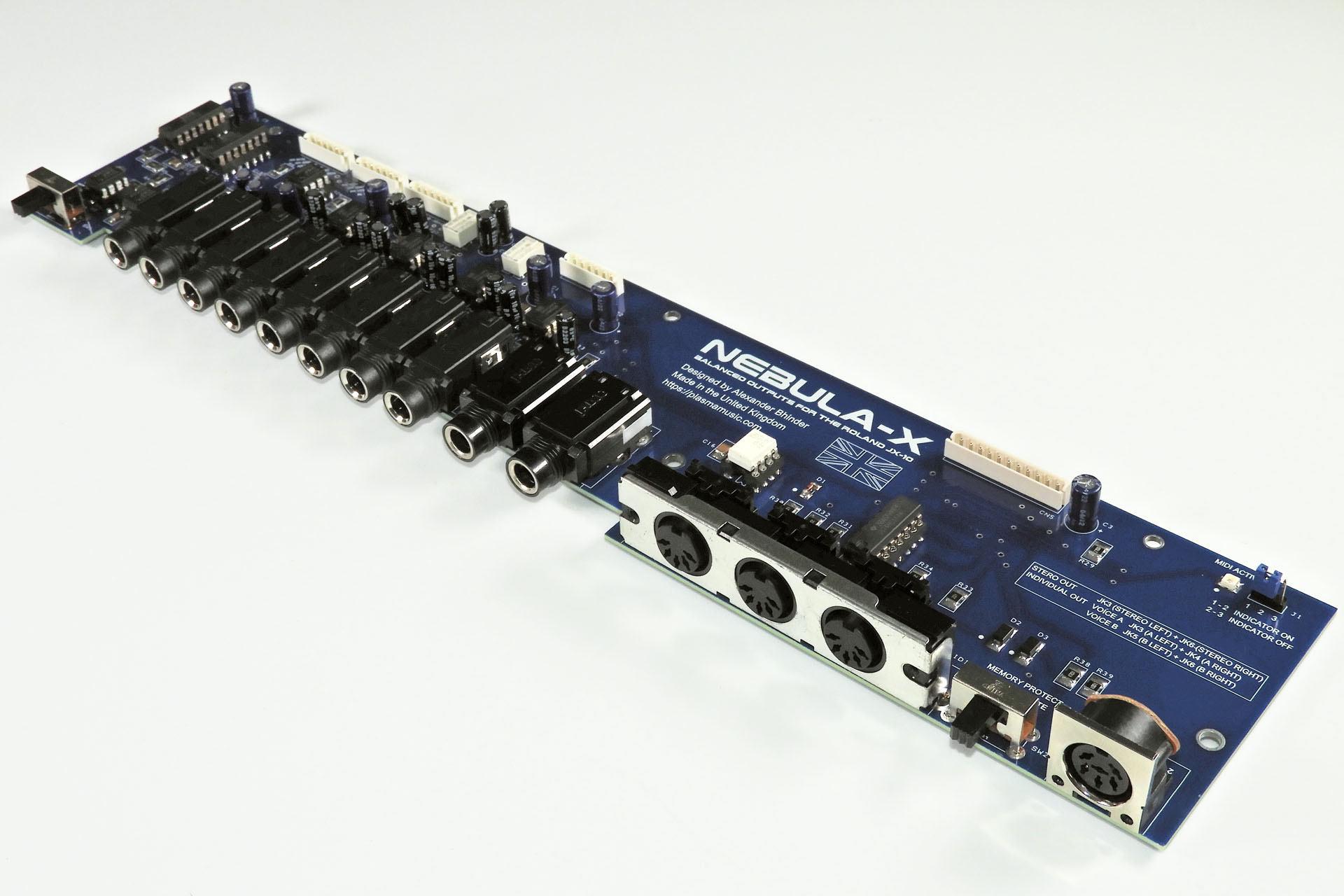
Nebula-X balanced outputs for the Roland JX-10
Nebula-X balanced outputs for the Roland JX-10 was another project that kept me distracted from things.

Iain introduced me to the whole Raspberry Pi thing and showed me stuff which, if I had to suss out on my own, would have taken me weeks if not months. More than that, his patience and general way was particularly inspiring. Iain’s a Java programmer specifically but showed me some Python code which kind of pointed towards what I wanted Gary 7 to do. Yes, I know that the firmware used for MIDI is either written in C or C++ but it wasn’t about the language or code. Iain had a way about him and well, gave me the confidence to make a start. It was a kind of Eureka moment, if you like.

While I toiled with how I was going to approach this whole software thing, I began designing a development board for Gary 7. This was by no means a prototype but simply a board which had a lot of open connections and which would allow me to easily change things if necessary. I believe 'versatility' is the word I'm looking for.

Indeed, although the objectives of this project were quite straight-forward, there was one major aspect of my Gary 7 MIDI kit selector for the Simmons SDS7 in which I had no real experience and that was of course, software.

My Gary 7 development board happened quite quickly. Of course, I didn’t use a full Raspberry Pi but chose the much smaller Raspberry Pi Pico. I was soon talking to Iain and other friends about the best way to proceed.
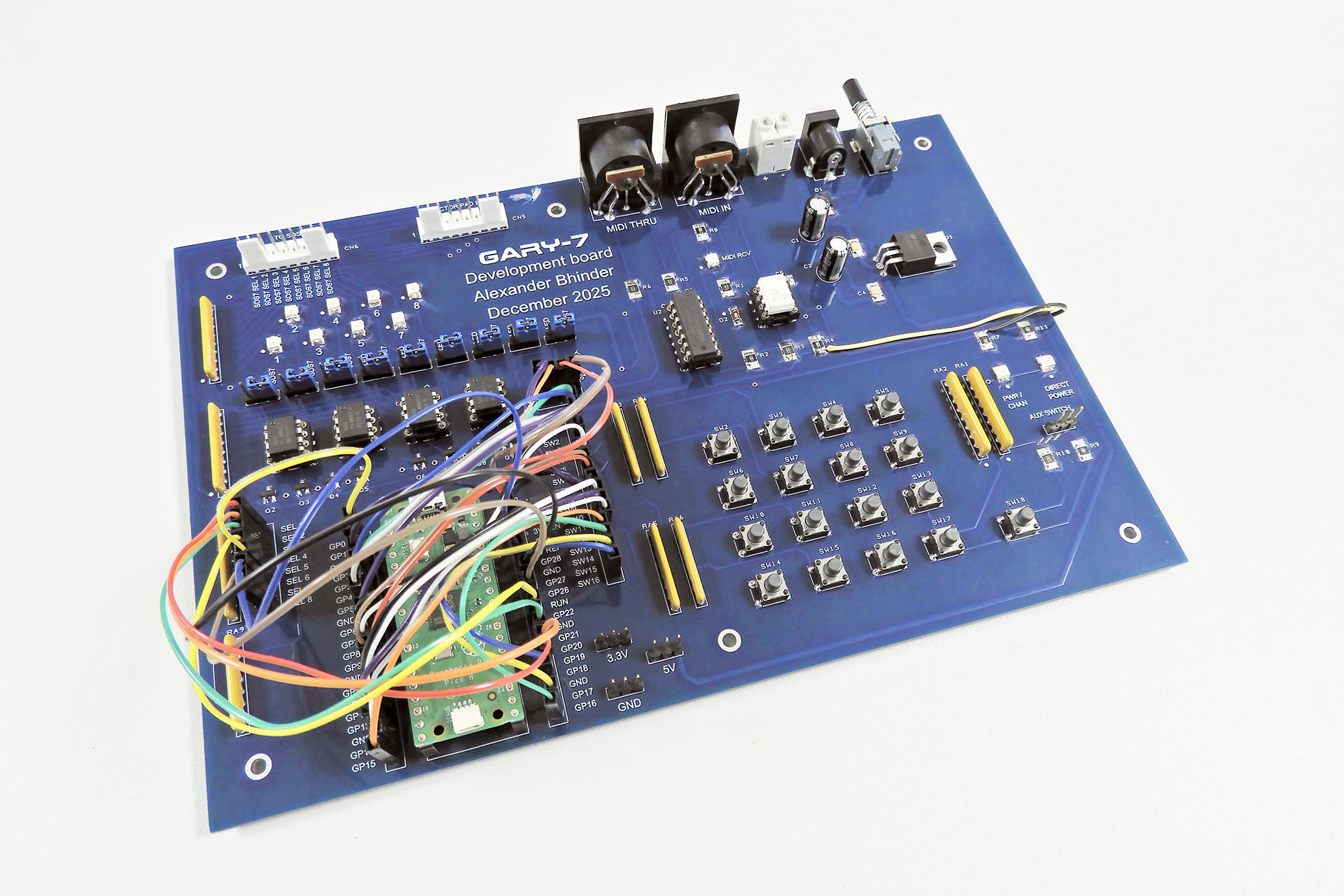
Gary 7 Development Board
Of course, most projects require prototyping but Gary 7 was my first project for which I decided to build a specific development board.

On a side note, with a chunky 7805 regulator, Gary 7 can be powered from an external 9V - 12V DC power supply. 😎 I used a 12V PSU just to check that the 7805 could deal with the voltage drop across it while delivering the current that the board required.

I’ve always been quite critical of AI but this project seemed to be an ideal opportunity to ‘have a go’. It was round about this time that another new friend and I decided to meet up.

As soon as Mike Walden announced his newly designed main-board for the Simmons SDS6, I contacted the customer of a unit that had been brought in to me and subsequently bought the first of Mike's boards. That was almost a year ago. Since then Mike and I have hooked up several times on line but just before Christmas 2025 he kindly agreed to come over to my place to chat Simmons SDS6.

I mentioned Gary 7 to him and that I was considering using AI to develop the software. "Give it a go. See what happens" was his response. With a lot of initial help from Iain and a word of reassurance from Mike, I decided to start where everyone starts and that was with a prompt, a detailed and methodical description of my objectives and the means with which I intended to deliver them. That might sound simple but like most things in life, what you get out of AI  is only as good as what you put in.

On a sidenote, if you're interested in Mike's replacement main-board for the Simmons SDS6, you can read more here.
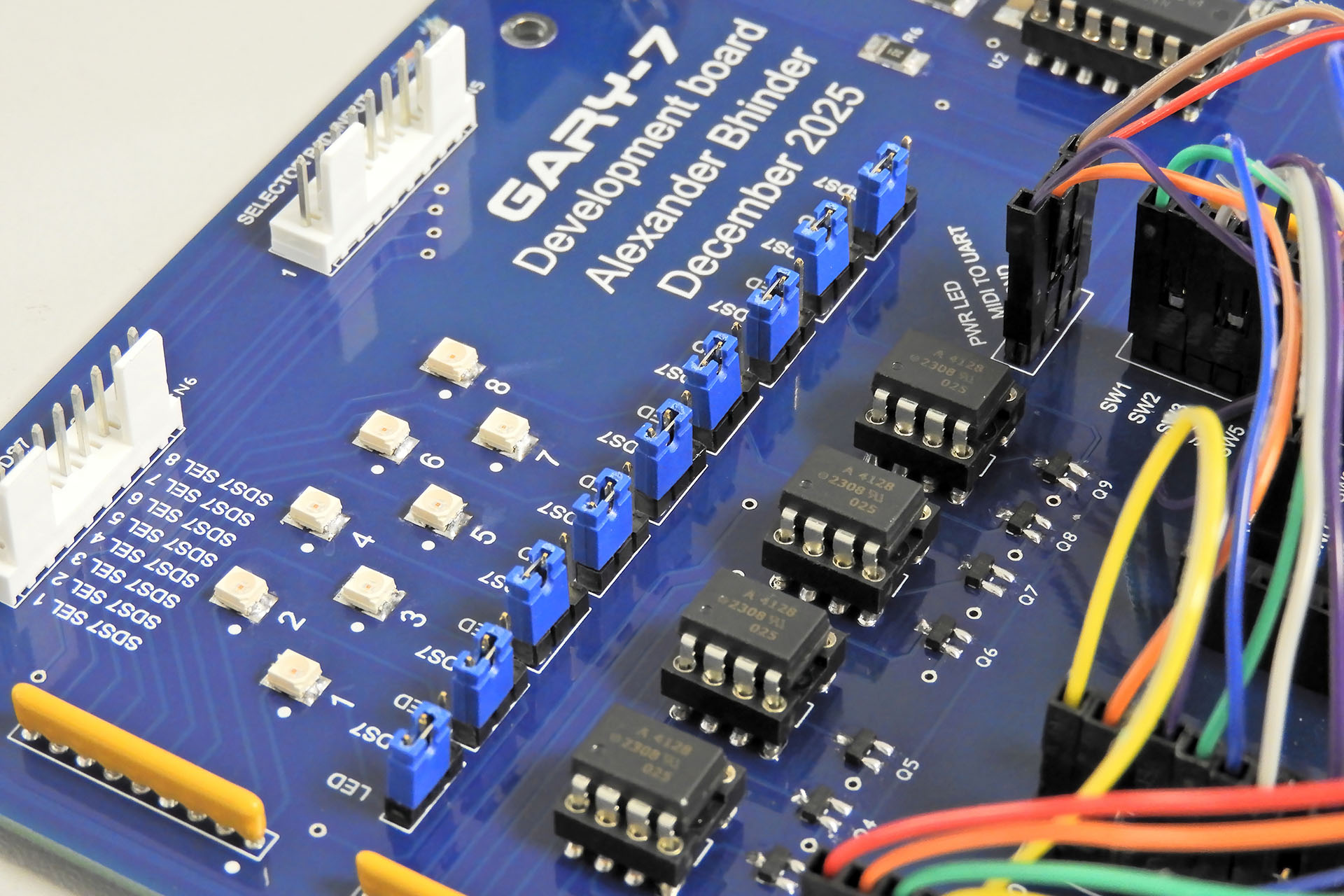
Gary 7 Development Board Matrix Switches
My Gary 7 development board, allowed me test the selector input/output matrix by hitting eight LEDs, before hooking things up to an actual SDS7.

December 2025 was a weird time for me and my family. Nebula-X and Gary 7 were much needed distractions and with the latter, I also immersed myself into the whole AI thing. It only took me two prompts to get something working but boy, did I learn a lot.

After getting the MIDI to SDS7 kit selector lines to work, I decided to push things. With sixteen switches to allow manual kit selection of the SDS7, I introduced a way of setting Gary 7’s MIDI channel with those switches, for example. Of course, it would have been kind of frustrating if Gary 7 didn’t remember the MIDI channel. Hence, the set MIDI channel had to be written to the Pi Pico’s memory. Then I came up with the idea of getting Gary 7 to remember the last kit selection prior to power-down. I referred to this as 'the last command'.

Early tests revealed unreliable memory retention so this had to be addressed and so the memory architecture and management of the Pi Pico were examples of what I learnt from the AI that I was using.

All versions of Gary 7 up to 1.6 were developed with the aid of AI so that was six prompts. I specified that all variables should be listed at the top of the code so tweaking the next three versions of the software was easy and something I could do myself.

By version 1.9, Gary 7 MIDI kit selector for the SDS7 was rocking!

With my cancer prognosis constantly in the back of my mind, getting Gary 7 MIDI kit selector for the Simmons SDS7 working was just so exciting, I just had to record it all. The two videos below show my bench testing.

Before I continue, let's quickly consider the whole kit selector thing of the Simmons SDS7 and the hardware I chose to do this...

The mechanism behind the kit selector of the SDS7 is simple but ingenious. Four signals from the SDS7 are switched to four outputs in a rather clever combination so as to allow for sixteen options. Gary 7 uses optical relays, emulating the zones or ‘pads’ on the Simmons selector pad, thus switching the four signals in the combinations required, to the four outputs.

Now then, questions could be asked like…

Why have the expense of the opto-isolated relays when I could have just got the Raspberry Pi Pico to generate four signals and switch them accordingly?

Well, any SDS7 user will be aware that this ol’ girl can be a bit temperamental and I figured that yes, it’ll cost a bit more and yes, things will be slightly more complicated for me but I really wanted to keep SDS7 as isolated as possible. I also wanted to ensure that SDS7 sees exactly what it wants to see on the four returning lines.
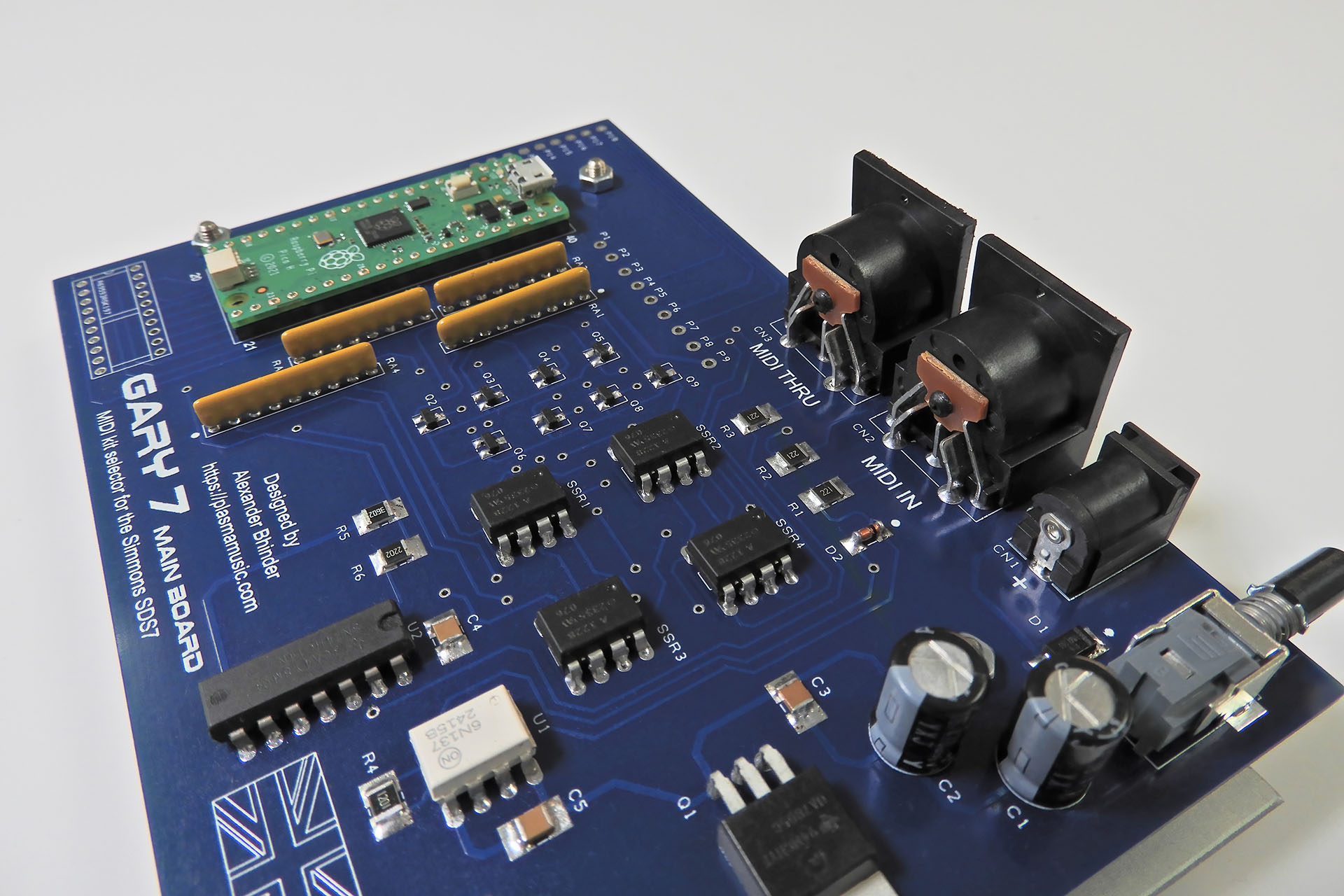
Gary 7 main-board showing dual SSRs and switching transistors
Here you can see the four dual SSRs (middle of image) and the the eight transistors that switch them (just a little up from middle of image).

Electromechanical relays would have cost more, potentially drawn more current and perhaps more importantly, they would have been much slower than optical ‘solid state’ devices so the reason to go for SSRs was clear.

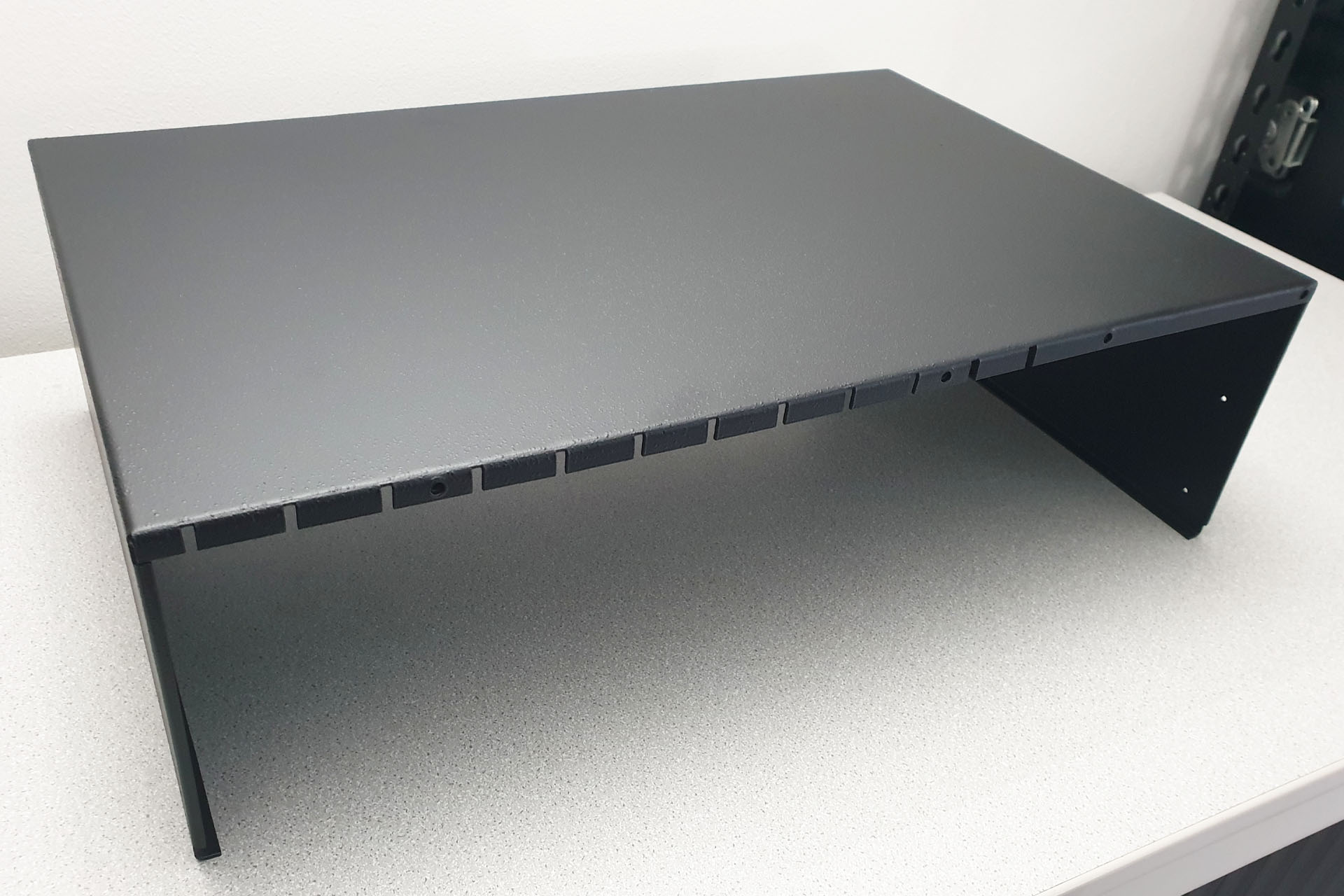
The next challenge was to find a suitable enclosure. There wasn’t much point to start designing PCBs if I didn’t know what they were going to go into. To be honest, I had a rough idea of the size of box required so I actually started looking for something back in November 2025, when I first had the idea of Gary.
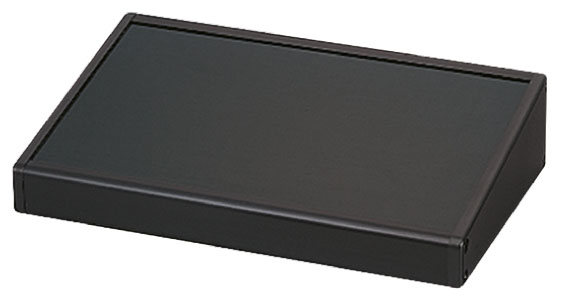
Takachi CF16-11BBThe Takachi CF series of cases, specifically the CF16-11BB consistently came back as my favourite and one of my suppliers seemed to have this in stock so I bought one for prototype purposes. Yes, it was more expensive than I’d have liked but it was small, made from aluminium and readily available.

There was however, one very slight problem. The rear of the enclosure had a 10° slant from the vertical axis. To ensure that the rear sockets sat flush with the rear panel, I had to come up with a plan.
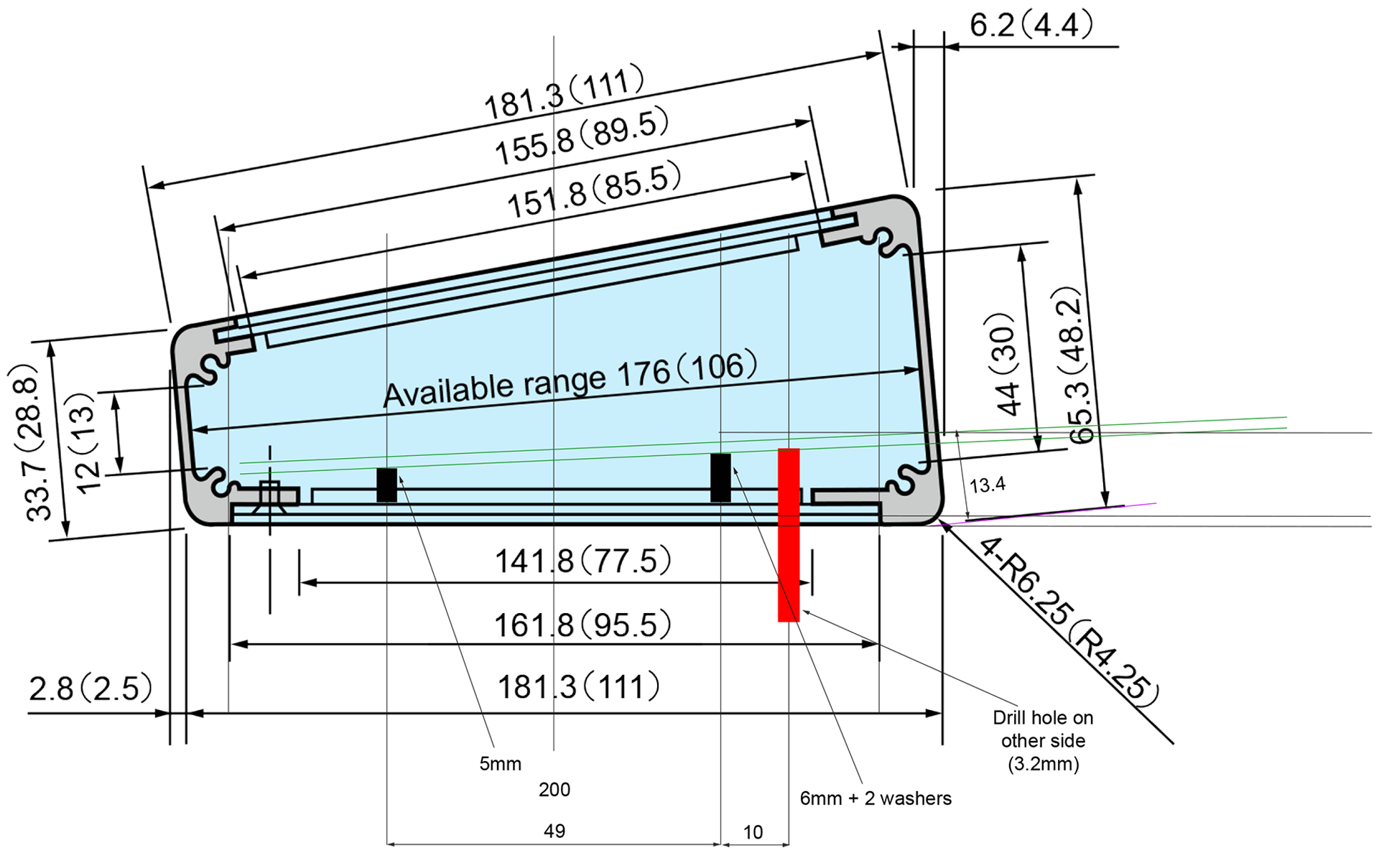
Takachi 16-11 for Gary 7
Lining up PCBs and rear sockets was particularly challenging with the Takachi CC16-11 case. As you can see, the rear of the enclosure is sloped. I superimposed my ideas over the original datasheet drawing after adding some dimensions which were missing.

You'll notice in the image above, that my 'plan' was to use slightly higher PCB stand-offs at the rear and slightly lower stand-offs at the front.

Despite lots of experience and all my best efforts, my first attempt at the Gary 7 enclosure had a couple of errors. The cut-outs for the switches were 1mm too big. I had to scrap the black anodised Takachi panel and get Lenton Engineering to make a new one from just plain aluminium.
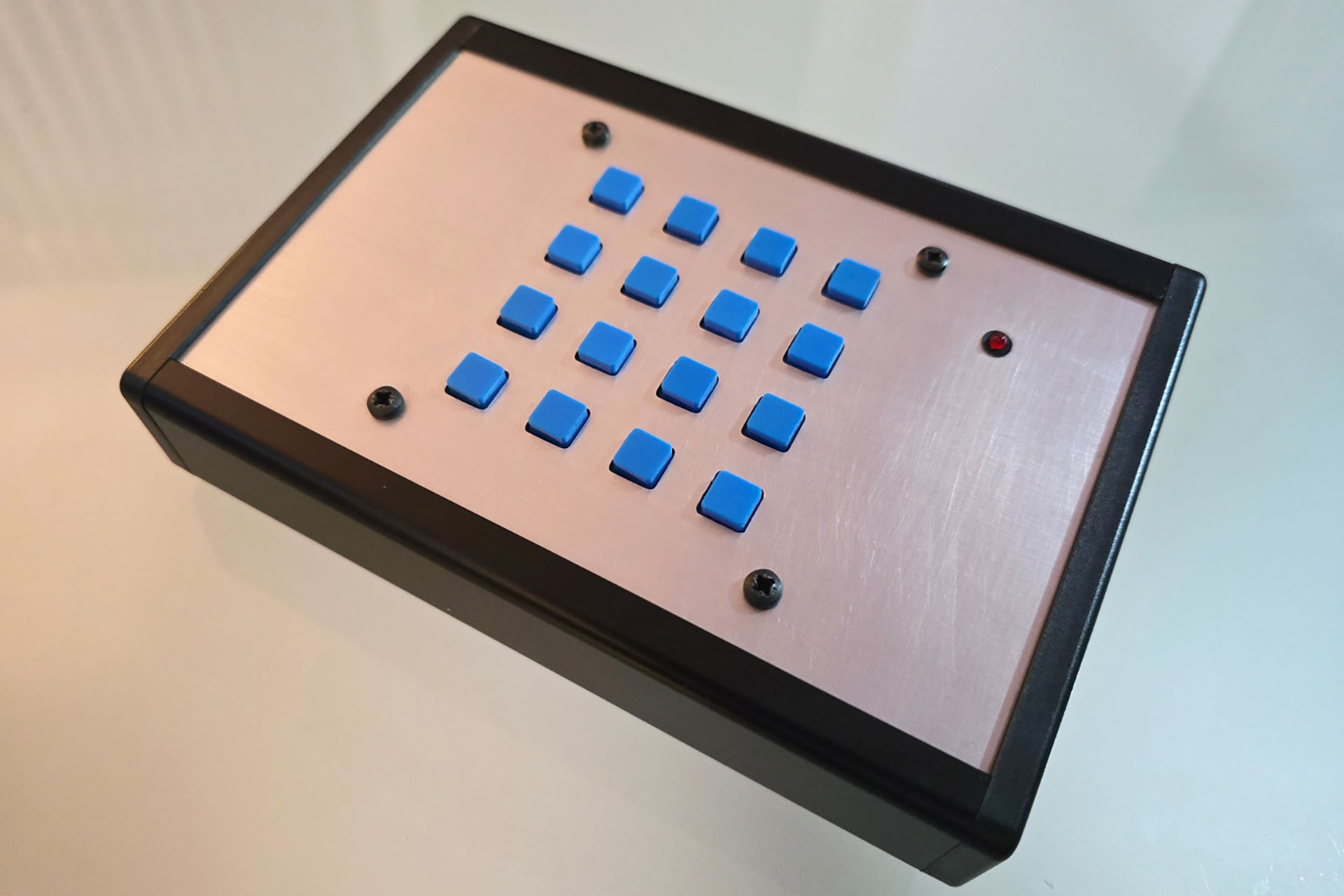
Gary 7 Prototype Top View
Gary 7 prototype top view. Not the top-panel that came with the enclosure as I originally made the tact-switch cut-outs 1mm larger than they had to be. Grr...

The other issue I had was down to the big multi-pin connectors on the rear panel. Basically, they were set too high. You can't see this too well in the image below but on the rear of the chassis mounting sockets, the securing nut butted into the top channel used for the side-screws of the enclosure. Lenton Engineering cut the channel but this wasn't the way to go, long term.
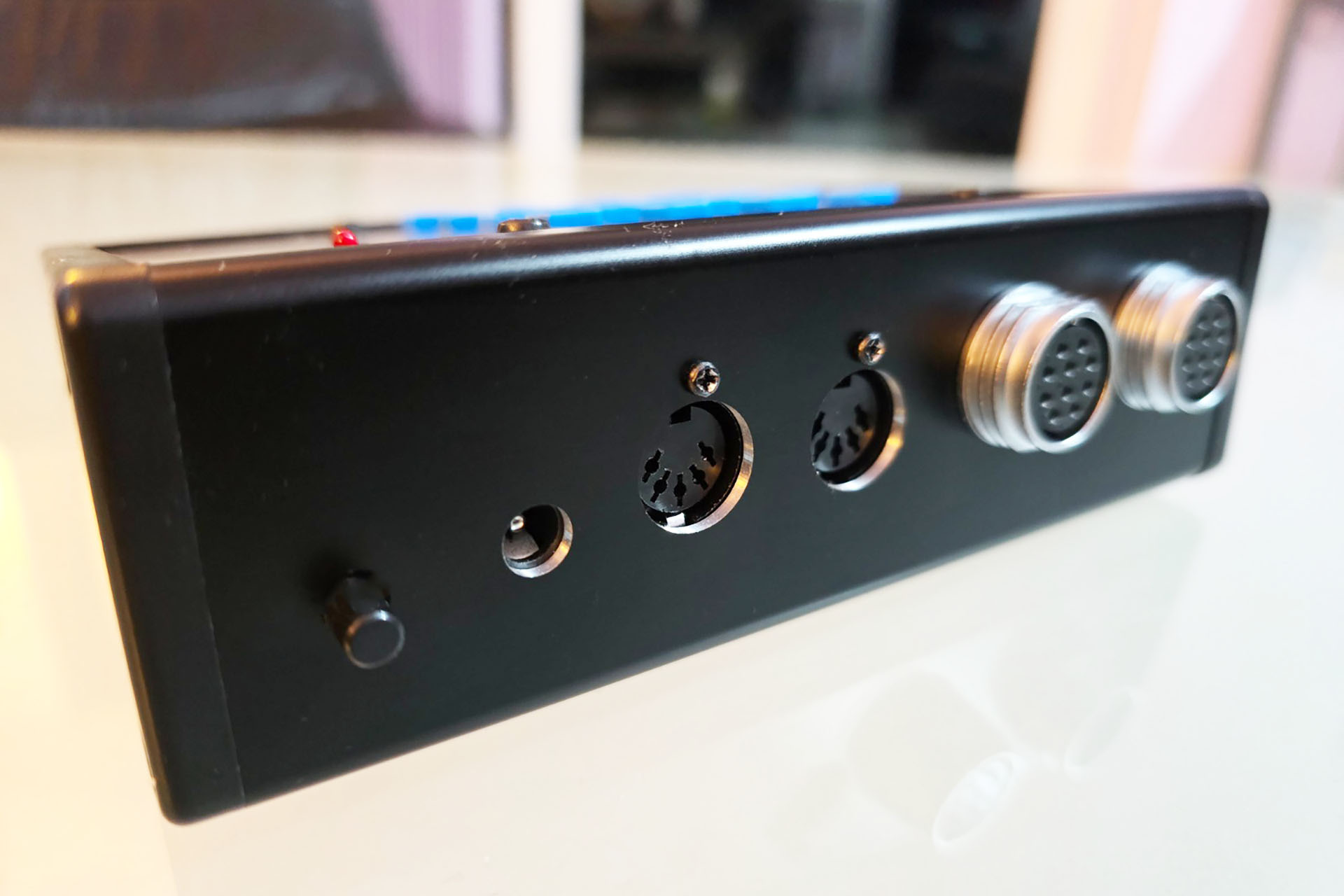
Gary 7 Prototype Rear View
Gary 7 prototype rear view.

I got the switch-board right first time but the main-board had to be redesigned. I had to cut away a section of the PCB, specifically to the left of the MIDI sockets, so as to allow access to secure the chassis mounting multi-pin connectors.
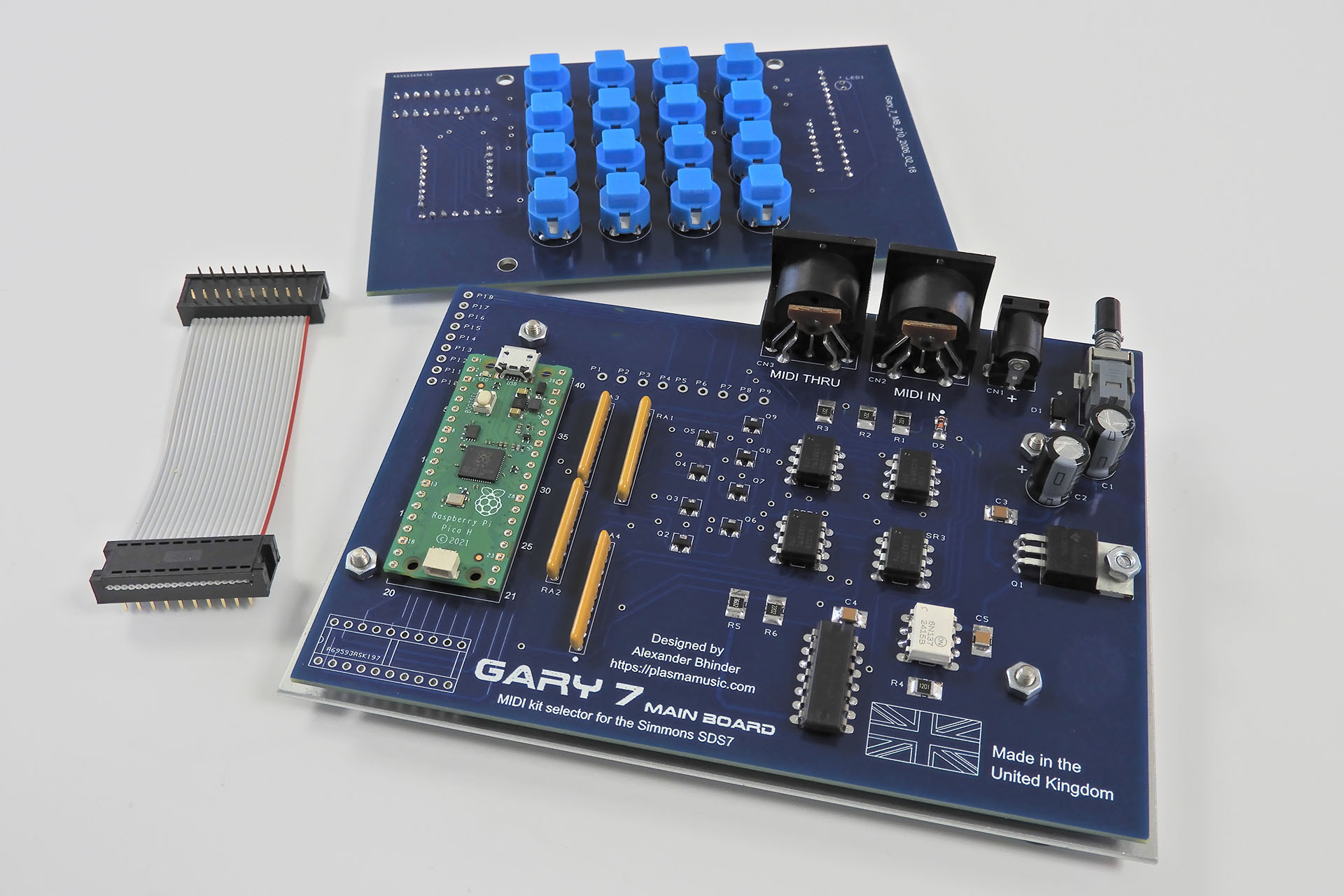
Gary 7 PCBs
Here are the two Gary 7 PCBs: the switch-board and the main-board. Also shown is a 20-way IDC ribbon cable that connects the two.

Power ON / OFF, power input (+9V DC) and MIDI are all soldered to the main-board while the multi-pin connectors to the SDS7 and the selector pad (if you have one) are chassis mounted. You may notice that the DC input and MIDI sockets look slightly lifted as if they're tilted. This is to help alignment of these sockets with the sloped rear of the enclosure.

What a pain in the butt but anyway... When the second drilled case components came back from Lenton Engineering, I couldn’t wait to see how things would fit together. Indeed this time, everything lined up perfectly and WOW... this is starting to look cool.
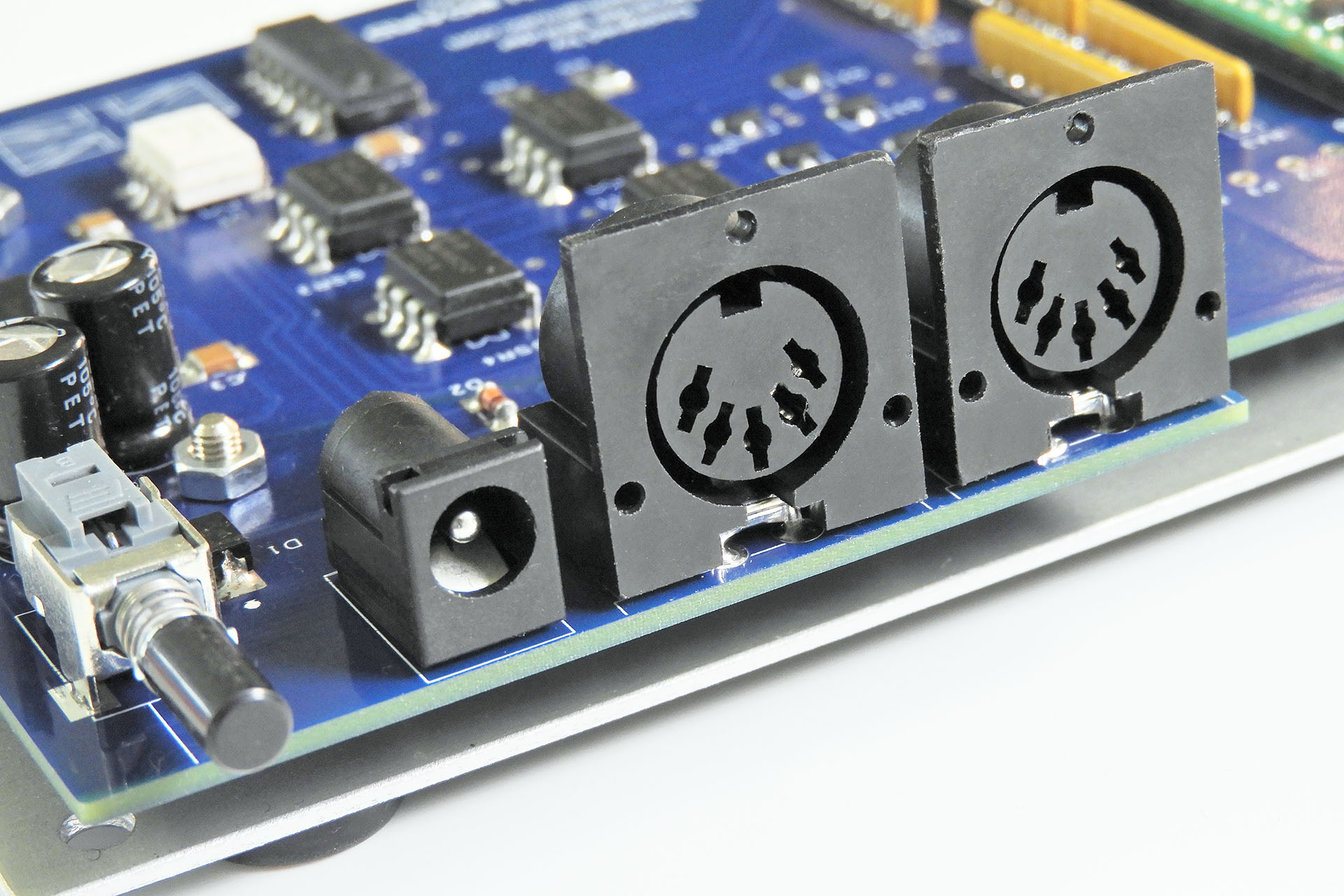
Gary 7 PCB sockets
All the sockets and the power switch all lined up perfectly with the case.

5V MIDI

Yes, I'm quite aware that 'modern' MIDI gear runs on +3.3V so as to interface with modern processors like for example, the Raspberry Pi but... I'm a strong advocate of backward compatibility and ensuring that the MIDI gear I design will work with anything, is a big deal for me. Customers should expect my MIDI products to work, they should take it for granted!
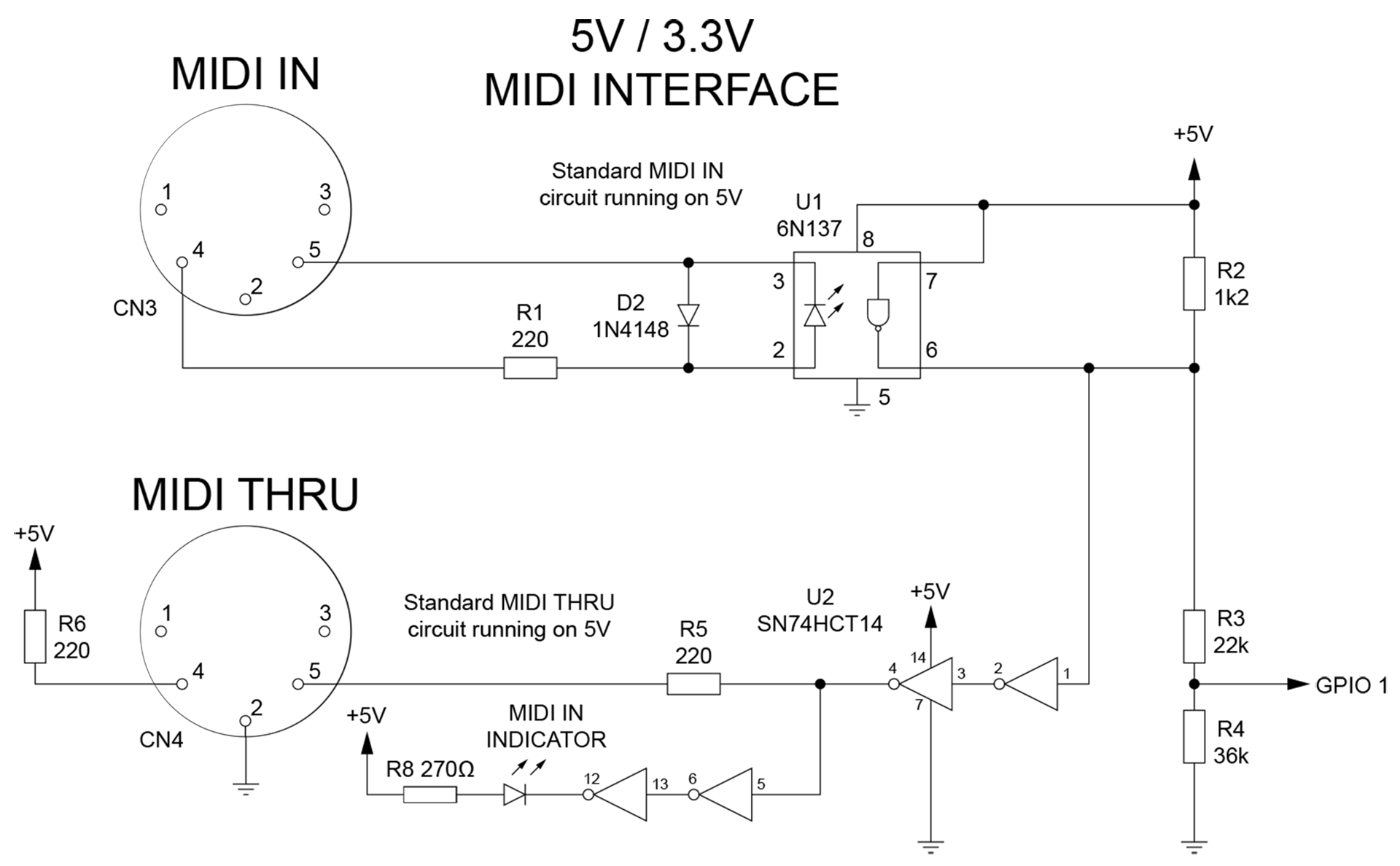
Gary 7 5V to 3.3V MIDI circuit
Here's the MIDI circuit from my Gary 7 development board. Gary 7's MIDI circuit is the same but without the MIDI indicator LED. As you can see 3,.3V MIDI IN for the Raspberry Pi is derived from a simple potential divider. It's just not difficult.

It really annoys me that many Internet gurus don't even acknowledge 5V MIDI. I'm the total opposite and to be honest, having 5V at the MIDI ports isn't a difficult thing to do anyway. As such, Gary 7 has a traditional (albeit much faster) MIDI circuit that's configured around 5v and which is fully backwardly compatible.

It's difficult to make a peripheral more than forty years after the original product was launched and keep a design connection with that product. I did try, though and having Simmons style switches was exactly the retro connection I was looking for.
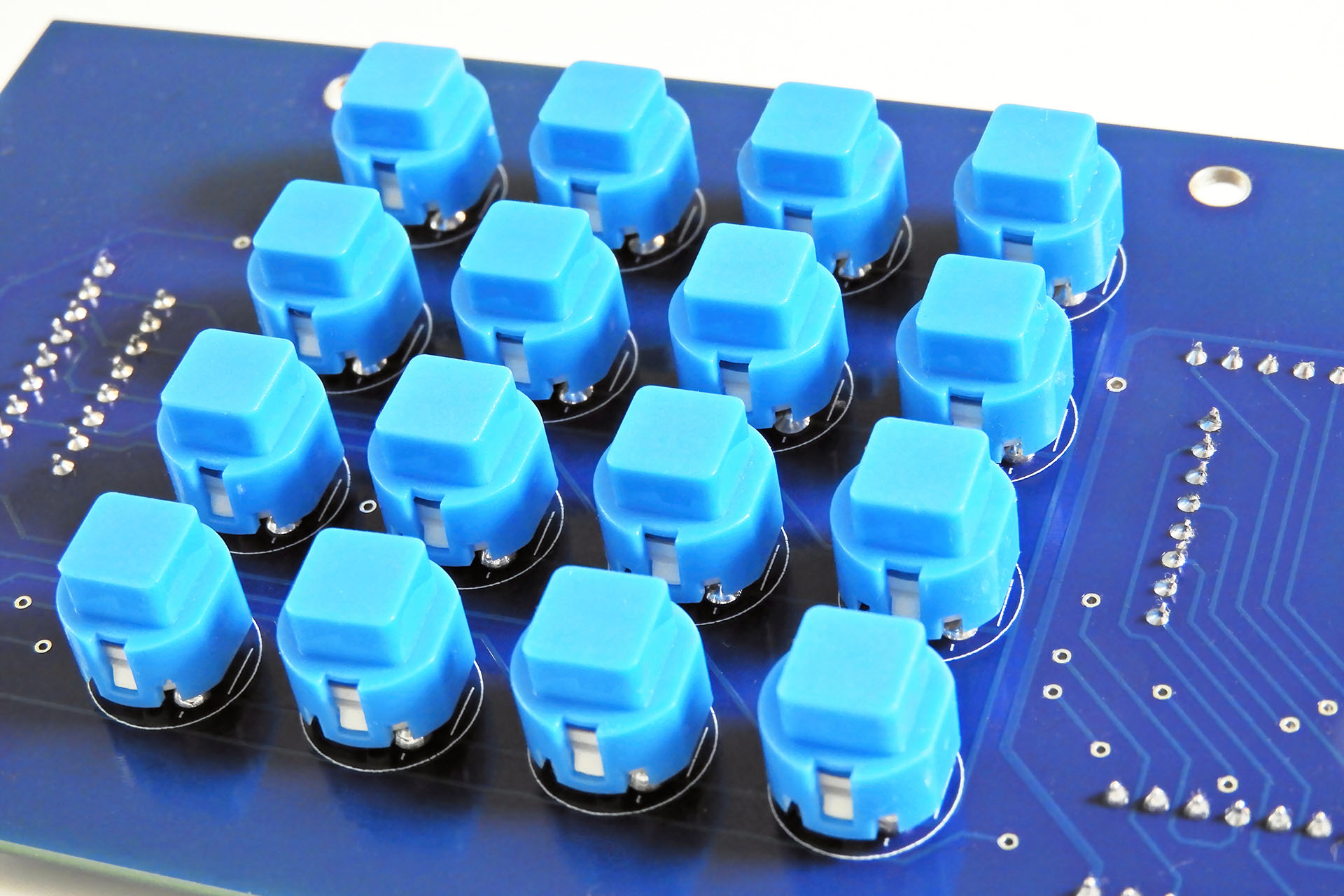
SDS7 Switches on Gary 7 Switch-Board
Gary 7 has the same style of switches as Simmons used on the SDS7, over forty years ago.

With the PCB, multi-pin sockets and enclosure all fitting nicely, I sent a set of silk screen print files to my friend Ivor Mitchell. Ivor dropped round a couple of days later to pick up the case parts. It was only a few days later when Ivor returned with the job. I was delighted and rushed to get the electronics into the now very sexy looking case.
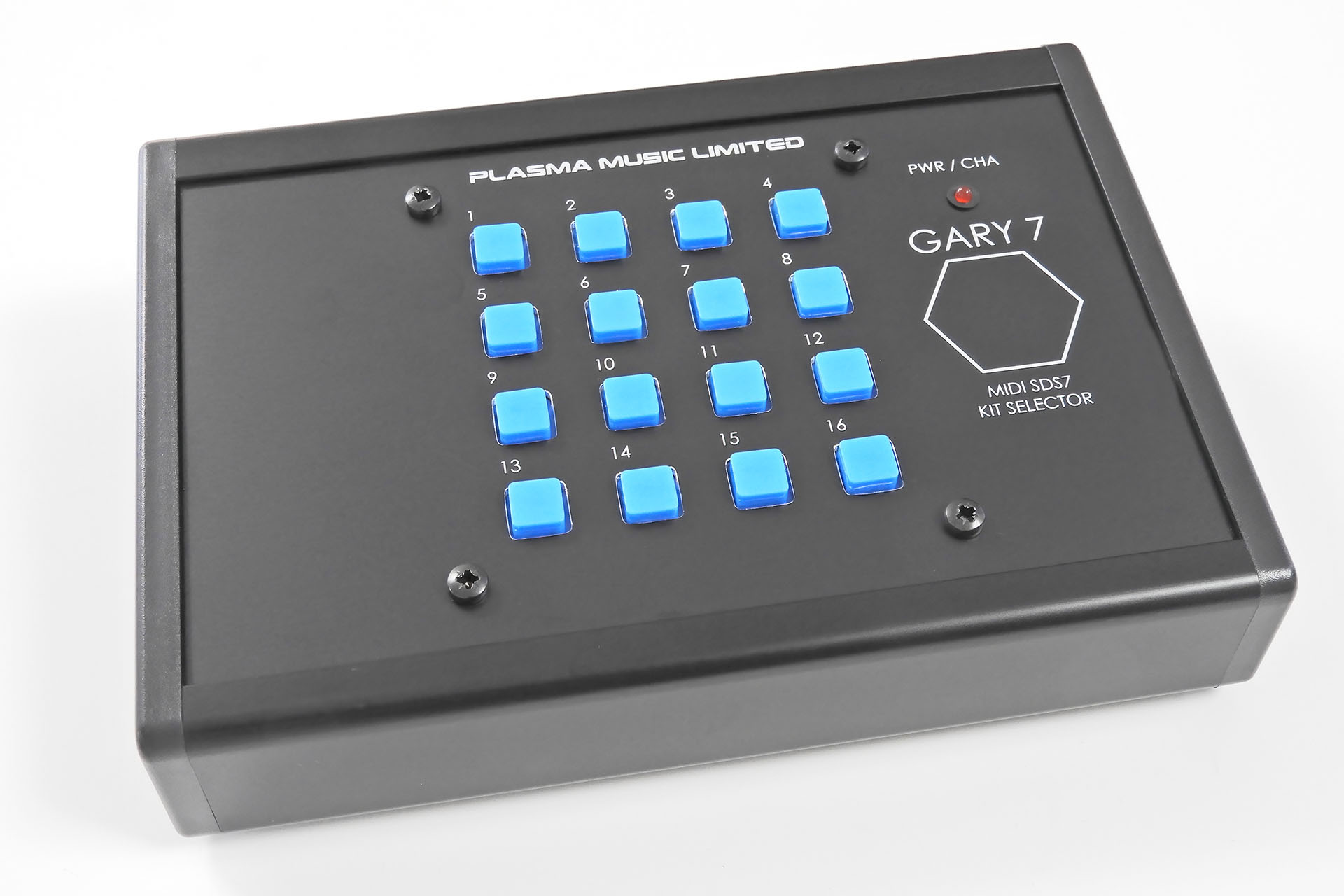
Gary 7 MIDI Kit Selector for the Simmons SDS7
I've never been patient but the time it took to get Gary 7 to this stage seemed like a particularly long wait. Having said that, it all seemed worth it in the end.

I had to buy another enclosure and recut the rear panel, lowering the multi-pin connector sockets by only 2mm.
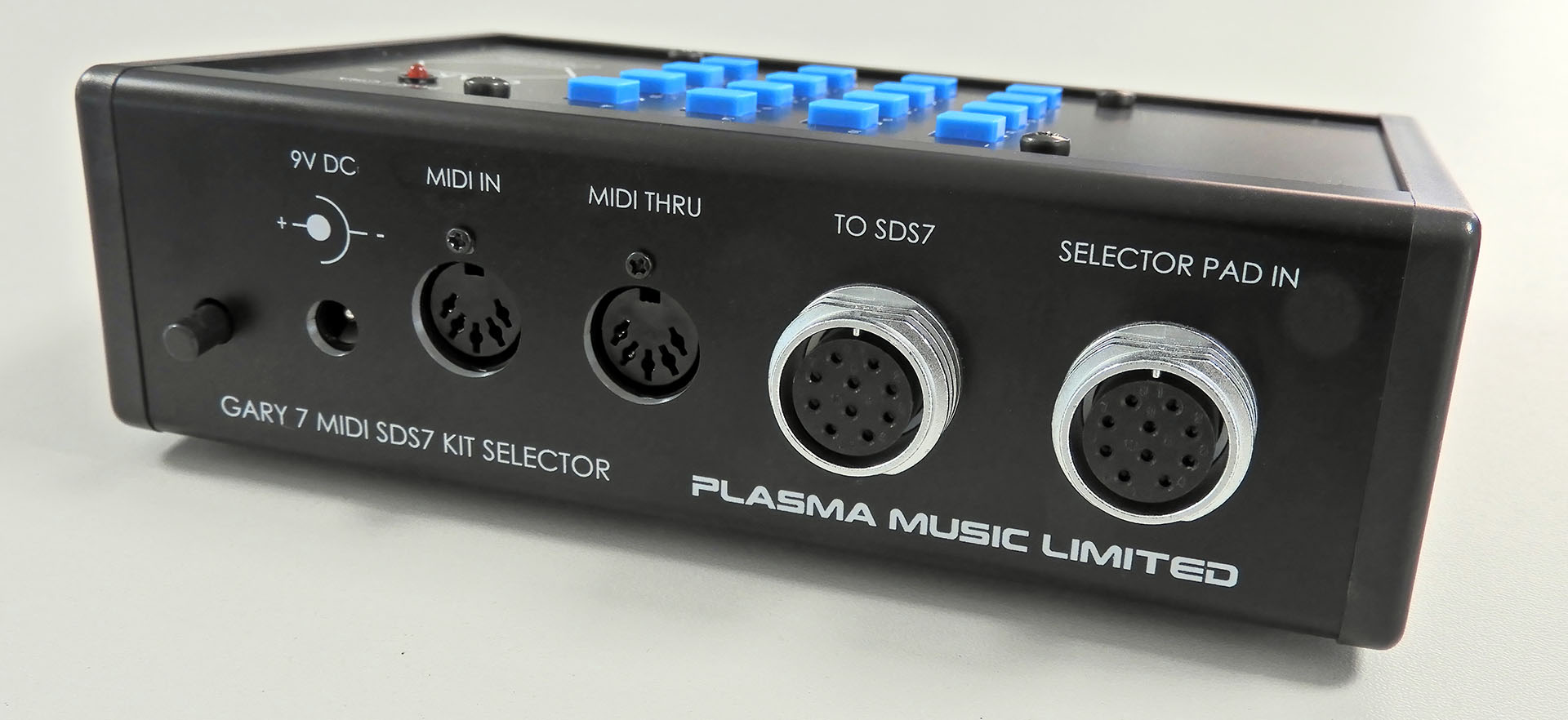
Rear of Gary 7 final
Rear of Gary 7 final with everything fitting and looking much better than my prototype.

Gary 7 MIDI kit selector for the Simmons SDS7 ended up being a BIG little project. My first project involving software, my first for which I made a bespoke development board and the first time I'd used AI for anything, it was seriously fun!

Gary 7offers three ways to select kits on the SDS7:

  1. MIDI program change
  2. Manually via the sixteen on-board buttons
  3. An original Simmons kit selector pad

As well as being able to set the MIDI channel on Gary 7, the last MIDI program change or last button press on the front panel will be remembered and output to the connected SDS7 five seconds after the next power-up. The 'Last Command' feature will NOT remember the last pad hit on a connected Simmons kit selector pad. That's because the selector pad input and the connection to the SDS7 are simply paralleled. The pad input does not pass through the processor so any signals received from the selector pad, can't be written to memory.

THE DOWN-SIDE - GARY 7 IS EXPENSIVE! 😕

On the back of Gary 7 are a pair of female connectors, identical to the selector pad input that's on the back of the SDS7. One connects to the SDS7 and one is for connection of an original Simmons selector pad. There’s also a cable to connect Gary 7 to the SDS7. This cable has two male connectors, one at each end. At the time of writing, just those four connectors alone are over 72 GBP.
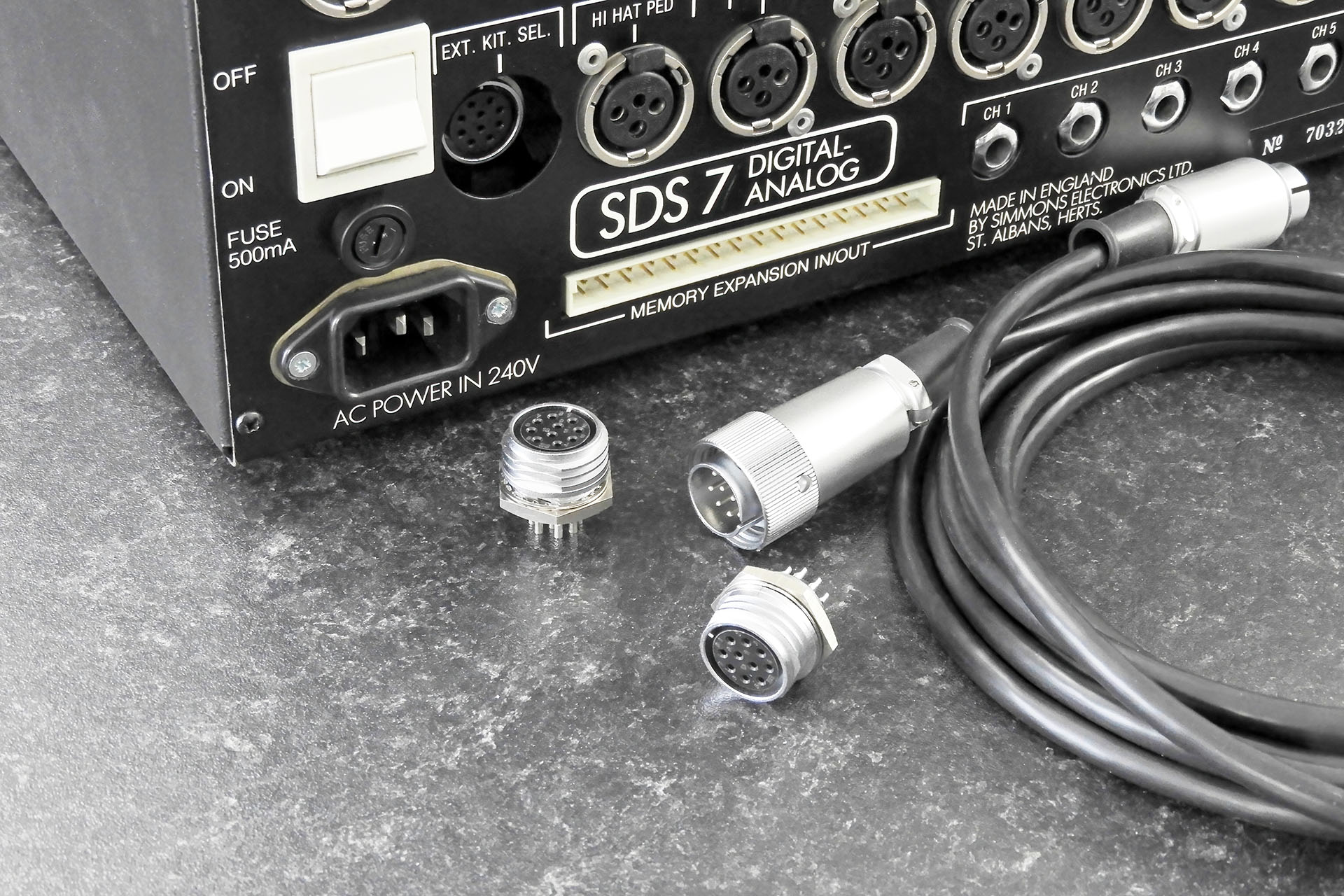
Hirose connectors as used for the kit selector pad connection on the Simmons SDS7
Shown are the connectors as used for the kit selector pad connection on the Simmons SDS7.

In contrast, the heart of the system, the Raspberry Pi Pico (with headers) retails in the UK for just under 5GBP!
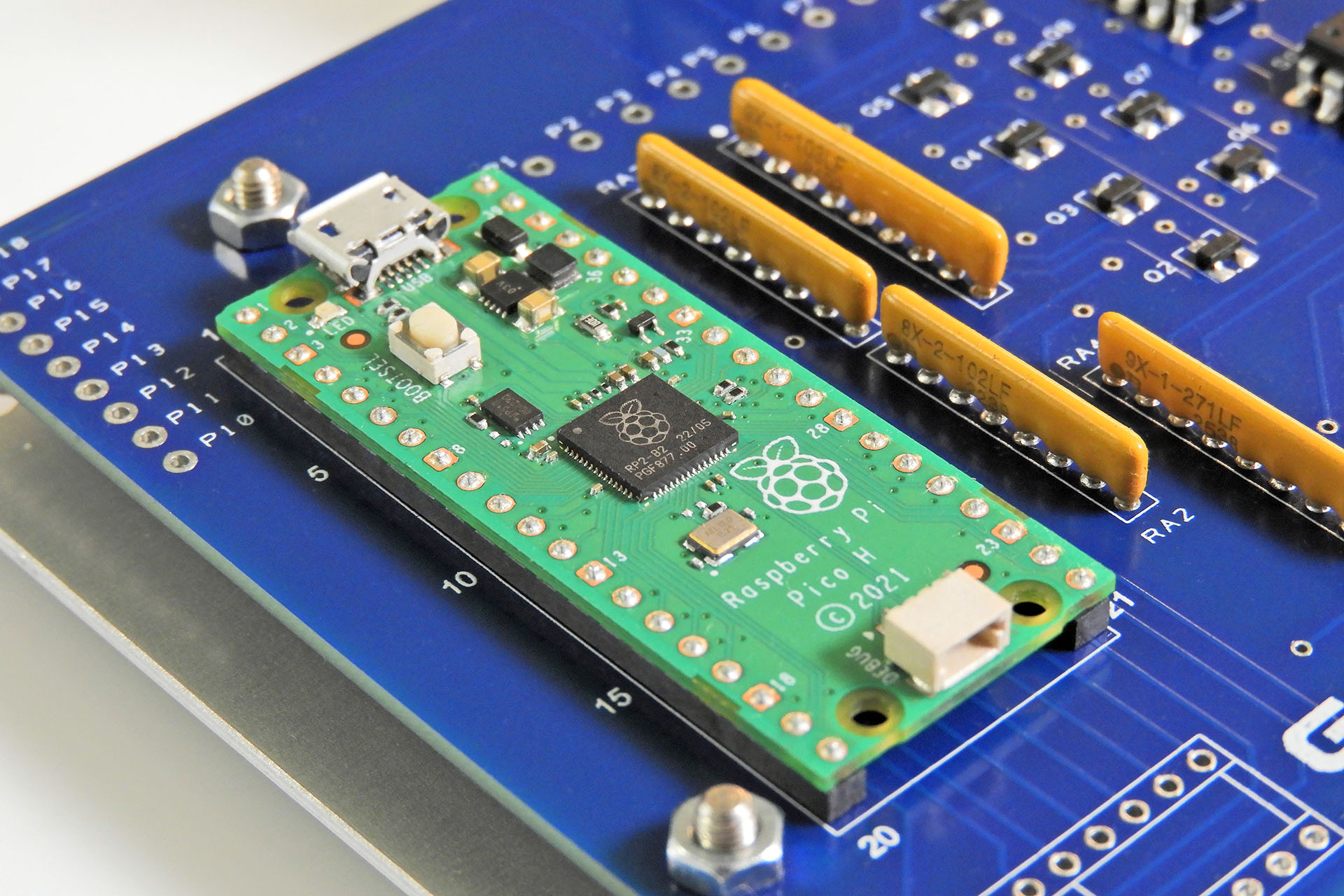
Raspberry Pi Pico on Gary 7
At the heart of Gary 7 is a Raspberry Pi Pico costing less than 5 GBP.

Incidentally, in the image above that shows the connectors, take a closer look at the cable that connects Gary 7 to the SDS7. You'll notice that there's a ring around one of the connectors. This 'locking' ring is supplied by the manufacturer, with the connector. If you have a Simmons selector pad, you'll be aware that this ring is (blatantly) absent. That's because the socket on the SDS7 is recessed and unfortunately, Simmons didn't make the cut-out in the rear of the SDS7 big enough, thus making the locking ring almost impossible to comfortably access. 😕 This connector on Gary is mounted directly to the rear panel and therefore, NOT recessed. As such, I decided to include the locking ring to make things secure at the Gary 7 end of the connection. Trying to fit the connector with the locking ring to the SDS7, might be difficult!

Anyway, back to the expensive Gary 7... The Takachi CF16-11BB enclosure is pretty cool but at more than 30 GBP each, suddenly it's not so cool. Bear in mind that I have to get it drilled out and then silk-screened.
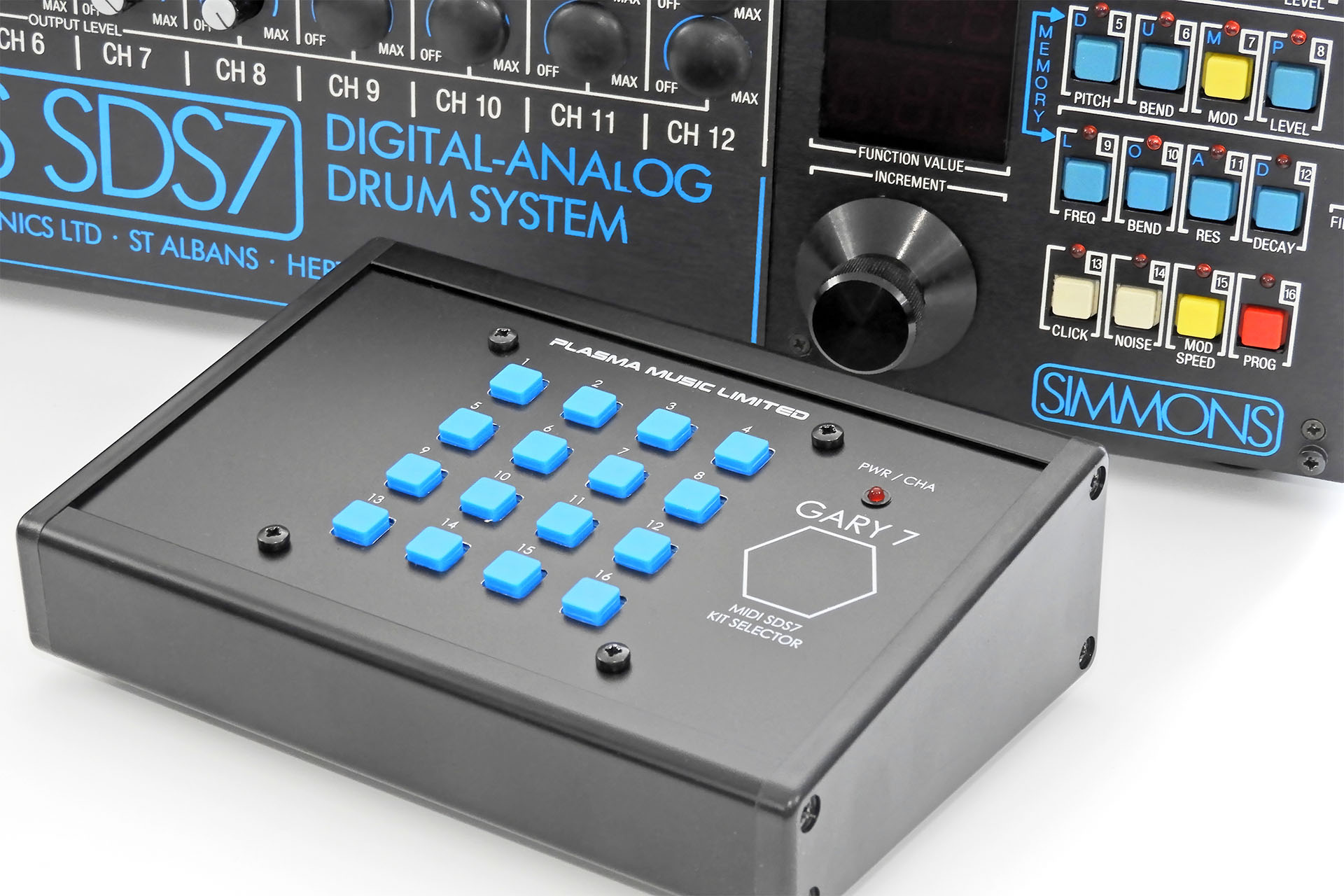
Gary 7 and Simmons SDS7
These guys look made for each other!

A WORD ON AI

The truth is that since this whole AI thing kicked off, I haven't exactly been keen. When I look back however, I was never a fan of having computers in the recording studio, LOL. Of course, it soon became obvious that computers in the studio was the way it was going back in the nineties and in contrast, AI is the way that everything's going now. NO! That's not quite true and there's a lot more to it than that.

I have a lot of test equipment in my lab. I have a couple of oscilloscopes, signal generators, logic analysers. I have over 2500 GBP worth of state-of the-art soldering equipment. And I've never argued that I shouldn't have any of that. All that gear helps me fix music technology and design and build some really cool stuff.

Similarly, I use two computers in my recording studio. Both computers run the most amazing software. The music that comes out of my studio however, is still mine. The computers just help me get it out.

My decision to use AI as an aid to develop the software for Gary 7 was based on the firm commitment that AI would be strictly used as just another tool. Like any other piece of equipment in my lab and like the computers in my studio, my intention from the outset was to use AI to help me develop something specific and not to get it done for me.


GIVING A LITTLE BACK

I've mentioned how Gary 7 kept me occupied and my Prostate Cancer UKmind distracted while I dealt with my prostate cancer diagnosis. In the UK, one in eight men will develop the disease and while the treatment I received was quite simply amazing and the staff who looked after me were angels, I feel that more needs to be done. Wouldn't it be just perfect if I could help in some way?

I have therefore made the decision to DONATE ALL PROCEEDS from Gary 7 sales to prostate cancer research. Since I'm in the UK, the specific charity that I'm choosing to support is Prostate Cancer UK.


GARY 7 CREDITS

I repair and service a wide range of music technology from valve amps to analogue and digital synthesiser and signal processors. I also design and manufacture peripherals for a lot of this equipment. It can get a bit lonely. I don't mean that I feel 'alone', I mean that there's just no way I can know everything. Having people I can talk to is a big deal for me and as well as having the best customers in the world, I'm also very lucky to know some great techs and engineers. 😊

CONCEPT:                             Alexander Bhinder
INSPIRATION:                      Iain Melville, Mike Walden
HARDWARE DESIGN:         Alexander Bhinder
PROMPTS:                            Alexander Bhinder
SOFTWARE:                          Microsoft Copilot
TESTING:                               Alexander Bhinder
ENCLOSURE DESIGN:         Alexander Bhinder
ENCLOSURE CUTTING:      Paul at Lenton Engineering
SILK SCREENING:                Ivor Mitchell at S & S Quality Print
CHEERING ME ON:             Ed Rose, Micha Buchner, Patrice Jacquot (my Simmons Vintage Technical Network buddies).

Gary 7 joins my other peripherals and upgrades for the Simmons SDS7 in the Simmons SDS7 Heaven category in my on-line store. Can't wait? You can buy Gary 7 here:

Last year I developed several peripherals for the Simmons SDS7 and it would seem that they're now becoming quite popular. Here are four 2025 Simmons SDS7 upgrades that I’ve had in recently.

Four Simmons SDS7s in for upgrades 2025
Here's the upgrades that have been installed into these units:

A – Dark Matter switched-mode power supply installed. Pleiades lithium battery conversion and discrete MIDI platform installed. NC-7 noise-cancelling mod installed.

B – Dark Matter switched-mode power supply installed.

C – 120V – 240V conversion. Pleiades lithium battery conversion and discrete MIDI platform with Tubbutec uniPulse installed. RESET-7 Power-on-Reset upgrade installed.

D - Dark Matter switched-mode power supply installed. Pleiades lithium battery conversion and MIDI platform with Tubbutec uniPulse installed. Repair of bass drum module.

E - All customers have also purchased AMEP Advanced Memory Expansion Pack.

I've used the adjective 'discrete' to describe the MIDI platform feature of Pleiades. That's because all of my upgrades are designed around three main objectives:

  • The outside of the equipment should remain untouched.
  • The inside of the equipment should require no permanent alteration.
  • Any upgrade can be easily removed and the equipment can be returned to factory.

Working to those three objectives can be quite challenging but hey, that's what I do! 🙂

Okay so you all know that I really love my job but the four Simmons SDS7 upgrades I've done so far this year have been a particular delight to work on, great fun and most rewarding. It gives me a true sense of comfort and pleasure to know that these iconic instruments will be banging away for another forty years!

A lot of the early Simmons stuff, can be, well... rather interesting to work on but nothing is quite as quirky as the SDS7. With a personality which can only be described as unpredictable, you really need to know what you're doing and in particular, you kind of need a lot of patience. Yes, it's only classic early eighties electronics and yes, that should sound easy but nothing ever goes quite according to plan when working on a Simmons SDS7!

The 120V to 240V conversion of SDS7 'C' in the image above, should have been really quite straight-forward but for the first time ever, I had a duff transformer. I couldn't believe it but the 240V tap was open circuit. This fault must have existed since production.

Destined to be for the US market, there's no way the that the transformer's 240V tap would have been tested at the Simmons factory or during the SDS7's past forty year life in the US.  Luckily, due to the Dark Matter upgrades I've done over the past few months, I've built up a small stock of spare transformers.

Simmons SDS7 mains transformer with open circuit 240V
Between common and the 240V tap, this Simmons SDS7 mains transformer should read about 38Ω. As you can see, this is definitely not the case.

WANT TO FIND OUT MORE? Here are links to posts featuring the products mentioned above:

Dark Matter Replacement Power Supply for the Simmons SDS7

Pleiades Lithium Battery Conversion for the Simmons SDS7

NC-7 Noise Cancelling Mod for the Simmons SDS7

AMEP Advanced Memory Expansion Pack for the Simmons SDS7

RESET-7 POR Upgrade for the Simmons SDS7

Simmons SDS7 upgrades at Plasma Music

All items are available for purchase in the Simmons SDS7 Heaven category in my online store. If you're unable to install stuff yourself, then as you can see, I'm always happy to take in your SDS7 and do the work for you. Just contact me for a chat.

Four Simmons SDS7 upgrades so far this year and it's only June. Wow!


UPDATE - 7th April 2026

Joining the above upgrades that I offer for the Simmons SDS7, is Gary 7 MIDI kit selector. You can read all about Gary 7 here.

Gary 7 MIDI Kit Selector for the Simmons SDS7

The ultra rare Simmons SDS6
Simmons SDS6 serial number 178 of one hundred and ninety units built.

Mike Walden's replacement CPU board for the Simmons SDS6 is an amazing rescue resource for one of the rarest eighties music machines ever! On my recommendation, one of my customers bought one of Mike's boards as soon as they were available. Here's the story...

The Simmons SDS6 was an analogue sequencer with eight trigger outputs and a hi-hat open / closed output, all intended to drive systems like the Simmons SDSV and SDS7. Of course the trigger outputs could be fed into many electronic drum systems of the time.

Simmons only made a hundred and ninety SDS6 sequencers. It was a beast at the time and by today's standards, is positively over the top.

Famous for its massive LED display, the first revisions (yes, there were several, even for a hundred and ninety units) only had tape sync and didn't include MIDI. Memory back-up was via the expansion port at the rear and users looking to copy / back up data had to do so via Simmons' proprietary Memory Expansion Pack. Incidentally, my 'Advanced Memory Expansion Pack' (AMEP) works just great with the SDS6.

Like many machines of that era however, the SDS6 used Ni-Cd batteries for memory back-up and if not charged regularly, these damn things leak and badly. If not caught quickly, the result is more often than not, a bricked Simmons SDS6.

For me, things started about this time last year when a customer turned up with a Simmons SDS7 and a SDS6, neither of which was powering up. As it turned out, the memory back-up batteries in both machines had long expired and had badly leaked.

Battery damaged Simmons SDS6 CPU board

It took several months to repair the SDS7 but the SDS6 was a lost cause. Having only made a hundred and ninety units, seeing one in this state is quite upsetting, to say the least.

Close up of battery acid damage to Simmons SDS6 CPU board

After a few weeks of trying to repair the damage, I was forced to draw a line as it became obvious that my efforts were quite futile. I proposed to my customer, that I design a replacement CPU board.

Another view of the original SDS6 CPU board showing even more battery damage
Another view of the original SDS6 CPU board showing even more damage.

Well, round about the same time, a certain Mike Walden had recently purchased a SDS6 which by the sounds of it, had suffered the same fate. Mike had the same idea. After having spent most of 2024 designing a whole load of bits and pieces for the Simmons SDS7, I really didn't have the time to take on something like a whole CPU reverse engineering project. Mike sounded keen so I left him to it.

Reverse engineering something like this is a mammoth task but you also need to bear in mind that there are very little resources on this stuff, out there. On top of that, there are technically two types of SDS6; the standard trigger output version and the MIDI version. Both were substantially different. Mike's failed SDS6 was a MIDI version which was great for me or rather my customer, as his was a MIDI version, too. Hey but more about that later.

On 27th April 2025, Mike announced on Simmons Drums Users - Past and Present (private) Facebook group, that his project was finished and that his replacement CPU board for the Simmons SDS6 would be available on ebay.

As soon as Mike's replacement CPU board for the Simmons SDS6 was on ebay, I telephoned my customer giving him the ebay item number. Yes, it was the middle of the night but this was a big deal.

Usually, the minimum production quantity for PCB projects is five. Mike had four boards available on ebay so I'm guessing that one of them ended up in his own SDS6. As you can see in the image below, I'm also guessing that the one Peter bought is, well... No. 2!

Mike Walden's Replacement CPU board for the Simmons SDS6 serial number 002
It looks like Peter my customer, bought the second board, serial number 002.

Peter immediately bought one of Mike's boards and then contacted me again to arrange drop-off.

The next day, Peter drove down to Hemel Hempstead from Cambridge and I simply couldn't wait to see Mike's board. Packaged extremely well, there were a few anxious moments before all was revealed.

On first sight, the first thing that went through my head was complete and utter respect. I'm an electronics design engineer and all I could think of were the hours of work that must have gone into this. "Mike, this is awesome!"

Mike Walden's replacement CPU board for the Simmons SDS6
Mike Walden's replacement CPU board for the Simmons SDS6 looks awesome!

If I'm brutally honest with myself, then I must confess to feeling slightly envious. I really wanted to take on this project myself but you simply can't do everything and at the time of writing, there was no way I could commit to this. Again, Mike did well to make the time for such an ambitious endeavour.

Anyway, a few days later and I decided to pull out Peter's SDS6. Oh boy. Memories of trying to resurrect this came flooding back. 😒 Not good but I'm glad we decided to keep this.

Before attempting to fit Mike's replacement CPU board for the Simmons SDS6, I decided to check the PSU voltages. Everything was fine so let's go.

In his ebay listing, Mike warned that there may be slight differences in mounting between various SDS6s, something I'm used to and not just with Simmons gear. Mike's board wouldn't quite 'drop' into Peter's SDS6 and I would suggest that if Mike's going to make more of these, perhaps enlarging the mounting holes might be a consideration. As it turned out, I drilled out one of them from about 3.5mm, to 4.5mm. After that, the board fitted without requiring any nudging or force.

The power on reset (POR) circuit in the original SDS6 looks as if it was an afterthought. Electronically similar to that in the SDS7, the POR circuit in the SDS6 is on a separate and very small PCB that's secured to the centre screw on the CPU board. Four cores of ribbon cable connect power, 0V, unregulated +8V and RESET to the CPU board in anything but an elegant manner.

Mike tidily incorporated the POR on to his design, a pin being made available for the connection to the pre-regulated voltage from the PSU. I ended up removing this pin and wiring the connection directly to the board but from underneath.

Close up of POR on Mike Walden's replacement CPU board for the Simmons SDS6
Like the SDS7 and many other Simmons machines from the same era, the power-on-reset circuit is built around a CD4011. In the same way, a pre-regulator voltage is picked up from the power supply and injected via J6, which you can see on Mike's board located just in front of the battery pack.

By the looks of it, Mike chose to include some type of battery charge monitor on his board. Comprising very small SMDs, there's nothing I can identify but D7, Q1 and U25 PCB references are a bit of a giveaway for a diode, a transistor and an IC. A status LED is also present but strangely, it isn't a surface mount type. A key above the battery pack offers reference to what the LED would indicate.

Battery monitor circuit on Mike's replacement CPU board for the Simmons SDS6
Mike's replacement CPU board for the Simmons SDS6 includes a monitor circuit which via a LED, provides a visual indication of the condition of the NiMH batteries.

Initially, I found the inclusion of this circuit somewhat curious for two reasons:

  • I’ve never seen a SDS6 with issues resulting from component failure. Every faulty SDS6 I’ve ever seen has suffered a battery leak. It seems strange therefore, to continue using rechargeable batteries.
  • There is no way to observe the battery charge status LED without opening up the SDS6.

The first point can be immediately dismissed. Instead of the original Ni-Cd batteries, Mike's design uses nickel metal hydride (NiMH) types which shouldn't leak! Excellent decision, Mike.

So let's continue...

After the afore mentioned and partly expected minor adjustment, the board slipped in nicely, well almost. On this particular SDS6 (#178), there was very little gap between the power supply PCB and the new board. Perhaps Mike could have got away with shaving off a few millimetres.

Mike's board was a tight fit
Mike's board was a bit of a tight fit in Peter's SDS6. My contingency plan was to increase the hole sizes in the power supply PCB so as to offer some wiggle factor.

I'd already connected unregulated +8V from the PSU to the POR circuit directly. All other connections had been secured, checked and double checked, so let's switch on and see what happens...

Wow! The SDS6 powered straight up and seemed to boot. The battery status LED was on so I figured I'd have a cup of tea and leave the batteries to charge. Good so far.

Mike's board fully installed in SDS6 #178
Mike's board fully installed and looking very hi-tech in SDS6 #178.

While I had my tea, I thought it a good opportunity to familiarise myself with the operation of the SDS6. After all, it's been a few years since I've seen one of these. Hmm... I think I might need more than just the one cup of tea. Those batteries and that SDS6 user manual aren't going to happen quickly.

After my break, I came back to SDS6 #178. I switched off, closed the lid and powered up.

Cycling through several functions, everything seemed to work just fine. I then connected my test SDS7 and proceeded to enter a simple pattern. The once totally dead SDS6 played the SDS7 just fine. I didn't test the hi-hat open / closed function and neither did I test the tape sync but the fact that this SDS6 is triggering a SDS7 seemed quite a result to me.

Simmons SDS6 driving Simmons SDS7 after Mike Walden's replacement CPU board fitted to SDS6
WOW!!!! Everything works!

CONCLUSIONS

Yes, my admiration for what Mike Walden has done should hopefully be obvious by now but somehow it doesn't seem enough? Mike's board is amazing and loaded into SDS6 #178, it works. I've also previously mentioned that I fully appreciate the effort that can go into a project like this, especially when there are so little resources available. In fact, I now need to ask my readers whose native tongue is not British English, to forgive me as slip into a little colloquialism and refer to Mike’s work as stonking (an adjective used to emphasize something impressive, exciting, or very large).

I was a bit concerned about the continued use of rechargeable batteries but  NiMH is a good compromise and I fully endorse Mike's decision to do so.

Mike had five boards made and I don't know if he'll be making anymore. At the time of writing, the four that he put up on ebay had all gone.

There are nine link options which in theory, will allow this board to work in non-MIDI SDS6s. Mike told me that the link options emulate the modifications that appear on the schematics advising on non-MIDI to MIDI conversion. A nice and very forward-looking touch, Mike. Unfortunately, Mike doesn't have the firmware for these early SDS6 versions and on top of that, it would be good if he could validate his board. In fact, I'm aware that Mike's put a call out to borrow a non-MIDI SDS6, just to confirm operation. In his ebay listing, he also advised that those interested in this board for use in a non-MIDI SDS6 should contact him prior to purchase. If Mike's request for a guinea pig non-MIDI SDS6 is successful, then I'm assuming that this isn't the end of the story.

Links underneath Mike's replacement CPU board for the Simmons SDS6 allow for MIDI and non midi configuration
Link options, five of which are on the underside of Mike's replacement board, allow for MIDI and non-MIDI configuration. As yet, the latter is untested.

With less than two hundred SDS6s made and more than forty years on, one wonders how many are still in existence. I do however, hope that Mike decides to release a few more boards.

Many will be aware that I'm ex-Simmons and once in a while, Dave and I actually manage to catch up with each other. Dave consistently expresses his delight at the work I and others are doing to keep what he started back when it was really exciting, alive and kicking decades later.

NOTE:

  • This replacement CPU board for the Simmons SDS6 is NOT my board. I had no hand in the design, manufacture or testing of the main item that's featured in this post.
  • I do NOT sell these boards. Neither do I offer any technical support for these boards.
  • Initially, Mike had five boards made. I have no idea if he'll be making any more.
  • Whilst the pricing of Mike’s board was amazingly acceptable, I do not know if he’ll maintain that, should he release more boards.
  • It would be most impractical for Mike to cater for all possible variations in SDS6 design. Hence, if Mike makes more of these boards, then I think it only fair to point out that purchasing and installing one is done entirely at your own risk.
  • I won’t be publishing or distributing Mike’s contact details so I guess that the only way to keep up to date on further developments, would be via the Simmons Facebook group quoted earlier.

RESET-7 snap-in upgrade for the power-on-reset circuit in the Simmons SDS7
RESET-7 power-on-reset upgrade for the Simmons SDS7.

My RESET-7 POR upgrade for the Simmons SDS7 was designed to extend effective battery life when the SDS7 has been converted to lithium battery backed up memory. This might not seem like a big deal but please allow me to explain...

The Simmons SDS7 uses a CD4011 to buffer, invert and interface a signal derived from the power supply on power-up and power-down and which provides the chip enable (CE) signal for the SRAM and RST (reset) for the processor. It's an important part of the Power-On-Reset (POR) circuitry in the SDS7. Since the device is on all the time, it's powered by the memory back-up battery when the SDS7 is switched off. Yes, that's right! The 'memory back-up battery' doesn't just back up the memory! CE on the 6116s needs to be high, when SDS7 is switched off. To do that, the CD4011 needs to be on.

The SRAM in the SDS7 comprises ten 6116 chips. These have a minimum memory retention voltage of 2V so theoretically, the memory back-up voltage can run down to this value and memory will be retained.

Oh, if only life would be that simple...

The minimum operating voltage of the CD4011 however, is 3V. If the memory back-up battery voltage falls below 3V, memory integrity will be compromised and corruption may occur.

Bypassing the SDS7's original POR circuitry, my Dark Matter replacement power supply for the Simmons SDS7 gets around this problem with a completely new POR design. Apart from being based around a power management IC, Dark Matter's POR circuit uses a SN74HC14N hex inverter to buffer, invert and distribute the RESET pulse and to maintain CE as required, for the 6116s. The big deal is that the SN74HC14N has a minimum operating voltage of (you guessed it), 2V.

Individual filters on Dark Matter supplies
Apart from being a really cool (literally) replacement for the original SDS7 power supply, Dark Matter includes a more modern POR circuit which, making the original SDS7 POR quite redundant.

Having a lower current consumption than the CD40111 and Schmitt-trigger inputs, also constituted towards my decision to use the SN74HC14N. For a simple hex inverter, it's a the perfect device in this situation.

"Hold on a minute, Alex. The CD4011 is a quad 2-input NAND gate and the SN74HC14N is a hex inverter. How can you replace one with the other?" I hear you ask.

Okay, let's talk Simmons SDS7 RESET for a minute...

The POR signal in the SDS7 is derived from a  simple R/C network taken off the power supply, post rectifier / pre-regulator. The output of the R/C network is fed into a CD4011 quad 2-input NAND gate where it's conditioned, buffered, inverted and distributed to the CPU and memory boards. RESET (RST) to the CPU and chip enable (CE) to the SRAM chips, to be precise.

Only three of the four NAND gates of the CD4011 are used and only two of them are used for RST and CE. The two inputs of each NAND gate are joined together which means that only the 'N' of the NAND is used and not the 'AND', if you know what I mean. We can therefore substitute an inverter in-place of each NAND gate.

original CD4011 and SN74HC14N as used on RESET-7 adapter for the Simmons SDS7

Of course my revised RESET circuit only uses three of the six inverters in the SN74HC14N but it's still a very perfect alternative. Hey, sometimes you have to look at what's actually going on, right?

Using just a power management chip might have given SDS7 a heart-attack. Putting a logic gate on the backend however, fools SDS7 into thinking that everything is as it was in 1983 (perhaps). 🤣

The installation of Dark Matter is however, very involved and so it's not going to be for everyone. To allow for simple conversion of SDS7's memory back-up to lithium, I therefore designed Pleiades. Unfortunately, Pleiades doesn't address the problem described here and so I decided to come up with a solution.

Since the CD4011 is nearly always socketed (in fact, I've never seen a SDS7 in which the CD4011 isn't socketed), my idea was to make a simple adapter which would be easy to fit once the CD4011 had been removed from its socket. There was one major problem, though. The CD4011 (otherwise referenced as IC1) couldn't be in a more inaccessible place. I wanted this to be easy but being right at the back of the SDS7 chassis, kind of underneath the vertically mounted rear socket PCB and surrounded by other components, meant that it would be anything but!

IC1 CD4011 in Simmons SDS7
The CD4011 in the SDS7 is annoyingly difficult to access.

There wasn't enough room to drop in a conventional, long pin vertical adapter so my first version of RESET-7 had right-angled pins on the back, the idea being that the adapter would be mounted vertically. Unfortunately, room was so tight that even this didn't fit.

So, my next option was to mount RESET-7 on the rear PCB and connect it to IC1 socket via a short IDC cable. Should I need to use this mounting option, I'd made a couple of 3.2mm holes on the RESET-7 PCB to accommodate a two self-adhesive PCB stand-offs.

RESET-7 POR upgrade for the Simmons SDS7 installed
Wow, that's more like it. Mounted to the rear PCB, RESET-7 is very secure and connects easily to the IC1 socket.

My RESET-7 POR upgrade for the Simmons SDS7 was designed with maintenance in mind so apart from having the same orientation as the original device, the SN74HC14N is also socketed, easy to access and the PCB has a couple of conveniently located test points, thus keeping an eye on voltage that's hitting the SN74HC14N when SDS7 is powered on or off, is simple.

You may be wondering about the relevance of the Schmitt trigger aspect of the SN74HC14N's inputs that I mentioned earlier. Well, unlike the old CD4011, the outputs of the SN74HC14N will only switch state when the respective inputs exceed a specific threshold. This means that no POR signal will be generated from spurious activity and so the possibility of a 'false' RESET will be greatly minimised.

RESET-7 POR upgrade for the Simmons SDS7 installed
With accessible terminals, the voltage to the SN74HC14 can be easily monitored.

So, if you're considering a lithium back-up battery conversion on your SDS7, I would firstly recommend Pleiades. If on the other hand, you're knowledgeable and confident to try something yourself, then do yourself a favour and please do consider RESET-7. Offering reduced current consumption from the battery when SDS7 is switched off and having a minimum operating voltage of 2V, your lithium battery (or batteries) will simply last longer.RESET-7 POR upgrade for the Simmons SDS7 is now offered as a highly recommended option when you buy Pleiades.


UPDATE - 18th June 2025

I've received an enquiry asking if RESET-7 would work in a SDS7 which has NOT been converted to lithium battery back-up. I haven't actually tested this but I honestly don't see why not.

The theory of operation remains the same but since a Ni-Cd needs to be regularly charged anyway, I'm not sure what advantage would be gained, other than having a very cool POR backend.

Simmons SDS9 repair at Plasma Music

Just before Christmas, a customer brought me a loft-find Simmons SDS9. It was in pretty good cosmetic condition but didn't boot properly. With the start of the New Year, this Simmons SDS9 repair became my first of 2025.

Having been told that this was a 'loft-find', I figured that the battery should be the first thing I should check out. Yep, it was totally dead and the usual white stuff had started accumulating around it.

The customer got lucky though and there wasn't too much damage. Once I'd cleaned the area around the battery and replaced the original Ni-Cd device with a lithium CR2032, I reinitialised the unit as I powered up for the first time.

Okay, good news... it booted. We'll see how much of this SDS9 works but first a few words on that battery change...

I normally replace a Ni-Cd with a 3.6V lithium battery when doing the Ni-Cd / lithium conversion thing. On this occasion, I didn't. The reason I went for a more conventional solution on this Simmons SDS9 repair, is that since the main-board is secured to the top-case, components up, there's not enough room to squeeze in a CR123 or ½AA battery holder and battery. Neither did I want to mount the battery to the bottom case as it would have to be unplugged for maintenance, thus forcing the SDS9 to lose all of its pre-sets or kits as they used to known. Makes sense, I guess... drums, kits...

Simmons SDS9 Ni-Cd to lithium battery mod
You can't just replace the original battery with a different type. Some modification to the circuit is required.

IMPORTANT - You CANNOT just replace the Ni-Cd with a lithium battery. Remember that the Ni-Cd is charged when the unit is powered on. If you don't modify the circuit, the same will happen with the lithium battery and that's something you really don't want to do!

With battery surgery complete, I then discovered that all the switches had issues and were either sticking, double triggering or not triggering at all. To be able to access various functions, that was the second thing that needed sorting out.

After removing the switches from the board, they can be easily dismantled and the metal spring contact and terminal contacts can be cleaned. Yep, they were certainly grubby!

The SDS9 didn't use encoders for data entry. Instead, analogue voltages were derived via potentiometers so while I was at it, I cleaned them too.

Simmons SDS9 switches now cleaned and working properly
I dismantled and cleaned the switches but as you can see, the integral buttons remains a little tarnished from age.

After reassembly, the switches worked perfectly and the integral buttons looked just a little newer. Other issues with this SDS9 soon became apparent, however:

  • The boot time was much longer than it should be (I actually noticed that before) and once in a while, it would freeze kind of mid-boot.
  • There was more than the usual amount of hum on the audio outputs.
  • The low-tom wasn’t triggering from the pad input but was working fine via button-tap and MIDI and the low-tom sound was playing in demo mode.
  • The rim and intermittently, the high, mid and low toms were self-triggering, like machine gun style. The frequency (tempo, if you like), of the self-triggering would reduce over several minutes and eventually it would die down to nothing.
  • Intermittently, triggering the snare / rim would also trigger the low-tom albeit with a low velocity. Triggering the low-tom didn't trigger either the snare or the rim, however. This thing was one-way and would also settle down after several minutes.

The customer told me that he reckoned this SDS9 had been in his loft for at least fifteen years, if not nearer twenty. With cold and damp winters and humid summers over here in the UK, I was surprised that the case hadn't at least, started to rust. I wasn't surprised that there were problems with the electronics, though.

So, I decided to replace all the electrolytic capacitors on the power supply. Actually, while I was at it and since there weren't too many electrolytics on the main-board, I changed them, too. If looked after and regularly used, the recap might not have been necessary but remember that this was a loft-find.

Simmons SDS9 power supply with new capacitors
New capacitors on the power supply helped reduce hum on the audio outputs.

Now that the unit was booting as it should, I started to look at the other problems.

The self-triggering gave me the impression that capacitors were charging / discharging and so I checked out the schematics for some caps which I thought could be responsible.

Do consider this, however...

The term 'IC' stands for 'integrated circuit' and we can assume (as if we didn't know already), that most chips (ICs) comprise various components, including capacitors. So, while checking out the discrete capacitors, one shouldn't dismiss ICs.

Indeed, there are lots of (ceramic) 1nF capacitors all over the place and so I changed them, like all of them, not just those associated with the self-triggering channels.

On the pad trigger inputs, there's a simple RC pull-down network attached to the inverting input of the first op-amp. Virtually all SDS9s I've seen however, have the resistor and capacitor on the mid-tom pad trigger input, wired the opposite way around to those on all the other channels. Instead of being 'RC' it's 'CR' if you know what I mean. I can't remember why this was done but space is tight here, if you want to wire them 'correctly' so perhaps the reason was that simple... space. Anyway, when I get a SDS9 in, I always put this right.

After swapping out a couple of TL084s (yes, they can and do indeed go screwy as well) , I replaced IC19, the 4051 multiplexer that passes triggers from the 8031 processor to the channel trigger inputs.

By now it was time to reattach the main-PCB to the power supply and jack-board and fire up this thing.

The SDS9 was now booting as expected and consistently. The excessive hum on the outputs was gone. The self-triggering on the rim had gone too but the toms were still giving me a headache and I still had that weird snare / rim to low-tom crosstalk. 😒

Many TL084s on this SDS9 were replaced
I replaced all of the 1nF capacitors associated with the pad trigger inputs as well as several apparently duff TL084s with TL074s

There was one more component that often causes problems but which I was hopeful, I didn't have to change and that's the 4067 (IC50). Like the 4051, this infamous multiplexer is also a common source of issues in all kinds of gear from the same era as the Simmons SDS9. The reason I didn't want to change it was simply because unlike the 4051, it's quite difficult to procure now-a-days.

Scoping the trigger lines going into the 4067, I noticed that triggering either the snare or rim, also produced a pulse on Pin 4 (the low-tom channel) of the 4067. This confirmed a crosstalk issue between the snare / rim and the low-tom. Oh dear! There wasn't anything weird going on between the TL084 trigger outputs and the 4067 inputs. The connections were good so this suggested that there was indeed a problem with the multiplexer itself and I really didn't want that to be the case. 😡

After having checked for short-circuits, I tested all the other channel inputs into the 4067 and everything was clean.

As well as multiplexing the channel triggers, the 4067 also multiplexes the voltages off the potentiometers.  If you have a SDS9 with potentiometers that are starting to act a bit weird, there's a good chance that the 4067 will be the root of the problem.

A common source of issues in many systems from the eighties, the 4067 'traffic cop' multiplexer
Decades later and a common source of issues in many systems from the eighties; the 4067 'traffic cop' multiplexer.

So back to the Simmons SDS9 repair...

Wow! That's more like it! Swapping out the 4067 resolved the self-triggering issues and the snare / rim to low-tom trigger crosstalk.

Now that I had a 'silent' SDS9, I looked at the duff pad trigger input on the low-tom. That was down to a broken trace between one of those 1nF capacitors and the associated TL084.

With a normal boot period, no self-triggering, all pad inputs working and no channel crosstalk, all seemed good but this Simmons SDS9 repair wasn't quite over just yet...

There was a really weird thing going on with this Simmons SDS9 repair. The high and mid toms didn't sound right. It seemed like there was noise missing from the high-tom and the pitch of the mid-tom was higher than I thought it should be.

I went into program mode and levelled the toms so that they all sounded identical. This wasn't a simple case of pushing over the pots to one extreme, though. Indeed the tone pitch of the mid-tom had to be tweaked so as to be the same as the high and low toms. The filter pitch of the high-tom also had to be tweaked so as to be similar to the mid and low toms. In fact, the lack of 'noise' on the high-tom was actually down to the high-tom filter not opening all the way. To be honest, I did have a hunch about that.

Each of the SDS9 tom signals passes through a CEM 3394 and it was common practice to socket these ICs. This was good because I was able to swap them around and quickly eliminate them as the cause of the high and mid tom issues. I was now able to focus my efforts further upstream.

Luckily the CEM3394s were socketed on this Simmons SDS9
The fact that the CEM3394s were socketed, made it easy to eliminate them from the cause of the problems with the tom channels.

Each CEM3394s is fed from a pair of LM13600 dual operational transconductance amplifiers (OTA). This makes conventional fault diagnostics a bit challenging as you can't monitor currents on an oscilloscope. The required technique involves a lengthy process of elimination, until such point that you're nearer 100% sure that the respective OTA is faulty. So, that's exactly what I did but... I wasn't convinced.

I sent a WhatsApp message to my friend and Simmons Vintage Technical Network colleague, Michael Buchner, telling him about my Simmons SDS9 repair and how it's almost 100% working now, except for these two annoying issues. He got straight back to me asking if by chance, the firmware was version 6.0. "Yes, it was." I confirmed. He immediately recommended that I downgrade to version 3.0. Seriously? I didn't understand how a firmware bug could manifest itself by producing such an obvious couple of symptoms.

Downgrading the firmware on this SDS9 fixed the weird tom issues
Surprisingly, downgrading the firmware fixed the last two issues I was having with the toms. THANK YOU, Michael Buckner for the heads-up!

Well, believe it or not, downgrading the firmware fixed the weird tom issues. The bad filter response on the high-tom and tuning error on the mid-tom were suddenly gone! Perhaps there was a calibration error in version 6.0 firmware. Who know, who cares! Michael's recommendation worked!!

I was at Simmons during the SDS9 period but I must confess to not having any recollection of this issue.

WOW!! Thanks, Michael.

So let's see what got fixed with this Simmons SDS9 repair:

  • Battery leakage cleaned up and SDS9 converted to lithium battery back-up.
  • Bad switches and potentiometers cleaned.
  • Slow boot up fixed.
  • Excessive hum fixed.
  • Rim and toms self-triggering fixed.
  • Low-tom pad trigger input not working fixed.
  • Snare / rim to low tom crosstalk fixed.
  • Bad calibration of filter pitch on high-tom fixed
  • Bad calibration of tone pitch on mid-tom fixed.
  • Sad customer is now a happy customer! 😎

To be honest, I really quite enjoyed working on this one.

Despite having been used extensively by many named artists, the Simmons SDS9 never acquired the same legendary status as other Simmons systems like the SDSV and SDS7. It's a shame because it's actually very good.

I guess Simmons decided to continue with the SDS7 idea of mixing digital samples with analogue synthesis but being a bit choosy how they did that, thus making the SDS9 more affordable.

The kick is generated in software. At the other extreme of technology of the time, the toms are classic (Simmons) analogue generated. Well, that's not quite true. They're digitally generated but pass through analogue filters which changes the sound and feel considerably. The snare and rims are sample-based making the SDS9's sound sources, as diverse as they could possibly be in 1985.

The end result was really very good and as I said, the SDS9 is quite an underrated e-kit. The sounds are classically 'Simmons' with punch, analogue 'fatness' and yet retaining clarity and definition.

Simmons SDS9 repair - almost like new now
Simmons SDS9 repair - almost like new now.

SDS9 die-hards will notice that this example has blue knob caps on the volume controls as well as on the parameter controls. To the best of my knowledge, everything is original so how those knobs ended up not being grey like the pad input sensitivity controls (and like other SDS9s), I don't know.


A LITTLE SIMMONS SDS9 STORY

Back in the summer of 1987, I took a week's break with a whole bunch of friends, to the Isle of Wight. Halfway through our week, we all drove up to Hammersmith as having been involved with Def Leppard, I didn't just have tickets but I also had backstage passes. As soon as the show ended, we made our way backstage. Rick Allen clocked me, pulled me aside and asked if it sounded okay out front.

"Hang on a second. Rick Allen, the drummer from Def Leppard is asking me if it sounded okay?" WTF?!?!?!?

How do you answer a question like that from Rick Allen? The man who had been through so much but who was determined to carry on and carry on he did!

Anyway, Rick was using a SDS9 and WOW! What a show. I'll never forget it.

Def Leppard Tour 1987
I've been trying to get permission to use this image but as yet, no one's got back to me. Could I kindly ask for someone from deflepparduk.com contact me?

ON A VERY PERSONAL NOTE...

For me, Def Leppard was not just another rock band. My connection with the band went way back, prior to my time at Simmons. In fact, I was a Phil Collen fan when he was in Girl and for a brief period in like 1981 (or '82), I had Pete Willis' famous white Hamer guitar as, while a student, a mate of mine lived in a flat above the Def Leppard crew.

The guitar went up for sale for only 350 GBP. I say "only 350 GBP" but as a student in the early eighties, I just didn't have that kind of money. The other guitarist in the band however, did and Neil bought that amazing guitar.

Neil had multiple sclerosis and sadly passed away many, many years ago. As for Pete Willis' Hamer, who knows what happened to that! 😢

As the eighties progressed, I have to admit that Def Leppard was very influential in the development of my own musical and production styles, my guitar sound and playing technique and even my song writing.

Today I look at the pictures, watch the videos and play those records and a sense of that ol' wide-eyed magic washes over me, as it did back in the day, forcing a nostalgic tear to run down my cheek.

Today, a simple Simmons SDS9 repair can seriously take me back and if I ever get around to writing an autobiography, Def Leppard would have to feature in it.


UPDATE - 5th March 2025

When the customer came to collect, we got talking and I mentioned how Simmons made available a ZIF socket set for the SDS9, the idea being that swapping out EPROMs would be quick and simple. It comprised three ZIF sockets and a plastic EPROM compartment cover which replaced the original steel factory cover.  The replacement cover was raised so as to fit comfortably over the EPROMs.

Well, Simon thought it was an awesome idea. Only problem was that the kits are now considerably more rare than a nice condition SDS9.

Simmons SDS9 with ZIF sockets making EPROM swap-out quick and simple.

Anyway, I thought I'd help him out as best as I could and fitted some rather smart ZIF sockets.


UPDATE - 30th March 2025

Two Simmons SDS9s repaired and serviced 2025
These two Simmons SDS9s are now fully functional and in really nice cosmetic condition.

Late last night I put the finishing touches on the second SDS9 I had in this year and which I briefly mentioned earlier in this post.

The customer asked for a full service including the following:

  • Replace all electrolytic capacitors.
  • Supply ROM A EPROM with factory 'RIM A'.
  • Bass drum trigger input not working.

Not exactly an extensive list and after a thorough examination, I advised the customer that the electrolytic capacitors didn't actually need replacing and that I couldn't find anything wrong with the bass drum trigger input.

Adrian had also given me a SDS1000 which he said (also) had a non-functioning bass drum trigger input. I wonder if things got a bit confused. What I did discover on the SDS9 however, was that the rim trigger input wasn't working and that the entire rim channel wasn't producing any sound.

I quickly sussed out that the non-functional rim trigger input was down to a wrong value capacitor. It took me a little longer to sort out the rim sound.

A little known fact about the SDS9 is that the rim technically has two voicings which can be output simultaneously and from different physical outputs.

  • the 'processed' rim is mixed with the snare and is output via the tip pole on the SDS9 snare audio output.
  • the unprocessed rim is available on the ring pole of the snare audio output.

So what do I mean by processed and unprocessed?

Well, the processed rim passes through the CEM3372 with the snare but the unprocessed rim is basically the raw sample, directly off the EPROMs.

Anyway, there was raw rim being output so the problem was either with the CEM3372, the TL084 that supplies the CV or both. Yep, you guessed it, both! 😕

I managed to convince Simon, the customer of the first SDS9, that I should correct the colour layout of his unit's knob caps. The knob caps on the second SDS9 were seriously faded, like the grey caps were brown and the blue caps were almost green. Hence, both units got a mild cosmetic make-over.

My Pleiades easy MIDI for the Simmons SDS7 was initially designed to address a common problem with this legendary instrument.

Pleiades installed in simmons sds7 power on

Like so many instruments of its time, the Simmons SDS7 memory was maintained by a Ni-Cd battery. This type of battery requires regular charging. Unfortunately, if not regularly charged and left for a couple of years, these batteries leak and can cause irreparable damage. It saddens me deeply that there are far fewer Simmons SD7s in the world, simply due to the fact that they got forgotten about and bad batteries did their thing.

Pleiades installed in simmons sds7

A 2-in-1 solution, as well as making lithium battery conversion simple and straight-forward, Pleiades also provides a convenient platform for anyone considering a Simmons SDS7 MIDI conversion.

Pleiades with and without tubbutec unipulse
Pleiades offers easy conversion of the SDS7 memory back-up from Ni-Cd to lithium but is also a perfect platform for the Tubbutec uniPulse (not supplied) allowing your Simmons SDS7 to become a MIDI Simmons SDS7!

Making provisions for a piggyback mounting of a third-party board isn't a particularly big deal. The real secret of how Pleiades makes Simmons SDS7 MIDI conversion so easy however, is a tiny snap-in board, that well, snaps in where SDS7's sequencer signals come on to the back plane. Fortunately, this connection is easily accessible. Connection between the daughterboard and the Pleiades main board is via a 26-way IDC cable. Power and MIDI also come on to the Pleiades daughterboard so everything's really easy.

Pleiades interface daughterboard snap-in
Part of the Pleiades kit, is this cool little board which snaps into the DIP header on the SDS7 back plane making trigger connections from the uniPulse solderless. Simmons SDS7 MIDI couldn't be simpler.

BUT THERE'S A CATCH...

SDS7's sequencer input jacks short to ground when no plugs are connected. The idea was to keep things under control and a short to ground on unused inputs reduces the likelihood of anything unwanted appearing and thus, going through the system. More than forty years on however, this now becomes a problem when we want to MIDI up a SDS7 internally. Why? Well, the trigger part of the MIDI to trigger process is injected via SDS7's sequencer inputs. If they're shorted to ground, then they're not going to work!

The twelve sequencer lines join the back plane (the main PCB that runs the width of the SDS7 and into which all cards connect), via a 14-pin IDC header and socket. The socket is located between the CPU and memory boards. The Pleiades snap-in plugs into this socket after the header has been removed. "Simple but brilliant Mr. Bond" but it does mean that when using Pleiades and uniPulse, the IDC cable needs to be completely removed as it's quite redundant. Plugging it into the socket on the Pleiades daughterboard will connect the shorted sequencer jacks to the trigger outputs of the uniPulse and so no triggers from the uniPulse will reach their intended targets.

SDS7 sequencer inputs cannot be used with Pleiades and uniPulse MIDI
Those familiar with the inside of the SDS7, will notice an absence of the 14-way IDC cable that carries the sequencer input signals to the back plane. Plugging it into the Pleiades daughterboard will sink the trigger signals from uniPulse to earth and so MIDI won't work. Hence, the cable is completely removed from the SDS7 when installing Pleiades with uniPulse.

Occupying a spare voice module slot (preferably slot 12) in your SDS7, all you need to do is remove the SDS7's main front panel to access Pleiades. This makes battery monitoring and changing simple. Pleiades also has switches and an LED which, if you have uniPulse installed, provide full access to some cool uniPulse functions.

Pleiades offers easy access to voltage monitoring and uniPulse functions
Pleiades offers easy access to voltage monitoring and uniPulse functions.

Like all my upgrades and modifications, Pleiades doesn't require any holes to be drilled into your SDS7. You won't have to cut any PCBs or carry out any 'hacks' that will permanently change your SDS7. In fact, Pleiades can be easily removed thereby returning your Simmons SDS7 to factory. MIDI access for example, is via the pad trigger input of the voice module that's occupied by the Pleiades board. A XLR to 5-way DIN cable is included with the Pleiades kit. As I said... no holes need to be drilled! Cool, eh? 🙂

You'll have noticed that Pleiades has two AA battery holders. This configuration is designed to make future battery changing possible WITHOUT having to back up your SDS7 memory or having your SDS7 powered on.

Pleiades has two AA battery holders connected in parallel
Pleiades has two AA battery holders connected in parallel which means that you won't have to worry about losing your SDS7 memory when you change batteries.

After several months of testing, it would seem that my original calculations may have been correct and that a single Li-SOCl2 3.6V AA battery would retain the SDS7's memory for close to 150 years! Of course, the battery itself would not last that long but the point I'm making is that you'll only need a single battery in Pleiades to keep your SD7 happy.

Pleiades voltage unchanged after five months
My prototype Pleiades was fitted with a single SAFT 14500 battery. Five months later and things look great! The terminals on Pleiades allowing voltage to be measured, are post protection diode / resistor so what you'll be seeing is the actual voltage that's going to the SRAM. The voltage on the battery is about 0.26volts higher than what's read. Of course when SDS7 is switched on, this will jump to 5V.

Changing your battery regularly, say every five years or so, will naturally mean that your SDS7 memory will be intact when that time comes. So simply dropping in your new battery into the unoccupied battery holder and then removing the old battery is all you'll have to do. Now, isn't that just so easy?!?!?

Additionally, each battery holder has its own (independent) diode / resistor protection circuitry. This arrangement ensures that the new battery won't rush-charge your old battery while you perform the swap. And YES, it also means that should be really (REALLY) want to use two batteries, then the same will apply; independent protection diode / resistor networks will mean that any micro voltage differences between the two batteries won't make one battery inadvertently charge the other.

Pleiades has independent diode resistor protection on the back of each battery holder
Independent diodes and resistors on the back of each battery holder ensure full protection of the battery and SDS7.

Excluding the Tubbutec uniPulse, Pleiades is supplied with everything you need for a smooth install and a fully illustrated and detailed installation manual is available after purchase.

The Pleiades kit
Pleiades is supplied with everything you need for your SDS7 lithium battery and uniPulse MIDI adapter conversion.

IMPORTANT: If you require  a Tubbutec uniPulse, please order here, specifying that you require the Pleiades Simmons SDS7 kit.

!!!! WARNING !!!!

There's a post that's been on the Internet for a while in which some guy slaps a lithium battery into his SDS7, wires it up to the memory board and claims that it works. PLEASE DO NOT DO THIS.

When powered up, the SDS7 will try to charge the battery. This will not be good and could even lead to a fire. Pleiades has been designed to do the job properly. Yes, it requires a small modification to the memory board but Pleiades won't destroy your SDS7 and definitely won't catch fire.


I joined Simmons a couple of years after the SDS7 was launched but next to the SDX, it's always been my favourite kit. I know that many favour the iconic SDSV analogue drum system but the SDS7 was just so much more 'me' at the time.

The SDS7 I bought while working for the company was sold to fund the purchase of my first SDX. It was a decision I always regretted but last December, a SDS7 came up on a well-known second-hand music gear site and I just had to have it. You can read all about that here.


Vintage Simmons Technical NetworkAnd finally, my Pleiades lithium battery conversion for the Simmons SDS7 would have taken much longer to develop and might not have even happened at all, if it wasn't for the help, support and encouragement that I received from my Simmons Technical Network friends and colleagues and my good friend, Guy Wilkinson. THANK YOU Ed Rose, aka The Simmons Guy, Michael Buchner and Patrice Jacquot.

Guy, many thanks for cracking on with and contributing so much to the Advanced Memory Expansion Pack (AMEP) for the Simmons SDS7.

tubbutecPleiades features extensive uniPulse integration and being a firm believer in partnerships, I'm very proud to mention the special relationship between Tobias of Tubbutec and myself. I see too many people now-a-days thinking that they can do everything themselves... and failing!

I first got to know Tobias while developing SDSM, my uniPulse adapter for the Simmons SDSV. Both Ed Rose and I had a couple of ideas for uniPulse and Tobias kindly updated the uniPulse firmware, implementing those ideas. AWSOME!

Pleiades is built to order and handmade in Hemel Hempstead, Hertfordshire, United Kingdom, only a few miles from St. Albans where Simmons used to based and where I used to work.

Pleiades easy MIDI for the Simmons SDS7 is available to purchase here:


UPDATE - 20th March 2025

The SDS7 memory comprises ten 6116 SRAM chips. These have a minimum memory retention voltage of only 2V so it would seem logical to assume that, so long as the back-up battery voltage is greater than 2V, SDS7's memory will be just fine.

In theory, that's true but there's something else going on...

IC1 (awkwardly located on the power supply PCB) is a CD4011 quad 2-input NAND gate. Used to buffer, invert and interface the Power-On-Reset (POR) circuitry, it's a crucial component in starting up and shutting down SDS7. It's permanently kept alive so just like the memory, when SDS7 is powered off, this device switches over to battery power.

IC1 CD4011 in Simmons SDS7
The CD4011 in the SDS7 is annoyingly difficult to access.

Unfortunately, the CD4011 has a minimum operating voltage of 3V which means that the memory back-up battery has to be above this value. If it's not, then IC1 won't function, the result being that SDS7 won't boot properly, if at all. As mentioned, so long as the battery voltage is above 2V, your SDS7's memory should in theory, remain intact. In practice however, this is NOT the case and without an adequate 'chip enable' (CE) voltage applied to the 6116s, the memory will corrupt.

Of course I considered replacing IC1 but there's no pin-for-pin equivalent to the CD4011 which has a minimum operating voltage of 2V. The SN74HC00N will operate down to 2V but unfortunately gates B and D are oppositely orientated to those on the CD4011. 😡

Developed at the same time as Pleiades, Dark Matter ended up being more than just a replacement power supply for the Simmons SDS7. I took the opportunity to address the short-comings of the original SDS7 POR circuit and so completely revised the design. Not wanting to stress out my test SDS7 by presenting it with something totally alien, my revised POR circuit included a SN74HC14AN which is actually a hex Schmitt trigger inverter. The 74HC14 has a crucial benefit over the original CD4011. Yes, you guessed it, this device has a minimum operating voltage of 2V. Exactly what I was looking for.

So, that's great if you buy Dark Matter. Hey, Dark Matter was even designed to seamlessly integrate with Pleiades. The Dark Matter installation however, is very involved and won't be for everyone so I searched for an alternative solution and quickly came up with something I've called 'RESET7'.


UPDATE - 7th May 2025

RESET-7 POR upgrade for the Simmons SDS7 installed
Mounted to the rear PCB, RESET-7 is very secure and connects easily to the IC1 socket.

REST-7 is now available and is offered as an option extra when you buy Pleiades.

AMEP advanced memory expansion pack for the Simmons SDS7

Over forty years and a couple of clones later, I'm delighted to announce the all new AMEP Advanced Memory Expansion Pack for the Simmons SDS7.

It can take days, weeks or even months to program a bunch of patches into your Simmons SDS7. After all your hard work, there's only ever been one way to back it all up and that's with a memory cassette via the expansion port. Well, not anymore! 🙂

The original Simmons memory cassette is exceedingly rare, more so than the SDS7 itself and finding one that hasn't been eaten by the batteries is virtually impossible. Unfortunately, the same can be said for the clones that have appeared over the years.

Also using 6116 SRAM chips, the original MEP was very large and just like the memory-board in the SDS7, it had built-in NiCad batteries that required the memory cassette to be regularly plugged into a powered up SDS7, so that the batteries could be recharged.

Original Simmons MEP
The original Simmons memory cassette was large, used a NiCad battery that required regular charging and was annoyingly unreliable.

Being a large device, connecting it to the SDS7 via the rear DIN 41612 socket that wasn't really designed to take that kind of thing, caused its own problems. A lot of people kept a box of matches with their memory cassette. Perhaps you can work out why.

Over the years, clones have been developed but strangely, they're all copies of the original Simmons memory cassette. Hence the term 'clone', I guess. Despite huge changes in technology since 1983 however, this means that all the issues associated with the original Simmons memory cassette, have also been copied.

AMEP advanced memory expansion pack for the Simmons SDS7 and SDS6

This year, while developing a couple of peripherals for the Simmons SDS7 which were intended to enhance performance and reliability and hopefully extend life span, I realised a need for a 'better' external data storage solution, especially since two of the peripherals I've developed, involve disconnecting the SDS7's memory back-up battery. Of course doing so, will mean losing all the data.

A good starting point for something like this was to define objectives so here's a sneak peak at the design brief I gave myself:

  • Small and compact design
  • More memory than the original MEP
  • Retain the 'Data' Protect' function
  • Remove dependency associated with rechargeable batteries
  • Battery should last for ten years minimum
  • Include a mechanism so that when the battery is changed, data is retained for a minimum of ten minutes
  • The new device must be affordable.

So all that was great but how was I going to achieve it?

The first thing was to get a concept together and then take a look at the Simmons SDS7 to see if something radical could actually work.

Well, I couldn't do all that by myself, not in any realistic timeframe, anyway. Fortunately, I've got a friend. In fact, I think I can safely say, that Guy Wilkinson is my best friend! 🙂

Guy and I got to know each other back in 2020, through the work he's done on the Roland Super-JX and my first product Aurora, a modular switched-mode power supply for the Roland MKS-80.

In June 2024, Guy and I took a day out and went to the 'Synthesised' exhibition at the National Computer Centre in Cambridge. We arrived early so went for a coffee and it was then that I mentioned my idea of AMEP Advanced Memory Expansion pack for the Simmons SDS7. Guy was surprisingly excited and quite keen to help.

Alex and Guy at Synthesised 2024
Me and Guy at a coffee shop somewhere in Cambridge, UK.

As has already been pointed out, the original Simmons memory cassette was very large, exerting undue torque on the SDS7's DIN 41612 expansion port. Hence, the box of matches which people would put underneath the cassette! So, not wanting to copy (clone) the original device and using newer, more compact technology instead, my idea was to make AMEP such that the body would sit perpendicularly to deck and parallel to the back panel of the SDS7. Instead of sticking out from the SDS7, it would run up the back of the SDS7. To keep costs down, Guy and I also explored the potential for a 'caseless' design.

To achieve this, AMEP began as a sandwiched, 2-board idea which both Guy and I were really happy with and which allowed us some versatility with regards layout.

Oh and there's one more thing...

When hooked up to the SDS7, the original memory cassette obstructed access to the SDS7's sequencer input 1 jack socket. SERIOUSLY?!?!? It should be straight-forward enough to design AMEP so it doesn't do the same!

When engaged, the original Simmons memory cassette blocked access to the SDS7 sequencer input 1
When engaged, the original Simmons memory cassette compromised access to sequencer port 1. AMEP does not!

Within a very short period, Guy had knocked up the concept and contacted me to come over and rip apart my test SDS7. I was developing my Dark Matter modular switched-mode power supply for the SDS7 at the time, as well as Pleiades, my lithium battery converter and Tubbutec uniPulse adapter, so I was a bit apprehensive. On the other hand, this had to be done and I really wanted all three products to go out at roughly the same time.

I had some other plans for the new storage device and so we checked out a lot stuff on the SDS7 than we actually needed to. Unfortunately, the 'keep these free for future expansion' lines as referenced on the original SDS7 schematics, didn't go anywhere and my idea of including MIDI for example, went straight out of the window. 🙁

8th September 2024 and we had our first prototype. Guy came over and plugged it in. I performed a bank dump. I removed AMEP, switched off my test SDS7, pulled the battery and then we tried to reload from the AMEP. Well, we were delighted. AMEP seemed to work. We tried this several times, checking the memory protect function and writing / reading from all four banks on the AMEP.

First prototype AMEP was a bit of mess but we had to make sure that the SDS7 would see it as a friend
The first AMEP prototype worked straight-away. Well, after I'd remembered how to save to an external device! You also get a glimpse of my Dark Matter prototype in this picture and if you know what you're looking for, you can even catch a bit of Pleiades.

Yes, AMEP prototype 01 looked a bit 'Heath Robinson' but Guy and I didn't know for sure if SDS7 would even talk with our new gadget so knocking up something to see if SDS7 would recognise a friend, was a necessary first step. Anyway, the test results were very encouraging. In fact, we were positively thrilled and so we continued.

The next couple of weeks were busy. Guy poured a considerable number of hours into finalising a pre-production prototype while I focused on further testing, graphics, enclosure and packaging.

You'll notice the very small LR44 type battery on Prototype 01 in the image above. Well, one criteria missing off the original list was that AMEP should use a standard and readily available battery and so the design had to be changed to accommodate a much larger CR2032. An appropriate battery holder has to make battery changing easy but should also be as discrete as possible.

AMEP is small and compact

I continued to test AMEP on my studio SDS7, my test SDS7 and a customer unit (thanks, Peter). Initially, AMEP didn't work on the customer's machine and I quickly discovered a problem with the 40-way IDC ribbon cable between the PSU board and the back plane. You need to remember that these cables are forty years old! One new IDC cable later and everything was fine. Hey, I'm not even sure if Simmons tested the SDS7 expansion port during the production process.

Replacement IDC cables for the Simmons SDS7
After forty years, every SDS7 could benefit from new IDC cables.

One problem that Guy and I have is that we use different electronic design software. This makes exchanging files very difficult and with something as involved as a new data storage device for a forty year old synthesiser, we had to come up with workarounds, which was a headache in itself.

By 24th September 2024, we were ready to submit an order for the first batch of PCBs.

AMEP Advanced Memory Expansion pack for the Simmons SDS7 pre-production prototype PCBs arrived
1st October 2024 and AMEP first production PCBs turned up.

Friday 4th October 2024, Guy came over and we made three AMEPs. It was an exciting and fun-packed afternoon. We even had Duran Duran playing in the background. Hey, all three AMEPs worked perfectly! 😮

Alex and Guy making the first batch of AMEP Advanced Memory Expansion pack for the Simmons SDS7
4th October 2024 and Guy and I are making the first AMEPs. By the way... THANK YOU Ed Rose for the awesome SDSV T-shirt! I can't believe you made this, Dude!!!

WRITE VERIFICATION

There's no mention in the Simmons SDS7 manual about any routine to verify that data has correctly been written to an external data storage device. Guy and I discovered however, that if AMEP's memory protection switch is ON and one attempts to write data to an AMEP memory location that already has that data, then the SDS7 display will flash up 'AC' meaning that everything's fine. We couldn't see any reason why SDS7 would respond differently, with an original Simmons memory cassette as this feature doesn't have anything to do with AMEP. We're definitely not claiming any credit for that one but it's a cool hidden feature.

Simmons SDS7 AMEP Write Fail Write Pass
The left image shows what is displayed on SDS7 when a write command fails. The right image shows what SDS7 displays when a write command is either successful OR with the AMEP memory protect switch ON and attempting to write data to an AMEP location that already has that data (verification).

I couldn't wait to tell my Simmons Vintage Technical Network colleagues the good news. With confidence high, Michael Buckner asked a question which was going to come sooner or later; "Would AMEP Advanced Memory Expansion pack for the Simmons SDS7 also work on the SDS6?"

Well, I couldn't see why it wouldn't but having confirmation would be a big deal so I decided to send Michael Buchner and Ed Rose, AMEP samples and await their response.

AMEP advanced memory expansion pack works with Simmons SDS6

At last! Decades after its release, there's now a cost-effective and reliable way to save your valuable SDS7 and indeed, your SDS6 data to an external device.

AMEP advanced memory expansion pack for the Simmons SDS7 is hand made in the UK


AMEP is handmade in Hemel Hempstead, Hertfordshire, United Kingdom, only a few miles from St. Albans where Simmons used to be based and where I used to work.

AMEP is made in the United Kingdom, just outside St. Albans, in fact.

And finally...

I really wanted to do AMEP justice so AMEP is supplied in it's own bespoke tin which has a transparent lid section.

I designed an insert, originally to be made from ESD foam but the quotes I received for this small item were insanely prohibitive. In fact, I figured that I could buy a 3D printer and make something better, myself.

Well, my graphics guy Tony and I have been meaning to get into 3D printing for a long time and we thought this would be a good excuse to make a start. Hence, the insert is 3D printed by me.

Plagued by whole load of things that gave the Simmons SDS7 the unfortunate reputation of being quite unreliable, albeit that virtually all the issues can now be resolved, I wanted SDS7 lovers to have something that they could depend on for a change. That's one reason why the AMEP packaging took a bit longer to sort out than I'd have liked. While AMEP is pretty robust and not particularly vulnerable to electrostatic discharge (ESD) damage, the same can't be said for your SDS7.

Unlike machines that came later, the data lines on the expansion port on the back of the SDS7, are completely exposed and unprotected. THIS IS A BIG DEAL. Whether you have AMEP or not, please do take appropriate precautions when handling your SDS7.

Anyway, I digress slightly. AMEP packaging is made with a conductive PLA, thus reducing the risk of ESD damage, not to AMEP but to your SDS7. 🙂

AMEP Insert in design stage
Bambu Studio is a nice bit of software.

Tony observed that everything about AMEP except the tin, is made by Plasma Music Limited! How cool is that?

AMEP unique packaging


If you're keen to keep all your Simmons SDS7 data safe, you can buy AMEP here:


Vintage Simmons Technical NetworkAnd finally, AMEP advanced memory expansion pack for the Simmons SDS7 would have taken much longer to develop and perhaps might not have happened at all, if it wasn't for the help, support and encouragement I received from my Simmons Vintage Technical Network friends and colleagues. THANK YOU Ed Rose, aka The Simmons Guy, Michael Buchner and Patrice Jacquot.

In particular, special thanks go to my dear friend Guy Wilkinson of Super Synth Projects who poured in hours and hours of work into this one. Guy, THANK YOU for doing so much to get AMEP finished and working. What you did is just brilliant! 🙂


UPDATE - 16th October 2024

Wow! I've already received the big question pertaining to the weird SDS7 Bank Anomaly. Whilst this hasn't got anything to do with AMEP, it's an important question and so I thought I would add my answer to this post.

According to the original owner’s manual, the SDS7 has two banks: HI and LO. The HI bank includes patches 40 to 79 and the LO bank includes patches 01 to 39.

Well, it doesn’t take a rocket scientist to notice that the HI bank has forty patches and the LO bank has thirty-nine patches! 🤔

THE SDS7 BANKS ARE NOT THE SAME SIZE 😡

So how the hell does this work? A good question and I don’t have a working original Simmons memory cassette to test that.

In theory, backing up the HI bank and then writing it to the LO bank will mean that you’ll lose a patch. Going the other way, backing up the LO bank and writing it to the HI bank will mean that you’ll have one patch unaffected (patch 40).

So here’s how it works:

  • Backing up the HI bank (patches 40 – 79) and writing to LO will result in patch 40 being lost. Patch 41 is written to patch 01 instead and patch 79 is written to patch 39.
  • Backing up the LO bank (patches 01 – 39) and writing to HI will result in patch 40 not being written to. Patch 01 is written to patch 41 instead and patch 39 is written to patch 79.

Yeah, I know. WTH?!?!?!?

Whilst AMEP is an incredibly cool piece of kit, it’s not ‘intelligent’. AMEP doesn’t have an on-board processor to negotiate the SDS7 bank anomaly. If it did, AMEP would have been prohibitively expensive and physically, much larger. ☹

BUT…. There’s a workaround:

!!! DON’T USE PATCH 40 !!!

Of course, if you save the LO bank and write it to the LO bank and if you save the HI bank and write it to the HI bank, everything will be fine. If however, you want to swap banks, then you'll have to use the workaround. I'd imagine it's the same if you have an original Simmons memory cassette.


UPDATE - 1st November 2024 - AMEP IS NOW ARM'D

Manufacturing tolerances have changed considerably over the past forty years and while AMEP will click in nicely into a brand new female DIN 41612 connector, that's not always the case with the same connector on the back of the SDS7. After four decades, things can feel a little loose.

To cater for a loose fit, AMEP now has an Anti Rock Mechanism (ARM) which securely keeps it in place. Not rocket science, just some PCB spacers added to AMEP's connector end but which work just great.

AMEP now has Anti Rock Mechanism
AMEP now features an Anti Rock Mechanism.

Unlike the original Simmons memory cassette, AMEP is small and light but the new ARM makes things feel even more solid and will hopefully reduce wear of the SDS7 expansion slot, over coming decades.

AMEP's anti rock mechanism keeps it securely in place
AMEP's ARM keeps it securely in place and prevents rocking when engaged with the DIN 41612 connector in the back of the SDS7.

The new anti rock mechanism allows AMEP to 'snap' into place. Yes, a simple idea but very worth implementing.


UPDATE - 26th January 2025

Compiling installation manuals and in the case of AMEP, a user guide can often take longer than the technical development of the respective product. Wanting my stuff to be available to the wider vintage music gear community, ideally, I'd like all of my manuals translated into several languages. Realistically that's not going to happen but when someone volunteers to translate at least one manual into one language, I simply have to jump at the chance.

That's exactly what happened while I was having a casual on-line conversation with my Simmons Vintage Technical Network buddy, Michael Buchner, who just asked "Would you like a German version of the user guide?".

Thanks to Michael Buchner for translating the AMEP user guide into German
My special thanks to Michael Buchner for translating the AMEP user guide into German

One of the guys who kept me motivated during my recent flurry of Simmons related projects, Michael did a great job and delivered a Bedienungsanleitung, within only a few days of our conversation.

Michael, THANK YOU so much for this! 😎

The AMEP user guide is made available after purchase but there's also a QR code on the packaging which will take you to a combined English / German file.


Dark Matter replacement power supply for the Simmons SDS7Being ex-Simmons, I guess it was only a matter of time before I'd end up designing peripherals for my favourite electronic drum systems. My Dark Matter replacement power supply for the Simmons SDS7 is the first in a small range of products, specifically for this legendary instrument.

Selling my own SDS7 while I was still at Simmons to help fund the purchase of my first SDX would end up being one of my biggest regrets. Decades later, I was able to buy a SDS7 in lovely condition and you can read all about that here.

Well, I got smitten all over again. Indeed it was like falling in love with an ex-partner who you hadn't seen for decades, LOL. As it transpired, a friend of mine contacted me a couple of months later, informing me of an on-line advert for another SDS7 which was for sale in London. Well, the SDS7 I'd recently purchased was in remarkable condition and keen to develop peripherals for this instrument, I decided to buy yes, another SDS7 but specifically for R & D purposes. I picked up the second machine for a really good price, as it had several issues all highlighted by the seller.

With lots of ideas in mind, Dark Matter replacement power supply for the Simmons SDS7 was going to be my first project.

So why bother?

  • At the time of writing, the Simmons SDS7 is forty years old. Back in 1983, power supplies were perhaps 15% efficient. Modern power supplies can be nearer 95% efficient, thereby generating far less heat than the old linear supplies. Less heat means less thermal stress on other components.
  • The Simmons SDS7 can accommodate twelve sound modules. The problem is that loaded with more than say eight, the power supply starts to stress out. The regulators on the +15V and -5V supplies are 78 / 79 series devices which are only rated at 1A. Even the massive 3A rated LM309 Steel regulator on the +5V was seriously pushed. Rated at 75W as opposed to the original 45W power supply, Dark Matter was definitely intended to address this issue.
  • All power supplies generate noise. The original SDS7 power supply is situated between the rear sockets PCB at the back of the instrument and the so-called back plane. The latter is a vertically mounted PCB that runs the width of the SDS7 chassis and into which, are connected all the (also vertically mounted) voice boards, CPU-board and memory-board. All analogue audio, digital and power are distributed through the back plane so having a power supply nearby isn't ideal and power supply generated noise was readily picked up by the rear sockets PCB, the back plane and an IDC ribbon cable which connected the two.
Simmons SDS7 power supply PCB is not in the best place
The PSU-board isn't exactly located in the best place but in 1983, there wasn't much choice.
    • My initial idea was to see if I could squeeze Dark Matter into the space occupied by the SDS7 power transformer. If I could do that, the power supply would be far away from any audio carrying conductors and would therefore potentially make SDS7 a little less noisy. Well, several layouts into the project and I finally ended up with a paper cut-out that suggested this was feasible.
  • As was quite common at the time, the original memory back-up battery in the Simmons SDS7 was a Ni-Cd device. This required regular charging. Unfortunately, if not regularly charged, these batteries are prone to leaking and it is a sad fact that today, there are far fewer SDS7s in the world than there should be, simply because they've been forgotten about and damage caused by battery leakage has been too extensive to even consider repair. Check out my post here and you'll appreciate what I'm saying. As such and like my other designs, Dark Matter incorporates a memory back-up battery. It's lithium-based and so, doesn't require charging. It's also located far away from being able to cause any damage!
  • And there's one more thing... Dark Matter is a modular switched-mode design which means that it can be used on virtually any domestic supply. Wow! No need to change transformer taps or fuses.

On a personal note, like Aurora for the Roland MKS-80, Supernova for the Roland Juno-106, etc, I simply wanted my Dark Matter replacement power supply for the Simmons SDS7, to keep this rather famous instrument reliably powered for at least another forty years. 🙂

So let's have a closer look at Dark matter...

Dark matter doesn't simply comprise a bunch of AC / DC converts. Obscured by the monitor-board are carefully designed filters which reside on the back end of each supply. When designing power supplies for audio applications, noise and hum need to be kept to a minimum and that's exactly what the filters do.

Individual filters on Dark Matter supplies
Hidden underneath the monitor-board, are Dark Matter's filters. Each output has its own filter network ensuring quiet operation.

Considering installing Dark Matter into a space other than that occupied by the original power supply was challenging but there was more to come. Indeed my next problem was getting power from Dark Matter to the SDS7.

Dark Matter installed into SDS7
Dark Matter fits snuggly into the space previously occupied by the SDS7 power transformer.

To start with however, Dark Matter needed to be safe and secure so once I was confident I could fit my new power supply into the original transformer location, I decided to design a robust steel bracket to keep my baby solidly in place. Although weighing considerably less than the old transformer assembly, Dark Matter mounts on to a substantial 2mm thick plate which also offers improved screening.

Simmons SDS7 Transformer Assembly
For those who may not be familiar with the internals of the Simmons SDS7, the transformer assembly is on the right-hand side of the box. This was where ideally, I would have liked Dark Matter to fit.

The plate uses the same holes which secured the old transformer assembly so no drilling or anything like that is required, to get Dark Matter physically in place.  Supplied with a full set of M5 fixing hardware, you don't even have to bother negotiating the Imperial stuff that Simmons used back in 1983.

Dark Matter steel mounting bracket ensures the installation is secure and safe
Dark Matter's steel mounting bracket ensures the installation is secure and safe.

I've already mentioned that the original power supply was situated between the rear socket PCB and the back plane. Voltage supplies from the original power supply PCB to the back plane are via four wires, one of which is  earth. Those wires are simply soldered to points on the rear of the back plane. If removed however, the solder points reveal four through-hole solder pads. Being designed in 1983, the solder pads adhere to the standard 0.1" spacing of the time. Oh!! That could be convenient.

Experimenting with a couple of connectors, I soon settled on a Molex system that I've used a lot and am quite familiar with. The header / housing system provided a reliable, non-exposed detachable connection between Dark Matter and the SDS7. Perfect! Just what I wanted.

Secure connection between Dark Matter and SDS7 back plane
It took a little experimentation but I eventually made a secure and rather elegant, detachable power connection to the SDS7.

Like a lot of Simmons stuff from the eighties, the RESET pulse for the CPU was initiated post rectifier / pre-regulator. The same circuit was used to generate the CE level for the memory. The rising voltage on power-up would be conditioned by a simple R C network, prior to being fed into a quad 2-input NAND gate array. The CE level for the 6116 SRAM chips needs to be active all the time, even when the power to the SDS7 is switched off, otherwise the 6116s will be disabled. This suggests that the back-up battery also supplies this circuit or at least a component in it and that's exactly right!

To get things up and running, I simply copied the original RESET circuitry on to the first Dark Matter prototype. Things worked fine but I was doubtful regarding reliability. Dark Matter is a modular switched-mode design so there's no easy way to access 'pre' converter (AC)  power.

Dark Matter PSU and monitor board interconnection

So, on my second prototype, I replaced the front end of the circuit that generates the RESET pulse, with a modern type supervisory IC. The entire pulse width of the new circuit was only a little more than just the time constant of the original circuit and so my test SDS7 booted noticeably quicker.

Each gate on the  CD4011 quad 2-input NAND is actually configured and used as an inverter. The device has a minimum operating voltage of 3V which is annoying when the important 6116 SRAM chips can run down to 2V. So, to deliver extended battery usage, I eventually replaced the CD4011 with a SN74HC14 hex inverter which can also operate down to 2V.

So what do I mean by extended battery usage?

To me, the term 'extended battery life' suggests that the current demand on the battery has been reduced, thereby allowing the battery to maintain it's desired output voltage for longer.

I've coined the term 'extended battery usage', to mean something different, however. By lowering the minimum voltage at which all battery backed-up devices will operate at, the battery can run down to a much lower voltage, in this case, 2V instead of 3V. I hope that makes sense.

Dark Matter was unique in as much that it was going into a host with variable current demands on each of the voltage supplies; the more sound modules you have in your SDS7, the more will be the current requirements. Anyone with a fully loaded Simmons SDS7 will know that it can struggle with twelve sound modules.

I was confident that Dark Matter would be able to supply sufficient current for any SDS7 but that wasn't what I was worried about. Remember that Dark Matter is in a relatively confined space with restricted air-flow and I had no idea how hot things would get. 🙁

Attaching a thermocouple to the +5V converter and temporarily fitting the top-case back on to my test SDS7, I observed that after half an hour or so, the temperature reached 40°C (104ºF) and that after ninety minutes, things stabilised at 47ºC (117ºF). Three hours later and there was no further rise in temperature.

I switched off and quickly removed the top-case from my test SDS7. The converters were only warm to touch.  WOW! 😮 This was seriously good news.

Dark Matter temperature test with eight modules
Loaded with eight modules, my test SDS7 eventually reached 47ºC and stayed there for three hours until I got bored. The saying "a watched kettle never boils" came to mind. A classic exponential curve if I ever saw one. Well, what else would you expect?

Thanks to some lovely customers, I was also able to test Dark Matter with a fully loaded SDS7. Running the test again for three hours, the results were similar to my previous test using eight modules but this time, the temperature flatlining a little higher at 55°C (131ºF).

Dark Matter temperature test with fully loaded SDS7 2
Current and temperature testing Dark Matter on my test SDS7 with twelve modules.

The results were very encouraging but at the same time, the tests had revealed a problem...

My first couple of prototypes had the memory back-up battery mounted on Dark Matter's monitor board but of course while 55°C is fine for Dark Matter, it's not a good idea to have batteries exposed to that kind of temperature. So, I decided that a complete relocation of the battery was necessary. A slight headache and even more cost for yet another batch of prototype PCBs but it actually turned out to be a blessing in disguise and led to a more beneficial configuration.

Prototype version 3 (or was it 4, I can' remember) and Dark Matter's battery-board now mounted on top and to the far left of SDS7's original power supply PCB. Located here and having more space, I was able to accommodate a dual battery holder. Why is that cool? Here's why...

The memory in the ten 6116 SRAM chips in the SDS7 can be retained for several decades with a single AA 3.6V LiSOCI2 battery. Having two battery holders however, means that when the time comes, so long as the battery isn't depleted, dropping in the new battery before removing the old one, means that your SDS7's kits won't be lost. 🙂 How cool is that?!?! 😮

Each battery holder has its own protection diode and resistor so there's no chance of the new battery inadvertently rush-charging the old battery, for the few seconds that the two batteries are in situ.

Dark Matter battery board mounted on top of original SDS7 PSU board
Dark Matter's battery-board is mounted well out of the way of Dark Matter's PSU-board.

So, the downside of putting the batteries virtually anywhere in a SDS7, is that the top-case needs to be removed when it's time to change them.

But wait... that's not the case with Pleiades! Although you will need a spare module slot to fit Pleiades, being accessible from the front panel means that changing the batteries is much easier and of course, Pleiades conveniently plugs into Dark Matter's monitor-board, in place of Dark Matter's battery-board. Indeed, for battery back-up, you can either use Dark Matter's battery-board or Pleiades.

Pleiades installed in simmons sds7 power on
A cool alternative to Dark Matter's battery board is Pleiades which allows convenient battery monitoring and changing by just removing SDS7's front panel. Pleiades also offers a great platform for the Tubbutec uniPulse MIDI to trigger adapter.

Situated on Dark Matter's monitor-board, are three status LEDs which confirm that a voltage is present on each of the three supplies. Just beneath the LEDs, are conveniently located test terminals so that the supply lines and indeed the SRAM voltage can be measured.

Status indicators and test points on Dark Matter
Like all my power supplies, Dark Matter features visual supply line status indicators and test terminals.

Dark Matter gives the Simmons SDS7 a significant performance boost, increases reliability and will ensure that this machine will be around for a long time.

With a detailed and fully illustrated installation manual that's available after purchase, Dark Matter is supplied will all the parts you need for a hassle-free installation.

The Dark Matter kit contains everything you need
Dark Matter is supplied with everything you need for a complete installation.

You may have noticed that the AC / DC converters on Dark Matter are British-made Vigortronix. Consistent with all of Dark Matter's components, I want the best.

Dark Matter's installation does require some original components to be removed but no holes need to be drilled, no PCBs need to be cut and there are no other permanent changes that need to be performed, Dark Matter has a fully reversible installation meaning that you can uninstall Dark Matter and return your Simmons SDS7 back to factory at any time. Why you would want to do that, I don't know but the option is always there.

Although quite involved, the installation of Dark Matter isn't particularly difficult, especially if you're patient and prepared to take your time. You should however, be familiar with SDS7's unique and quirky personality.

Simmons was no doubt, an innovator and its products certainly inspired a whole branch of music technology as well as music itself but the company also had its failings. One of them was a severe lack of production engineering and another was an equal lack of quality control. Some aspects of the SDS7 design are seriously frustrating and appreciating an inconsistency in manufacturing and quality, small differences between individual instruments, can be really annoying.

So, if you're considering Dark Matter, then please be warned. This is an installation for experienced Simmons techs only!

My Test Simmons SDS7 Is Back In One Piece
Delivering classic eighties electronic drum sounds, the Simmons SDS7 is also uniquely quirky.

At the beginning of this post, I mentioned that Dark Matter is one of several peripherals that I've developed for the Simmons SDS7 so I rather hope that you're asking "what are the others?" Okay, here you go:

  • Pleiades is a lithium battery adapter but it's also a convenient mount for the Tubbutec uniPulse MIDI to trigger converter. Featuring a special clip-in secondary PCB, Pleiades makes MIDI triggering for the Simmons SDS7 a breeze. Pleiades is fully compatible with Dark Matter and there's more about that later.
  • AMEP or Advanced Memory Expansion Pack is a modern replacement of the original Simmons memory expansion pack. With no way to back up SDS7's memory, installing either Dark Matter or Pleiades and hence, removing your SDS7's battery, would mean losing your patches! I didn't see the point of copying the original Simmons MEP, like those who developed clones for example and so AMEP is a truly radical design. AMEP is reliable, it doesn't need to be charged, it's a fraction of the size of the Simmons MEP and subsequent clones, it features four times the memory of anything previous and has a facility whereby changing the battery won't wipe the data! I have no idea why no one has made one of these as it's so desperately needed. Anyway, AMEP gives you the option to back up your SDS7 prior to doing anything heavy that'll involve disconnecting the battery on SDS7's memory-board.
  • NC-7 Noise Cancelling Mod for the Simmons SDS7 is for the few SDS7s that didn't have this mod factory fitted.
  • RESET-7 replaces the CD4011 quad 2-input NAND gate in the SDS7's power-on-reset circuit, with a modern hex inverter with Schmitt trigger inputs. The replacement chip  has a minimum supply voltage of 2V. This has the effect of extending battery usage.
  • Simmons SDS7 Program Chart is an editable pdf which allowing you a written record of a single patch with all the parameters of up to twelve modules.

I've tried to synchronise the launch of Pleiades, Dark Matter and AMEP as they can all work together and with each other. That in itself, has been a challenge and has made summer 2024 particularly busy for me.

Dark Matter is handmade in Hemel Hempstead, Hertfordshire, United Kingdom, only a few miles from St. Albans where Simmons used to be based and where I used to work.


Vintage Simmons Technical NetworkAnd finally, Dark matter would have taken much longer to develop, if it wasn't for the help, support and encouragement of my Simmons Vintage Technical Network friends and colleagues. THANK YOU Ed Rose, aka The Simmons Guy, Michael Buchner and Patrice Jacquot.

There's also one other person that I need to thank and that's my good friend Guy Wilkinson of Super Synth Projects. Guy popped over one afternoon and I just happened to have my first Dark Matter prototype on the bench. I had a really annoying problem and Guy was quick to point out something that really wasn't right. It was one of those "Seriously?" moments!  Thanks, Guy. 🙂

Dark Matter is available to purchase here:

My Pleiades lithium battery conversion for the Simmons SDS7 was initially designed to address a common problem with this legendary instrument.

Pleiades installed in simmons sds7 power on

Like so many instruments of its time, the Simmons SDS7 memory was maintained by a Ni-Cd battery. This type of battery requires regular charging. Unfortunately, if not regularly charged and left for a couple of years, these batteries leak and can cause irreparable damage. It saddens me deeply that there are far fewer Simmons SD7s in the world, simply due to the fact that they got forgotten about and bad batteries did their thing.

Pleiades installed in simmons sds7

A 2-in-1 solution, as well as making lithium battery conversion simple and straight-forward, Pleiades also provides a convenient platform for anyone considering a Simmons SDS7 MIDI conversion.

Pleiades with and without tubbutec unipulse
Pleiades offers easy conversion of the SDS7 memory back-up from Ni-Cd to lithium but is also a perfect platform for the Tubbutec uniPulse (not supplied) allowing your Simmons SDS7 to become a MIDI Simmons SDS7!

Making provisions for a piggyback mounting of a third-party board isn't a particularly big deal. The real secret of how Pleiades makes Simmons SDS7 MIDI conversion so easy however, is a tiny snap-in board, that well, snaps in where SDS7's sequencer signals come on to the back plane. Fortunately, this connection is easily accessible. Connection between the daughterboard and the Pleiades main board is via a 26-way IDC cable. Power and MIDI also come on to the Pleiades daughterboard so everything's really easy.

Pleiades interface daughterboard snap-in
Part of the Pleiades kit, is this cool little board which snaps into the DIP header on the SDS7 back plane making trigger connections from the uniPulse solderless. Simmons SDS7 MIDI couldn't be simpler.

BUT THERE'S A CATCH...

SDS7's sequencer input jacks short to ground when no plugs are connected. The idea was to keep things under control and a short to ground on unused inputs reduces the likelihood of anything unwanted appearing and thus, going through the system. More than forty years on however, this now becomes a problem when we want to MIDI up a SDS7 internally. Why? Well, the trigger part of the MIDI to trigger process is injected via SDS7's sequencer inputs. If they're shorted to ground, then they're not going to work!

The twelve sequencer lines join the back plane (the main PCB that runs the width of the SDS7 and into which all cards connect), via a 14-pin IDC header and socket. The socket is located between the CPU and memory boards. The Pleiades snap-in plugs into this socket after the header has been removed. "Simple but brilliant Mr. Bond" but it does mean that when using Pleiades and uniPulse, the IDC cable needs to be completely removed as it's quite redundant. Plugging it into the socket on the Pleiades daughterboard will connect the shorted sequencer jacks to the trigger outputs of the uniPulse and so no triggers from the uniPulse will reach their intended targets.

SDS7 sequencer inputs cannot be used with Pleiades and uniPulse MIDI
Those familiar with the inside of the SDS7, will notice an absence of the 14-way IDC cable that carries the sequencer input signals to the back plane. Plugging it into the Pleiades daughterboard will sink the trigger signals from uniPulse to earth and so MIDI won't work. Hence, the cable is completely removed from the SDS7 when installing Pleiades with uniPulse.

Occupying a spare voice module slot (preferably slot 12) in your SDS7, all you need to do is remove the SDS7's main front panel to access Pleiades. This makes battery monitoring and changing simple. Pleiades also has switches and an LED which, if you have uniPulse installed, provide full access to some cool uniPulse functions.

Pleiades offers easy access to voltage monitoring and uniPulse functions
Pleiades offers easy access to voltage monitoring and uniPulse functions.

Like all my upgrades and modifications, Pleiades doesn't require any holes to be drilled into your SDS7. You won't have to cut any PCBs or carry out any 'hacks' that will permanently change your SDS7. In fact, Pleiades can be easily removed thereby returning your Simmons SDS7 to factory. MIDI access for example, is via the pad trigger input of the voice module that's occupied by the Pleiades board. A XLR to 5-way DIN cable is included with the Pleiades kit. As I said... no holes need to be drilled! Cool, eh? 🙂

You'll have noticed that Pleiades has two AA battery holders. This configuration is designed to make future battery changing possible WITHOUT having to back up your SDS7 memory or having your SDS7 powered on.

Pleiades has two AA battery holders connected in parallel
Pleiades has two AA battery holders connected in parallel which means that you won't have to worry about losing your SDS7 memory when you change batteries.

After several months of testing, it would seem that my original calculations may have been correct and that a single Li-SOCl2 3.6V AA battery would retain the SDS7's memory for close to 150 years! Of course, the battery itself would not last that long but the point I'm making is that you'll only need a single battery in Pleiades to keep your SD7 happy.

Pleiades voltage unchanged after five months
My prototype Pleiades was fitted with a single SAFT 14500 battery. Five months later and things look great! The terminals on Pleiades allowing voltage to be measured, are post protection diode / resistor so what you'll be seeing is the actual voltage that's going to the SRAM. The voltage on the battery is about 0.26volts higher than what's read. Of course when SDS7 is switched on, this will jump to 5V.

Changing your battery regularly, say every five years or so, will naturally mean that your SDS7 memory will be intact when that time comes. So simply dropping in your new battery into the unoccupied battery holder and then removing the old battery is all you'll have to do. Now, isn't that just so easy?!?!?

Additionally, each battery holder has its own (independent) diode / resistor protection circuitry. This arrangement ensures that the new battery won't rush-charge your old battery while you perform the swap. And YES, it also means that should be really (REALLY) want to use two batteries, then the same will apply; independent protection diode / resistor networks will mean that any micro voltage differences between the two batteries won't make one battery inadvertently charge the other.

Pleiades has independent diode resistor protection on the back of each battery holder
Independent diodes and resistors on the back of each battery holder ensure full protection of the battery and SDS7.

Excluding the Tubbutec uniPulse, Pleiades is supplied with everything you need for a smooth install and a fully illustrated and detailed installation manual is available after purchase.

The Pleiades kit
Pleiades is supplied with everything you need for your SDS7 lithium battery and uniPulse MIDI adapter conversion.

IMPORTANT: If you require  a Tubbutec uniPulse, please order here, specifying that you require the Pleiades Simmons SDS7 kit.

!!!! WARNING !!!!

There's a post that's been on the Internet for a while in which some guy slaps a lithium battery into his SDS7, wires it up to the memory board and claims that it works. PLEASE DO NOT DO THIS.

When powered up, the SDS7 will try to charge the battery. This will not be good and could even lead to a fire. Pleiades has been designed to do the job properly. Yes, it requires a small modification to the memory board but Pleiades won't destroy your SDS7 and definitely won't catch fire.


I joined Simmons a couple of years after the SDS7 was launched but next to the SDX, it's always been my favourite kit. I know that many favour the iconic SDSV analogue drum system but the SDS7 was just so much more 'me' at the time.

The SDS7 I bought while working for the company was sold to fund the purchase of my first SDX. It was a decision I always regretted but last December, a SDS7 came up on a well-known second-hand music gear site and I just had to have it. You can read all about that here.


Vintage Simmons Technical NetworkAnd finally, my Pleiades lithium battery conversion for the Simmons SDS7 would have taken much longer to develop and might not have even happened at all, if it wasn't for the help, support and encouragement that I received from my Simmons Technical Network friends and colleagues and my good friend, Guy Wilkinson. THANK YOU Ed Rose, aka The Simmons Guy, Michael Buchner and Patrice Jacquot.

Guy, many thanks for cracking on with and contributing so much to the Advanced Memory Expansion Pack (AMEP) for the Simmons SDS7.

tubbutecPleiades features extensive uniPulse integration and being a firm believer in partnerships, I'm very proud to mention the special relationship between Tobias of Tubbutec and myself. I see too many people now-a-days thinking that they can do everything themselves... and failing!

I first got to know Tobias while developing SDSM, my uniPulse adapter for the Simmons SDSV. Both Ed Rose and I had a couple of ideas for uniPulse and Tobias kindly updated the uniPulse firmware, implementing those ideas. AWSOME!

Pleiades is built to order and handmade in Hemel Hempstead, Hertfordshire, United Kingdom, only a few miles from St. Albans where Simmons used to based and where I used to work.

Pleiades is available to purchase here:


UPDATE - 20th March 2025

The SDS7 memory comprises ten 6116 SRAM chips. These have a minimum memory retention voltage of only 2V so it would seem logical to assume that, so long as the back-up battery voltage is greater than 2V, SDS7's memory will be just fine.

In theory, that's true but there's something else going on...

IC1 (awkwardly located on the power supply PCB) is a CD4011 quad 2-input NAND gate. Used to buffer, invert and interface the Power-On-Reset (POR) circuitry, it's a crucial component in starting up and shutting down SDS7. It's permanently kept alive so just like the memory, when SDS7 is powered off, this device switches over to battery power.

IC1 CD4011 in Simmons SDS7
The CD4011 in the SDS7 is annoyingly difficult to access.

Unfortunately, the CD4011 has a minimum operating voltage of 3V which means that the memory back-up battery has to be above this value. If it's not, then IC1 won't function, the result being that SDS7 won't boot properly, if at all. As mentioned, so long as the battery voltage is above 2V, your SDS7's memory should in theory, remain intact. In practice however, this is NOT the case and without an adequate 'chip enable' (CE) voltage applied to the 6116s, the memory will corrupt.

Of course I considered replacing IC1 but there's no pin-for-pin equivalent to the CD4011 which has a minimum operating voltage of 2V. The SN74HC00N will operate down to 2V but unfortunately gates B and D are oppositely orientated to those on the CD4011. 😡

Developed at the same time as Pleiades, Dark Matter ended up being more than just a replacement power supply for the Simmons SDS7. I took the opportunity to address the short-comings of the original SDS7 POR circuit and so completely revised the design. Not wanting to stress out my test SDS7 by presenting it with something totally alien, my revised POR circuit included a SN74HC14AN which is actually a hex Schmitt trigger inverter. The 74HC14 has a crucial benefit over the original CD4011. Yes, you guessed it, this device has a minimum operating voltage of 2V. Exactly what I was looking for.

So, that's great if you buy Dark Matter. Hey, Dark Matter was even designed to seamlessly integrate with Pleiades. The Dark Matter installation however, is very involved and won't be for everyone so I searched for an alternative solution and quickly came up with something I've called 'RESET7'.


UPDATE - 7th May 2025

RESET-7 POR upgrade for the Simmons SDS7 installed
Mounted to the rear PCB, RESET-7 is very secure and connects easily to the IC1 socket.

REST-7 is now available and is offered as an option extra when you buy Pleiades.

My Test Simmons SDS7 is Back Together

Today is a BIG day. Today, my test Simmons SDS7 is back in one piece! SDS7 serial number 70320 was finally put back together after several months of doing exactly what I bought it for… to host the development of a small range of peripherals for one of my favourite electronic drum systems. 😊

Back in December last year, I found a really nice SDS7 up for sale and having wanted one of these ever since I sold mine back in 1987 to help fund the purchase of my first SDX, I just wanted to get another one.

My early Christmas present to myself got me all smitten again and I had ideas to design stuff that would help keep this legendary instrument going for another forty something years. The only problem was that I didn't really want to develop stuff on the SDS7 I'd just bought, as it was immaculate.

Then in May 2024, a friend pointed me in the direction of a SDS7 that was up for sale relatively locally (London). It had some faults but having a few ideas of what might be causing the problems, I grabbed it for a really good price.

Subsequently, SDS7 #70320 became the platform on which I developed Pleiades lithium battery conversion and uniPulse MIDI to trigger platform, Dark Matter modular switched-mode power supply, AMEP advanced memory expansion pack and NC-7 noise cancelling snap-in, all of which will be launching very soon. Indeed, I’m delighted to announce that SDS7 #70320 is actually running Pleiades, Dark Matter and NC-7. AMEP will be here very shortly. In fact, the pre-production PCBs should arrive today.

Using paper cut-outs to make sure that Dark Matter would fit
After my initial designs, I used paper cut-outs, to make sure that Dark Matter would fit snuggly into the transformer cavity of SDS7.

You may have noticed that the top-case of my test SDS7 looks very 'black' and seems to have an acute absence of age-related scratches, dents and rust. Well, that's because I got it sand blasted and then re-powder-coated. I actually had a customer's SDS7 in at the same time so I got both top-cases done together.

Simmons SDS7 Top Case Refinished
I was absolutely delighted with the results of sand blasting and powder coating this old Simmons SDS7 top case. The guys even managed to reproduce that original eighties leatherette texture.

It's been a heavy few months and there were a couple of points during that period when I thought I’d been a bit too ambitious. Ed Rose (aka The Simmons Guy), Michael Buchner, Patrice Jacquot and my close friend Guy Wilkinson (of Super Synth Projects) were however, so incredibly supportive. Without their help and encouragement, things would have taken so much longer and perhaps, might not even have happened.

My Test Simmons SDS7 Is Back In One Piece

Finally and at long last however, my test Simmons SDS7 is back in one piece and #70320 looks and sounds amazing. I’m just so pleased that it all worked out. Pleiades, Dark Matter and AMEP will be launched at the same time and very soon, like within the next couple of weeks, hopefully so stay tuned. 🙂


UPDATE - 16:00, 1st October 2024

This is my very first post update that has the same date as the post itself! Yes, something happened a few hours after I published this post. My prototype AMEP PCBs arrived. 😮

AMEP pre production prototype PCBs
Oh! Look what just turned up! AMEP pre-production prototype PCBs. Oh WOW!!

Looks like I'm going to be busy for a few days.


UPDATE - 7th December 2024

All the peripherals that I've designed this year for the Simmons SDS7 are now available in my online store. In fact, I've made a category just for them.

  • Pleiades lithium battery conversion and uniPulse MIDI adapter kit.
  • Dark Matter 75W modular switched-mode power supply.
  • AMEP advanced memory expansion pack.
  • NC-7 noise-cancelling snap-in module.

I think I'm going to take a break now!


UPDATE - 7th April 2026

So I took a break but when you get ideas, well...

Added to my Simmons SDS7 Heaven category in my online store, are RESET-7 and Gary-7. You can read more about them here: